


- Home
- Photoshop ecosystem
- Discussions
- Setting up a Script to process all frames of a vid...
- Setting up a Script to process all frames of a vid...
Setting up a Script to process all frames of a video file

Copy link to clipboard
Copied
I have a few plug-ins that seem to work for what I need to do.
The problem is that when I open my video file (which I can see all frames on the animation timeline), I cannot run my custom Action on more than one frame at a time.
I have my Action Set to run; filter1->filter2->filter3->filter4->Next Frame.
This works if i sit there and hit the Action play button on each and every frame, but I need this to be automated.
Is there a script that is out there or something that could be created that would allow me to run the Action which would then move to the next frame and run the Action again until it has processed every frame?
****I CANNOT CONVERT TO SMART FILTER WITH THESE PLUGINS****



Explore related tutorials & articles
 15
Replies
15
15
Replies
15




Copy link to clipboard
Copied
You seem to call them frames when they are Layers.
Does the document contain Groups, Adjustment Layers, Fill Layers?

Copy link to clipboard
Copied
I have a script here that might work?
Copy link to clipboard
Copied
@Paul
I downloaded the script. Though when I hit "Process" in PS nothing happens, the screen just disappears. Do I need to customize it in anyway?
Copy link to clipboard
Copied
@c.pfaffenbichler ---
I am calling them frames because I imported a video file in the layer window there is only (1) layer. I did not import video frames as layers. In the animation timeline, there is (1) layer but there are all the frames within that layer.
Copy link to clipboard
Copied
But if it is one video Smart Object you cannot edit the frames individually in Photoshop, can you?
Can you not simply apply the Filters to the SO?
Copy link to clipboard
Copied
I can apply the action to each individual "Frame" if I do it one at a time. PS will allow me to change the layer to a SO, but the filter/plug-in that I am using is not compatible with SO so that will not work.
I actually set an Action Set to run the filters and then advance one frame and then run a different Action Set which then does the exact same thing and then returns to the first Action Set, which actually causes it to stop saying the first Action Set is already running.
^^^ may sound confusing, but I tried it as a work around ^^^^
Copy link to clipboard
Copied
I may misunderstand, so could you please post a screenshot with the pertinent Panels visible?
Copy link to clipboard
Copied
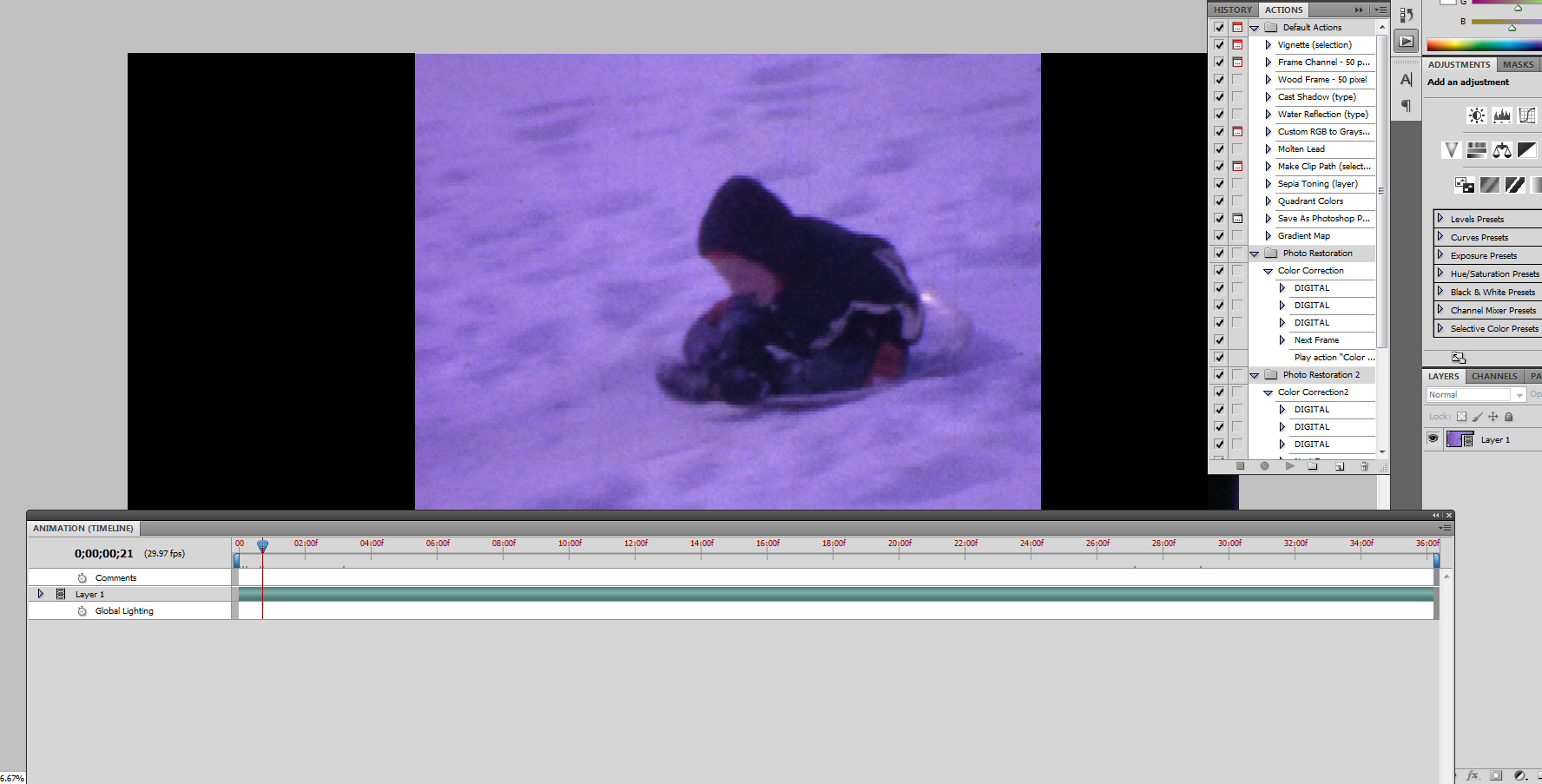
Copy link to clipboard
Copied
Sorry, I guess I don’t understand, but video editing is not my forte.
As far as I know, if the video is a Smart Object the Filter/s will be applied to the whole video.
If you want to filter individual frames you need to use »Frames to Layers« to get the frames into the document as Layers – if I’m not mistaken.
Copy link to clipboard
Copied
Normally the Smart Object would work, for a set of filters. However the plug-ins that I need to use, will not work with it. I would import frames to layer, but it limits you to 500 layers.
Copy link to clipboard
Copied
May I ask how long the video you need to process is/how many frames we are talking about?
Copy link to clipboard
Copied
Anywhere from 4 mins to 40 mins in one shot.
Minimum amount of 7,200 fames, max 72,000 frame
Copy link to clipboard
Copied
With that volume Photoshop probably is not the best choice as a video editor anyway.
Have checked if results similar to your filters could be achieved in After Effects or Premiere?
What filters are you talking about and could you post an example in the form of a before/after image?
Copy link to clipboard
Copied
I need to do frame by frame corrections, so Photoshop would be the best choice since I have yet to find a filter in AE that will work the way I need it to.
I'm not really editing within PS, just adjusting the frames (colors/hues/etc.)

Copy link to clipboard
Copied
We have been playing with the video features of Photoshop CS6 since it came out and I have learned a few things in our trial-and-error. I noticed in your screen shot that the video is imported as "Layer 1". For my team when the videos imported with this same setting we had issues with getting actions to work properly. But if you make this one change you might have better luck:
1. Click the fly-out menu in the upper right corner of the Timeline panel.
2. Select "Enable Auto-Groupping of Clips". Now when adjustment layers are created they will be put into a group with/on top of the video as a whole (affects the entire video).

Give this a try and see if that solves your issue.


Get ready! An upgraded Adobe Community experience is coming in January.
Learn more
 AdChoices