Inspiring
March 5, 2025
Question

shadow on animal

  • March 5, 2025
  • 3 replies
  • 503 views

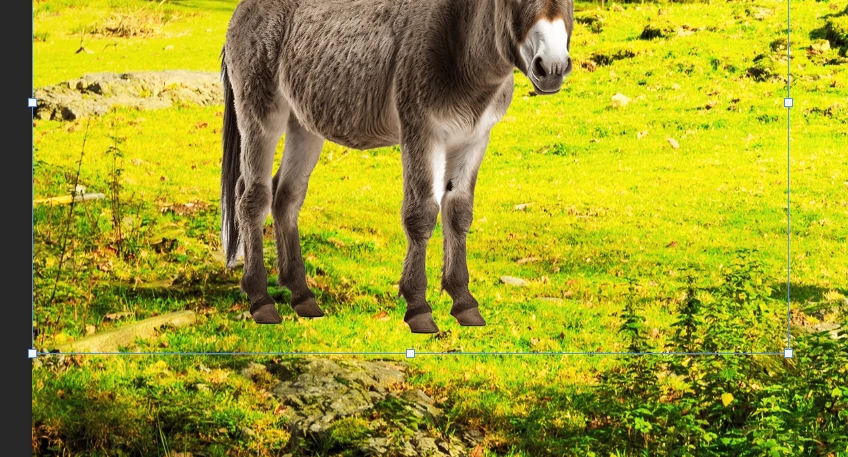
What is the easiest way to create a shadow to make the donkey part of the scene
 

3 replies

Inspiring
March 10, 2025

Hey @hendy_5450 


Hope you are doing good !


The easiest way to create a realistic shadow for the donkey is:


1) Duplicate the donkey layer: Place it below the original.


2) Convert to Black Silhouette: Use hue/saturation (reduce lightness) or Fill with Black.


3) Blur the shadow: Apply Gaussian Blur for softness.


4) Distort for Perspective: Use transform > Distort/skew to align with the ground.


5) Adjust Opacity: Lower Opacity and use multiply blend mode for realism.


This keeps the shadow natural and integrated into the scene.


Thankyou!

davescm
Community Expert
Community Expert
March 10, 2025

It needs two things, a shadow on the donkey to try and match the scene lighting, and a shadow from the donkey on the ground again to match the shadows in the scene.

Add a new layer above the layer on which the shadow will fall and clip it to that layer. That way, for example, the shadow on the donkey will not fall elswhere. Set that new layer to multiply blend mode. Paint in the shadow on that layer with a soft brush with it's opacity set to around 30% and colour set to black.
Repeat for the shadows on the ground, remembering that the darkest shadow is closest to the donkey's feet and it will fade as it gets further away.


Dave

Inspiring
March 10, 2025

thanks,

the shadow fo the feet, I got, but without clipping it in,

if I clip it in, the shadow will go away!

And why would I want he donky DARKER to match the scene, wouldn't I want it lighter?


Trevor.Dennis
Community Expert
Community Expert
March 5, 2025

You are being a bit stingy with the screen shot.  Can you show us the entire picture?

Inspiring
March 10, 2025

was just trying to show you which animal i'm referring to
