Richard___G
Inspiring
August 9, 2020
Answered

Shape Tool Gear icon not responding

  • August 9, 2020
  • 1 reply
  • 1631 views

I'm trying to add shapes.  As I understand it, one clicks the cutom shape icon on the left and then in the toolbat whic appear at top, you click on the shapes dropdown and then the gear icon with appears and that icon is supposed to provide the option to add/import shapes.  My problem is that when clicking on the icon nothing appears.  Am I doing something wrong? Thhis happens whether ot not I hove already have applied a shape


TIA - Richard
This topic has been closed for replies.
Correct answer JJMack

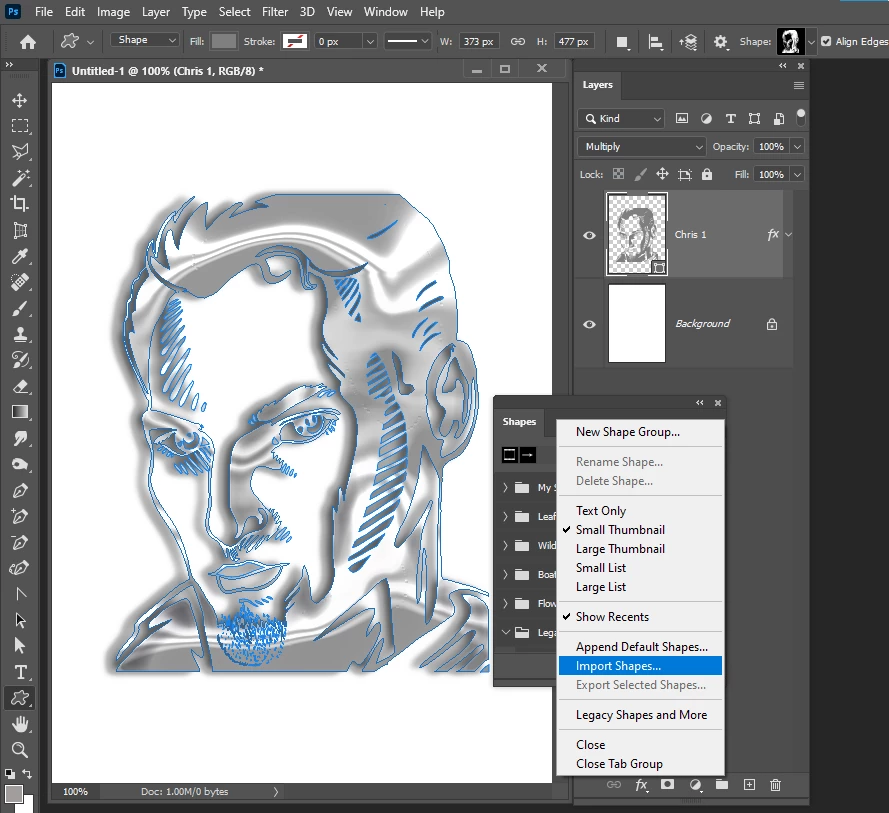
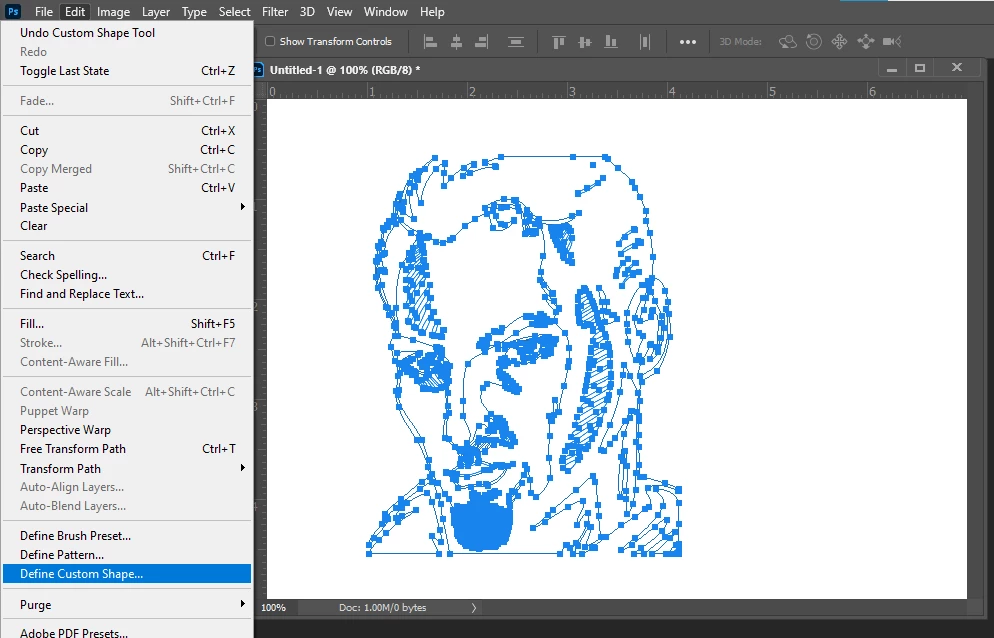
No you create the path for the Cutsom shape then use menu Edit>Define custom shape.


In old version if Photoshop you can import Custom shaped using the Preset Manager. Newer version of Photoshop have a Shapes Palette you can import custom shapes in.

1 reply

JJMack
Community Expert
JJMackCommunity ExpertCorrect answer
Community Expert
August 9, 2020

No you create the path for the Cutsom shape then use menu Edit>Define custom shape.


In old version if Photoshop you can import Custom shaped using the Preset Manager. Newer version of Photoshop have a Shapes Palette you can import custom shapes in.

JJMack
Richard___G
Inspiring
August 10, 2020

Thanks JJMack!


The menu option you showed only allows me to rename the shape.  Once I selected a shape I was able to add new shapes with the gear icon which wasn't working yesterday.  Weird.


I hope I can bother you with 2 more question if you don't mind. I've been pretty impressed with your knowledge..


1. Now when I add a shape, it comes in with small lines at the edges.  What are they for , how can I use them and how can I get rid of them?

2. The blue bubbles no longer display when I bring in a shape.  I assume they are points for modifying the shape.  Again,  how can I use them and how can I get rid of them?


I've searched for the answers to these questions but can't seem to find the correct answers.  I'm using PS 2020.


Thanks vey much, Richard


Richard
JJMack
Community Expert
Community Expert
August 10, 2020

Show a screen capture your are referring to.  You define new shapes and you import shapes.   You rename old shapes. Please identify what versions of Photoshop you are dealing with. Are you using the old Preset Manager or the new Shapes palette to manage your Custom shapes.  The Shape Palette menu I showed had Import Shapes and Photoshop's Edit menu has Define Custom shape. Old Preset manager has a Load button. Here is what CS6 Preset Manager looks like managing Custom Shapes.


PS 2020


You use them by dragging them out or specifying the the size in dialog.  Once you have the shape layer you can transform its size and edit its path.

JJMack