
Participating Frequently
December 3, 2020
Question

Shapes gradually going from blue to orange

  • December 3, 2020
  • 3 replies
  • 819 views

Hi folks,


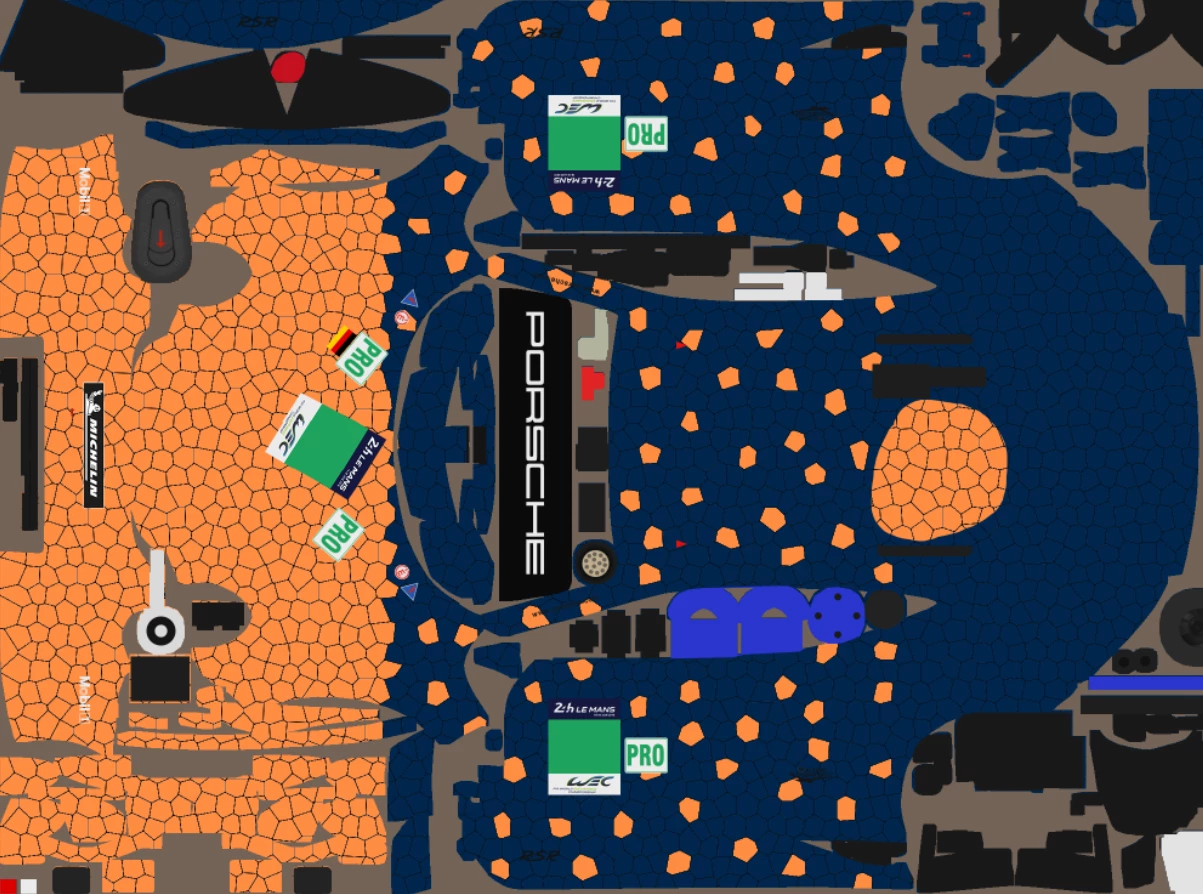
Look at the picture to figure out what I want to do.

I'm working on designing a car paint, and it's covered of hexagons. The ones at the rear are blue, and at the front they are orange. Between both (where there are orange hexagons among the blue), I would like to gradually have more and more hexagons to turn from blue to orange as we are reaching up the front.


As doing it freehand doesn't end in a stisfying result, I wanted to know if you knew some kind of a method to help me doing it ? 


I can give further explanations if needed.

Thanks already for your help.
This topic has been closed for replies.

3 replies

Mylenium
Legend
October 19, 2021

Regardless of what else you do this is most likely simply a case of using a 3D paint tool like Substance Painter. Your UV layout is going to need some love and attention, anyway, or else you may end up with hugley differently sized shapes and pretty odd seams and if you ever plan on producing this physically it would be even more critical to work out the exact proportions for vinyl cutting even just for masks. Other than that of course there may be more sense in designing the actual pattern in Illustrator, given that it creates separate shapes from the outset, which are much easier to handle. Presumable a simple greyscale gradinet applied across the board and then finely mangled through "Rcolor Artwork" and a bit of tweaking with individuall fills could probably do miracles for your design and after expanding the appearance it would be primetime ready without much redundant extra work...


Mylenium

JJMack
Community Expert
Community Expert
December 3, 2020

I would think you would need to use a 3d Application  model the car and have it distorted your orange hexagons and blue design onto the car model body surfaces.  I do not know for sure for I do not create 3D models.  You would not want to create a Car 3D model using what is available Photshop's 3D feature. Adobe has some fabric design extension for Photoshop the may be helpful implementing your paint design.  Transferred the design onto a 3D object surface I would think is a job for a 3D application.

JJMack
Chuck Uebele
Community Expert
Community Expert
December 3, 2020

Best bet would be a script that randomly places the shapes, but is biased with values from a standard gradient.


Here is an example of a script. This will duplicate a red and blue hexigon layer in a random gradient across the canvas. For your file, if you have the shapes created, and they are all on separte layers, you can use the same sort of random code to change the color of the layer.


#target photoshop
var doc = activeDocument;
var redHex = doc.layers.getByName('Red Hex');
var blueHex = doc.layers.getByName('Blue Hex');
var widthHex = parseInt(redHex.bounds[2])-parseInt(redHex.bounds[0]);
var heightHex = parseInt(redHex.bounds[3])-parseInt(redHex.bounds[1]);
var sw = true;
var iStart = 0
var ranNum = 0;
var x = 0
var y = 0


for (j=-heightHex/2;j<doc.height;j+= heightHex/2){
    if(sw){iStart = 0}
    else{iStart = .75*widthHex}
    for(var i=iStart;i<doc.width;i+= (widthHex + widthHex/2)){
        ranNum = Math.floor(Math.random()*doc.width)
        if(ranNum<i){dupLay (blueHex)}
        else{dupLay(redHex)}
        doc.activeLayer.translate(i-parseInt(doc.activeLayer.bounds[0]),j-parseInt(doc.activeLayer.bounds[1]))
        }
    sw=sw==false;
    }

function dupLay (lay){
    doc.activeLayer = lay;    
    lay.duplicate ();
    
    }


Théo5CECAuthor
Participating Frequently
December 3, 2020

Thanks a lot, it will help me so much !

I just need to separate each of the 900+ shapes now ^^'


Sadly in the end, after diving in it for several hours, it's not that helpful to me.


This because even if I did some coding from time to time, I don't know js at all, so it would take me days to understand the whole program you sent me, and weeks to adapt it to my situation. And I don't have that much time.


It's my fault for everytime I'm looking for something it ends to be very hard and complex to do, so I would like to know if you could do it please, and if you agree, what you would need me to give you to make it possible.


Thanks already for your answer.

Chuck Uebele
Community Expert
Community Expert
December 4, 2020

Yes, to automate the coloring of the shapes, they would need to be on separate layers. Which would be a lot of work. Most my script just deals with creating the shape layers. There is actually very little regarding the randomizing of the color.


Actually, the stained glass filter worked better. Here's an example of using it on my original image. I then used channels to separate the red and blue hexagons, to create masks using your colors.