
indeus
Participating Frequently
May 10, 2021
Answered

SHIFT key act like stucked after pressing Alt + Shift.

  • May 10, 2021
  • 3 replies
  • 6816 views

My Photoshop has this bug for a year now, try everything but can't fix it. 
After I used Alt + Shift to move layers, the shift key acted like it's stuck and Layer blend mode changed to the hard mix. I have to press the SHIFT key a few times again to make it stop.
Sometimes only press Alt + Shift also makes Layer Blend mode changed to Hard mix.
I tried reinstalling photoshop, installing different versions  (2018, 2019, 2020, 2021), remove Wacom's driver, reset preferences, different keyboards... nothing worked.

Please help, I'm so desperate. I had to change Blend mode back to normal every time I use Alt + Shift move.
I'm using Windows 10.

P/s: Sorry I'm too frustrated to download a screen recorder program.
This topic has been closed for replies.
Correct answer Trung Duc2416941798gg
You use EVkey percussion, so you must be Vietnamese.
I realized this when this error only happens to Vietnamese people :).
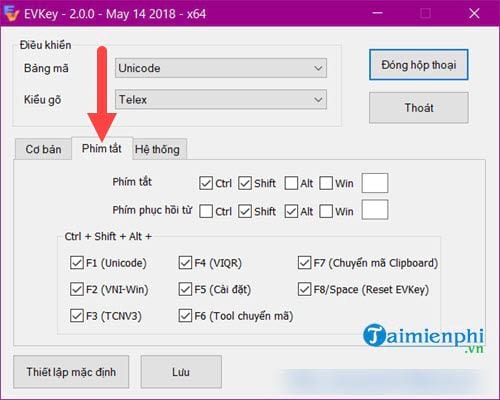
Please open the settings of the EV key.
In the "Shortcuts" section. there is an option called "Word Recovery Key".
Untick , save, and now you can use it side-by-side with pts without any problem


3 replies

Trung Duc2416941798ggCorrect answer
Participant
April 24, 2022
You use EVkey percussion, so you must be Vietnamese.
I realized this when this error only happens to Vietnamese people :).
Please open the settings of the EV key.
In the "Shortcuts" section. there is an option called "Word Recovery Key".
Untick , save, and now you can use it side-by-side with pts without any problem


Participant
July 24, 2022

Exactly!! Thank you so much. Cảm ơn nhiều đồng hương, bị bao lâu mà ko biết 

Community Expert
May 10, 2021

Hey there, this looks strange. I can imagine you're desperate now that this is going on for a year! 


I read that you have already tried most of the standard solutions like resetting preferences...


Another thing is: the shortcuts for changing Blend Modes are also connected to Shift-Alt. So: Hard Mix, for example is connected to the shortcut Shift-Alt-L. However, because you already changed keyboards, I guess the problem isn't a stuck L or Shift key. 


I also found another topic about Wacom drivers causing this problem. Have you already tried to install an older driver at this page: Drivers | Wacom


I hope this somehow helps!

indeus
indeusAuthor
Participating Frequently
May 10, 2021

I read that one, but that driver is only found for macOS. Unfortunately I'm using Windows 10. I tried installing the oldest Wacom driver but it didn't work.

PECourtejoie
Community Expert
Community Expert
May 11, 2021

I tried that, even used Your Uninstaller to completely remove the driver. Still no result.


Hi, strange, indeed.

Does it happen if you hold Shift first?

I can't help but think that it does sound like it is an accessibility feature of Win10...

Bojan Živković11378569
Community Expert
Community Expert
May 10, 2021

Without watching your video: if you want to move layer on top then press Ctrl + Shift + ] not Alt. From my testing Alt + Shift alone does not change blend mode, while Alt + Shift + letter like S does change and that is normal, standard shortcut.


If your goal is to duplicate layer by dragging it use only Alt without Shift key.

indeus
indeusAuthor
Participating Frequently
May 10, 2021

That's why it's a bug not a function, I used Alt + Shift move to duplicate layer and move them in a straight path. And somehow it turned the duplicated layer's blend mode to Hard mix. And then Photoshop acted like the Shift key is stuck (Use scroll mouse to navigate at x2 speed while not pressing Shift, Ctrl + I = Ctrl Shift I, etc...).
Just watch my video and you know what I am talking about.