
dragantomas
Inspiring
May 24, 2023
Question

Shortcut for HUD color picker not working

  • May 24, 2023
  • 3 replies
  • 1768 views

Hi all,


I have updated Photoshop this morning to the lastest version.


Went to use HUD color picker, as ussual (Ctrl Option Command Click) but now nothing is happening.

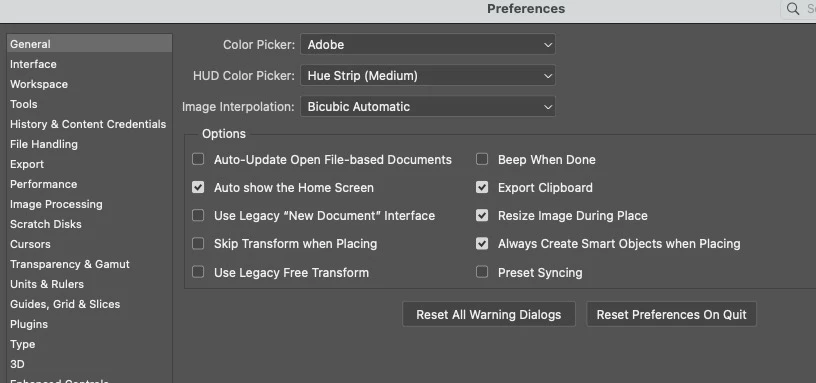
See the screenshot settings I have for HUD color picker. Does someone knows how to bring it back to workstation by using the shortcut, or why the shortcut is not working?
 

This topic has been closed for replies.

3 replies

Jeff Arola
Community Expert
Community Expert
May 24, 2023

On the Pen you can program whether a click corresponds to left or right mouse buttons.

So the keyboard shortcut for the Hud Color Picker if one is using a mouse would be

Ctrl Option Command Left Click

dragantomas
Inspiring
May 25, 2023

I went to Wacom preferences but was not able to find option for left click, there was only right click option. See screenshot.

Obviously I am missing something. Which option should I choose here?


Jeff Arola
Community Expert
Community Expert
May 25, 2023

I believe Click would be the same as left click on a two button mouse.

ClaudiaR99
Community Manager
Community Manager
May 24, 2023

Hello @dragantomas, I'm sorry you are experiencing some issues. Please make sure to use Left click. What is the tool you have active when trying to use shortcut?

dragantomas
Inspiring
May 24, 2023

Hi @ClaudiaR99, thank you.


Sorry, what do you mean by using the left click? I am asking as I am using the Wacom pen. I was on Wacom preferences but there is no left click option, or I wasnt able to find it anyway. I would be in the brush tool when trying to use the HUD.


Jeff Arola
Community Expert
Community Expert
May 24, 2023

It doesn't work with any of the painting tools plus gradient tool?


It seems to be working here on a 2022 Mac Studio running macOS Ventura 13.4 and photoshop 2023 (ps ver 24.5)


Resetting the photoshop preferences by going to Photoshop>Settings (Preferences)>General, clicking Reset Preferences on Quit and restarting photoshop should hopefully fix it.

https://helpx.adobe.com/photoshop/using/preferences.html

dragantomas
Inspiring
May 24, 2023

Single letter shortcuts for painting and gradient tools works fine. 


But that 3 letter shortcut for HUD color picker is not working. I am tired of reseting the photoshop, need to reupload the keyboard shortcuts plus all other actions and preferences. Is there no other way around that?