

Omineus
Known Participant
July 26, 2024
Answered

Shortcut-key to set color label on one or multiple layers at once

  • July 26, 2024
  • 3 replies
  • 1282 views

Hello, does anyone have a way to create a shortcut key for setting a color label on one or multiple layers at once?

This topic has been closed for replies.
Correct answer Stephen Marsh

@Omineus 


You can only have the hard-coded colours, not custom colours.
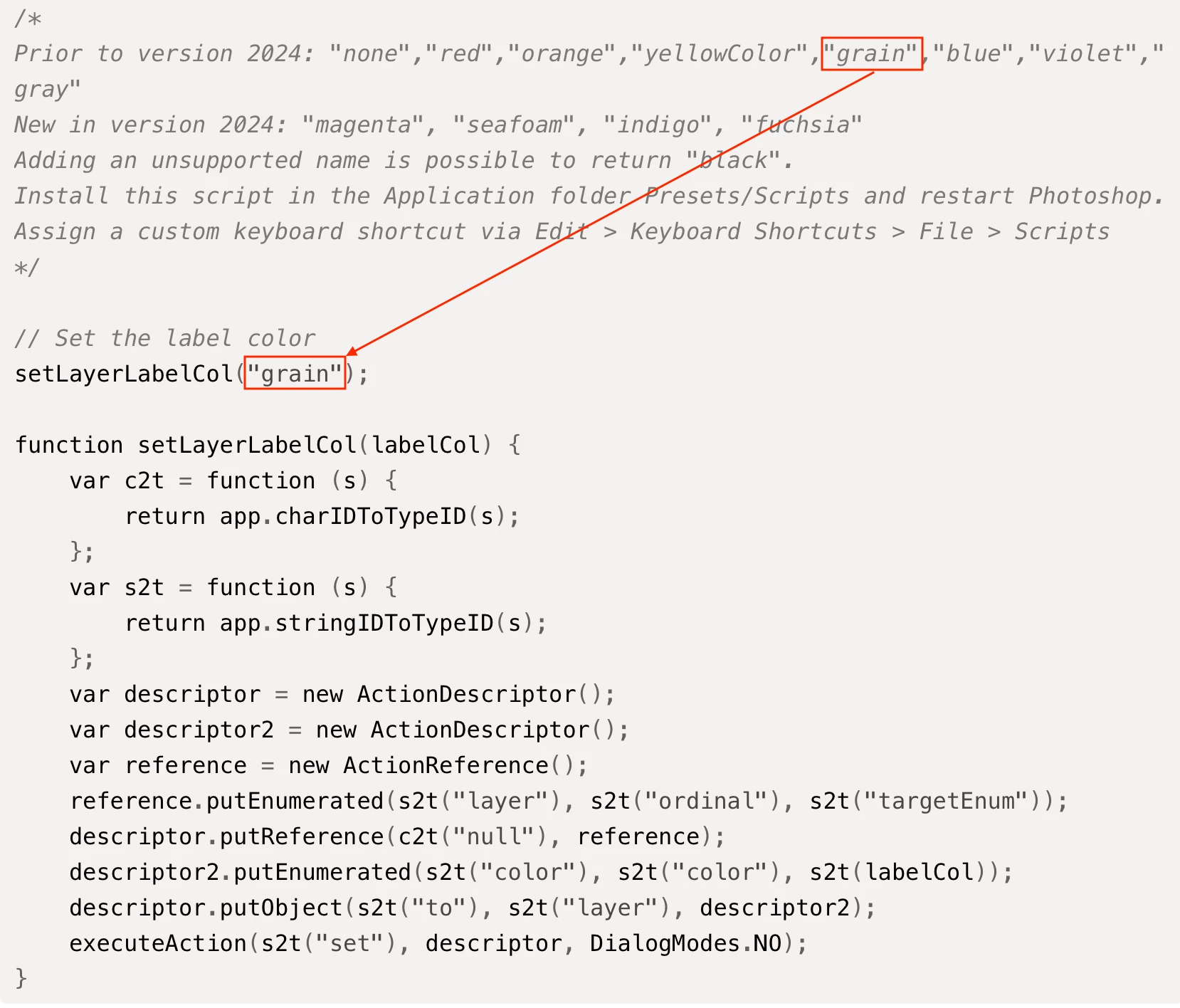


/*
Prior to version 2024: "none","red","orange","yellowColor","grain","blue","violet","gray" 
New in version 2024: "magenta", "seafoam", "indigo", "fuchsia"
Adding an unsupported name is possible to return "black".
Install this script in the Application folder Presets/Scripts and restart Photoshop.
Assign a custom keyboard shortcut via Edit > Keyboard Shortcuts > File > Scripts
*/

// Set the label color
setLayerLabelCol("grain");

function setLayerLabelCol(labelCol) {
    var c2t = function (s) {
        return app.charIDToTypeID(s);
    };
    var s2t = function (s) {
        return app.stringIDToTypeID(s);
    };
    var descriptor = new ActionDescriptor();
    var descriptor2 = new ActionDescriptor();
    var reference = new ActionReference();
    reference.putEnumerated(s2t("layer"), s2t("ordinal"), s2t("targetEnum"));
    descriptor.putReference(c2t("null"), reference);
    descriptor2.putEnumerated(s2t("color"), s2t("color"), s2t(labelCol));
    descriptor.putObject(s2t("to"), s2t("layer"), descriptor2);
    executeAction(s2t("set"), descriptor, DialogModes.NO);
}


https://prepression.blogspot.com/2017/11/downloading-and-installing-adobe-scripts.html


3 replies

Stephen Marsh
Community Expert
Stephen MarshCommunity ExpertCorrect answer
Community Expert
July 27, 2024

@Omineus 


You can only have the hard-coded colours, not custom colours.


/*
Prior to version 2024: "none","red","orange","yellowColor","grain","blue","violet","gray" 
New in version 2024: "magenta", "seafoam", "indigo", "fuchsia"
Adding an unsupported name is possible to return "black".
Install this script in the Application folder Presets/Scripts and restart Photoshop.
Assign a custom keyboard shortcut via Edit > Keyboard Shortcuts > File > Scripts
*/

// Set the label color
setLayerLabelCol("grain");

function setLayerLabelCol(labelCol) {
    var c2t = function (s) {
        return app.charIDToTypeID(s);
    };
    var s2t = function (s) {
        return app.stringIDToTypeID(s);
    };
    var descriptor = new ActionDescriptor();
    var descriptor2 = new ActionDescriptor();
    var reference = new ActionReference();
    reference.putEnumerated(s2t("layer"), s2t("ordinal"), s2t("targetEnum"));
    descriptor.putReference(c2t("null"), reference);
    descriptor2.putEnumerated(s2t("color"), s2t("color"), s2t(labelCol));
    descriptor.putObject(s2t("to"), s2t("layer"), descriptor2);
    executeAction(s2t("set"), descriptor, DialogModes.NO);
}


https://prepression.blogspot.com/2017/11/downloading-and-installing-adobe-scripts.html


Omineus
OmineusAuthor
Known Participant
July 27, 2024

Very clear. Understood! 

Thank you very much!

Stephen Marsh
Community Expert
Community Expert
July 26, 2024

@Omineus – This can be scripted and a custom keyboard shortcut applied to the script. Even an action could do it if you were happy with an F-key shortcut.


As there are 11-12 possible colours, this could be a bit convoluted with separate scripts for each colour.


Another option would be to take the extra effort to add a GUI to pick the colour and then one would only need a single script (but would this really be any better than Myra's suggestion of using the standard native feature?).


Omineus
OmineusAuthor
Known Participant
July 27, 2024

Thanks for your quick and comprehensive message. Would it be possible for just these 5 colors? Can I change the shortcut keys and colors afterwards?

Myra Ferguson
Community Expert
Community Expert
July 26, 2024

It isn't a keyboard shortcut, but you can apply a color label to more than one layer at a time. You can Shift + select the layers that you'd like to label with a color, right-click, and in the contextual menu that opens, select Color and then whichever color you want to apply.

Omineus
OmineusAuthor
Known Participant
July 27, 2024

Thanks for your answer. When your trying to stay organized without layer names and still keep the tempo. This method does not work.