
Nykk_Deetronic
Inspiring
October 31, 2018
Answered

Shortcuts Madness after updating to Photoshop CC20!?

  • October 31, 2018
  • 1 reply
  • 598 views

Dear Sirs

Please help me.

I am now slow like I am the beginner! The SIMPLEST task I do for less than a second I can not do for hours!!!

Something is broken OR something is changed! What happened with shortcuts???

CTRL + T are standard Transform tool, with holding SHIFT - it supposed to scale object proportionally, CTRL + SHIFT (while in transform mode) - to scale proportionally in all axes... Now this is a madness!!!

What happened? Please HOW DO I RESTORE OLD SHORTCUTS?!? Who messed with shortcuts!?

I have:

Adobe Photoshop CC 2018 directory and now

Adobe Photoshop CC 2019 directories in

C:\Users\MyUserName\AppData\Roaming\Adobe\

Can I COPY everything from:

C:\Users\MyUserName\AppData\Roaming\Adobe\Adobe Photoshop CC 2018\Adobe Photoshop CC 2018 Settings\     to

C:\Users\MyUserName\AppData\Roaming\Adobe\Adobe Photoshop CC 2019\Adobe Photoshop CC 2019 Settings\

? Will this solve this huge problem??? I can`t use transform tool anymore... I had this problem since Photoshop is updated via CCloud, but I didn`t have time to report...
This topic has been closed for replies.
Correct answer

Hi

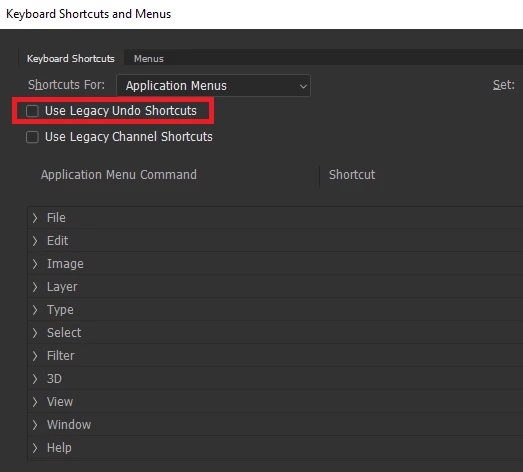
To revert the legacy undo enable this option in preferences

and for the transform take a look here

New and enhanced features | Latest release of Photoshop CC

This bit

How do I turn off the new proportional scaling by default behavior while transforming layers?

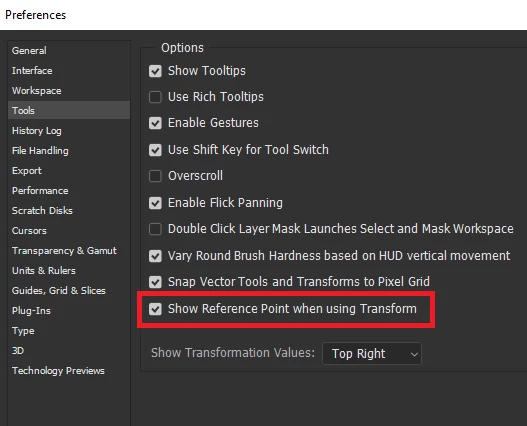
You may want to enable this option as well

Also known issues in this release

Known issues in Photoshop CC

1 reply

Correct answer
October 31, 2018

Hi

To revert the legacy undo enable this option in preferences

and for the transform take a look here

New and enhanced features | Latest release of Photoshop CC

This bit

How do I turn off the new proportional scaling by default behavior while transforming layers?

You may want to enable this option as well

Also known issues in this release

Known issues in Photoshop CC

Nykk_Deetronic
Inspiring
November 2, 2018

Thank you! Transform seems to act like before! Thank you very much!

Btw I set all prefs as seen in your windows - maybe this helped a bit too

p.s. I get to used to standard - Illustrator / Photoshop shortcuts I work years ago, new version really strokes me through the heart It was like trying GIMP and shutting it down because it does not have Photoshop shortcuts I assume as standardised.