Copy link to clipboard
Copied

Hi,
My brain is not working today.....I can't remember how I drew the boxes around selections of the image attached. The ruler just makes lines from end to end. Thanks in advance.

Hi
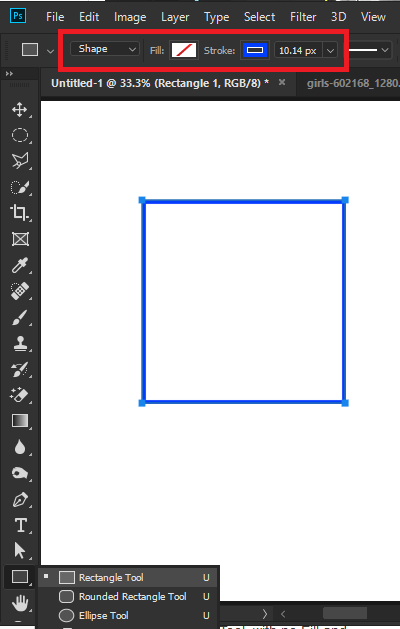
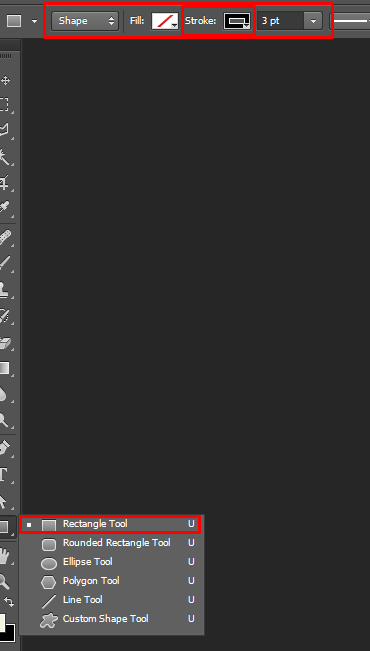
Use the Rectangle Shape Tool, with no Fill and add a Stoke

Copy link to clipboard
Copied
Hi
Use the Rectangle Shape Tool, with no Fill and add a Stoke

Copy link to clipboard
Copied
Hi, Use a rectangular shape tool in photoshop.
Keyboard shortcut key is "U". When you draw a rectangle make sure your fill is empty and your stroke it on.

Here is the video guide how to use it.
Thanks.
Copy link to clipboard
Copied
Thanks so much for your help. I have been studying so many things at once that my brain is fried!
Copy link to clipboard
Copied
You are welcome!
Good Luck!
Copy link to clipboard
Copied
Thank you for the additional video tutorial!
Get ready! An upgraded Adobe Community experience is coming in January.
Learn more