Known Participant
November 9, 2017
Question

Show custom shape panel!

  • November 9, 2017
  • 1 reply
  • 1593 views

Hello Friend!

Is it possible to write a script that shows the panel so that it stays in the "Custom Shape Tool (U)" property bar? Unfortunately I could not do this with the ScriptingListener.
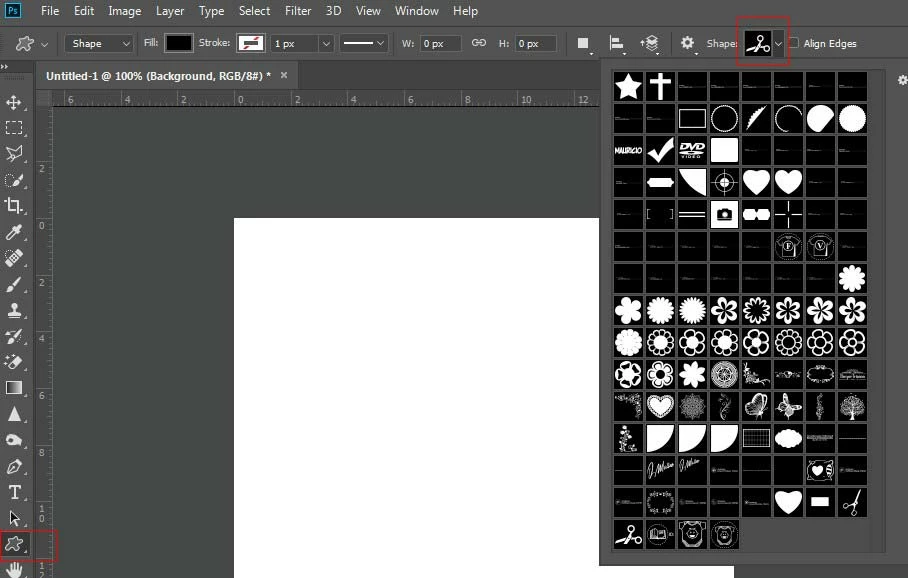

This topic has been closed for replies.

1 reply

smithcgl9043167
Inspiring
November 9, 2017

I assume that this and some commands from the properties bar of some tools are not accessed by scripts.

Chuck Uebele
Community Expert
Community Expert
November 9, 2017

You are correct. There are a lot of things in PS that can't be accessed by scripting. Only workaround, that I can think of is to create your own UI or an extension panel with all the controls in it.

SuperMerlin
Inspiring
November 10, 2017

Thank you Chuck Uebele once again for the tip, I think it's a little bit to finish.

Hi SuperMerlin I changed this excerpt:

  1. function getToolPresetNames() { 
  2.      var ref = new ActionReference();     
  3.     ref.putEnumerated( charIDToTypeID("capp"), charIDToTypeID("Ordn"), charIDToTypeID("Trgt") );     
  4.     var appDesc = executeActionGet(ref);     
  5.     var List = appDesc.getList(stringIDToTypeID('presetManager'));    
  6.     var presetNames=[];    
  7.     var list = List.getObjectValue(7).getList(charIDToTypeID('Nm  ')); 
  8.     for (var i = 0; i < list.count; i++) {    
  9.             var str = list.getString(i); 
  10.             presetNames.push(str); } 
  11.     return presetNames; 
  12. }

That is why!

  1. function getCustomShapeList(){ 
  2. var desc, shapeList, ref, Names; 
  3. ref = new ActionReference(); 
  4. ref.putProperty( charIDToTypeID("Prpr"), stringIDToTypeID("presetManager") ); 
  5. ref.putEnumerated( charIDToTypeID("capp"), charIDToTypeID("Ordn"), charIDToTypeID("Trgt") );  
  6. desc = executeActionGet(ref); 
  7. shapeList = desc.getList(stringIDToTypeID("presetManager")).getObjectValue(6).getList(charIDToTypeID("Nm  "));   
  8. Names = new Array(); 
  9. for (var z = 1; z<shapeList.count;z++){ 
  10. try
  11. Names.push(shapeList.getString(z)); 
  12. }catch(e){alert(e);return;} 
  13. return Names; 
  14. }; 

This added the Shapes list to the project but nothing happens when I select any item from the list. What would be missing and how did you get access to the managed Shapes?


The access to the preset manager only gets you a readonly list.

getObjectValue(Number)

///////////////////////////// presetManager

// 0: Brushes

// 1: Swatches

// 2: Gradients

// 3: Styles

// 4: Patterns

// 5: Contours

// 6: Custom Shapes

// 7: Tools

You might be able to create presets to the ones you want? but not directly