

Trevor.Dennis
Community Expert
Community Expert
May 28, 2017
Pregunta

Showing Smart Objects in Info Panel with 17.1.1

  • May 28, 2017
  • 2 respuestas
  • 539 visualizaciones

I think I saw something about 17.1.1 being better at managing layer count, and especially Smart objects in the Info Panel, but I can't find that reference now.  The Info Panel Options has a check box for Smart Objects, but they don't appear to be listed in the Info panel.
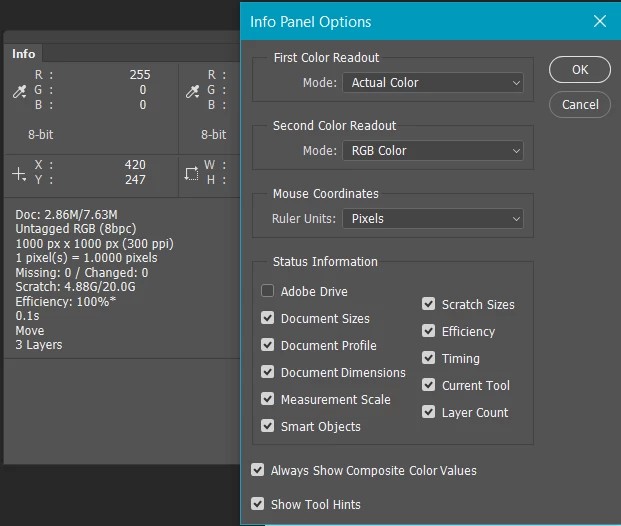
I came to this after reading the How to Manage Large Composites thread, and remembering the new Info panel capability opened a large project that has half a dozen SOs to see if I was now getting a more accurate layer count.  It didn't look like it.  So I tested with a new document with five assorted layers, and grouped three of them as an SO and the layer count reduced to three.  Having a better idea of layer count — including nested SOs — is something that would be useful; to me, so I'd be interested if anyone has got a handle on this.

    Este tema ha sido cerrado para respuestas.

    2 respuestas

    davescm
    Community Expert
    Community Expert
    May 28, 2017

    That Smart Objects check box just seems to put the missing/changed info which flags up when the source for a linked SO has gone AWOL.

    Dave

    Trevor.Dennis
    Community Expert
    Community Expert
    May 28, 2017

    Thanks guys.  JJ, yes I'd used the layer panel filters which work fine, but I was hoping that the 'improved' handling of Smart Objects in the info panel would give me a true layer count.  Dave, the large project I tested this with did indeed have an unlinked SO, but I could still see nothing in the Info panel.

    For a while now I have suspected that my system boggs down when I use a lot of SOs.  Especially if they are nested.  I was going to build a new system back in January, but had to postpone because of family problems in the UK.  That situation is resolved now, so I have started researching a new build all over again.  Looking at my current system that has a 3930K that still scores OK on PassMark, I was thinking where the bottleneck might be, and got quite a shock when looking at the RAM on CPU-Z.  The MB is a Gigabyte X79-UD5, and while its DIM slots are slow by today's standards it should still run memory up to 2400Mhz:

    I am not flash at this stuff, so I don't know whether to take that 666.5Mhz at face value, or if the four channel architecture doubles that to a still miserable 1300Mhz

    So my thoughts are that slow memory is slowing my system down because of the way SOs are stored and handled.  This is pure supposition mind you, although Chris Cox did tell us, some years ago, that memory speed was the biggest bottleneck at that time.  This lag with SOs is more apparent with illustrations than with purely raster photographic projects I'm thinking.  You might remember I asked for help when that watch project caused so much lag I had to give up on it!

    So time to put that to rights with a new build.  I'd like to stretch to a 6900K, but that is NZ$1500 all by itself, but it has a 50% score advantage over my 3930K on PassMark, so I might bite the bullet and get out my credit card. 

    davescm
    Community Expert
    Community Expert
    May 29, 2017

    Hi Trevor

    Yes you double the frequency shown (DDR - Double Data Rate).

    It sounds like we have very similar systems at present. 3930K on an ASUS p9X79Pro with 64GB RAM (1800Mhz)

    On the nested Smart objects causing big delays, I wonder if you could do something similar to the action we can take in 3D programs i.e. bake certain elements of the render so that the whole thing is not being recalculated live. I suppose the equivalent may be merge to a new layer then turn off the SOs temporarily? Just a thought .

    Dave

    JJMack
    Community Expert
    Community Expert
    May 28, 2017

    Have you tried using the layers palette and filter smart object layers so only those layers will show in the layers palette? The info panel seems to have a total number of layers count.  I do not seem to see any info for smart object layer in there when the smart object check box is checked or not.except Missing and changed

    JJMack