
Trevor.Dennis
Community Expert
Community Expert
May 28, 2017
Question

Showing Smart Objects in Info Panel with 17.1.1

  • May 28, 2017
  • 2 replies
  • 546 views

I think I saw something about 17.1.1 being better at managing layer count, and especially Smart objects in the Info Panel, but I can't find that reference now.  The Info Panel Options has a check box for Smart Objects, but they don't appear to be listed in the Info panel.
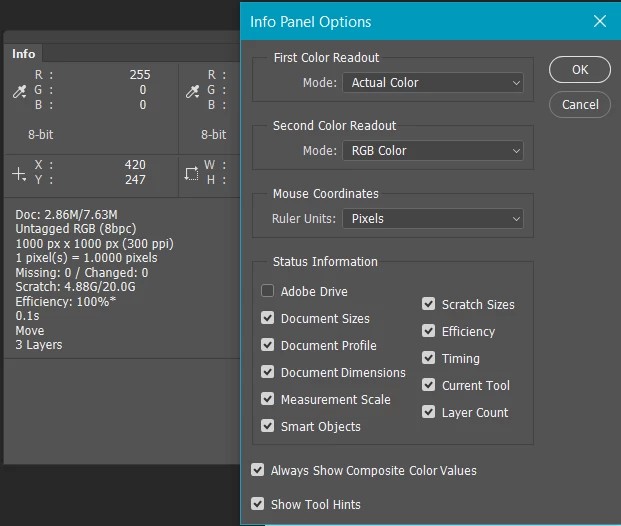
I came to this after reading the How to Manage Large Composites thread, and remembering the new Info panel capability opened a large project that has half a dozen SOs to see if I was now getting a more accurate layer count.  It didn't look like it.  So I tested with a new document with five assorted layers, and grouped three of them as an SO and the layer count reduced to three.  Having a better idea of layer count — including nested SOs — is something that would be useful; to me, so I'd be interested if anyone has got a handle on this.

    This topic has been closed for replies.

    2 replies

    davescm
    Community Expert
    Community Expert
    May 28, 2017

    That Smart Objects check box just seems to put the missing/changed info which flags up when the source for a linked SO has gone AWOL.

    Dave

    Trevor.Dennis
    Community Expert
    Community Expert
    May 28, 2017

    Thanks guys.  JJ, yes I'd used the layer panel filters which work fine, but I was hoping that the 'improved' handling of Smart Objects in the info panel would give me a true layer count.  Dave, the large project I tested this with did indeed have an unlinked SO, but I could still see nothing in the Info panel.

    For a while now I have suspected that my system boggs down when I use a lot of SOs.  Especially if they are nested.  I was going to build a new system back in January, but had to postpone because of family problems in the UK.  That situation is resolved now, so I have started researching a new build all over again.  Looking at my current system that has a 3930K that still scores OK on PassMark, I was thinking where the bottleneck might be, and got quite a shock when looking at the RAM on CPU-Z.  The MB is a Gigabyte X79-UD5, and while its DIM slots are slow by today's standards it should still run memory up to 2400Mhz:

    I am not flash at this stuff, so I don't know whether to take that 666.5Mhz at face value, or if the four channel architecture doubles that to a still miserable 1300Mhz

    So my thoughts are that slow memory is slowing my system down because of the way SOs are stored and handled.  This is pure supposition mind you, although Chris Cox did tell us, some years ago, that memory speed was the biggest bottleneck at that time.  This lag with SOs is more apparent with illustrations than with purely raster photographic projects I'm thinking.  You might remember I asked for help when that watch project caused so much lag I had to give up on it!

    So time to put that to rights with a new build.  I'd like to stretch to a 6900K, but that is NZ$1500 all by itself, but it has a 50% score advantage over my 3930K on PassMark, so I might bite the bullet and get out my credit card. 

    Trevor.Dennis
    Community Expert
    Community Expert
    May 29, 2017

    RAM can play a part it if but I do not think smart Object layers would add that more overhead then a normal pixel layer unless you have a lot of smart filters on the Smart object layers.  Each filter causes the layer to be process an additional time.  My Processors are slow 2GHZ so my 1600 ECC RAM 40GB runs I believe at 1333 I also think their may be different number of memory buses depending on the number of  RAM slots used I have 4 8GB  and 2 2GB.  The Number of Processors may also help with some filters.   I have 2 2GHZ Xeon  Processors with six cores so up to 24 threads can be running.  I do not consider my machine to be slow however,  I do not use many smart filters and it very rare for me to have more that 50 layers. 10 layers more my speed.   My  cameras 1D MK2 8MP 1D MK4 16MP 16bit mode.  I consider myself to be slower and slower.

    My RAM is quite like yours but a little slower

    I went for slower cheaper Dual Xeons back when now PassMark show i7-6900k 3.2GHZ mark 18,028 @ $995USD slower Dual Xeon E5-2670 2.6GHZ  mark 18,305 @ $360USD  little more than a third of the cost of the I7-6900K the mother would more expressive and require more power I would think myself I buy refurbished Dell workstation the come in working order with three ear service OS installed.

    Intel Core i7-6900K @ 3.20GHz

    18,028

    $994.99
    [Dual CPU] Intel Xeon E5-2680 @ 2.70GHz

    18,346

    $480.00
    [Dual CPU] Intel Xeon E5-2670 @ 2.60GHz

    18,305

    $360.00

    That's interesting data.  I wonder if anyone else would like to join the party?

    When I was getting bogged down with the watch illustration I saved out the SO PSB files and flattened them, but it made very little difference.  OK I just loaded the watch illustration and had another play with it.  It has 61 layers in 11 groups, and 11 Smart Objects which have between 1 and 6 layers, (the 1 layered SOs were merged to make the file workable. 

    It is actually OK at the moment with no more than about a half second lag, but experience tells me that if I expand the project again, that lag can stretch to 3 seconds or so.  I don't mind sharing the file again, but there is no point as it stands right now, but I'll maybe try and get it to slow down again, and then upload to dropbox.

    Dave, how old is your system?  64Gb was serious money when I built my current system five years ago.  I really think that a 3930K in the right MB with the right RAM is still going to cut it.  I've discovered talk of the X299 chipset on Toms, so I think I'll wait for that, and go worry the lads on the Prem Pro Hardware forum.

    JJMack
    Community Expert
    Community Expert
    May 28, 2017

    Have you tried using the layers palette and filter smart object layers so only those layers will show in the layers palette? The info panel seems to have a total number of layers count.  I do not seem to see any info for smart object layer in there when the smart object check box is checked or not.except Missing and changed

    JJMack