
Participating Frequently
March 11, 2019
Question

Shrink long-generated file names during Export Layers to Files

  • March 11, 2019
  • 2 replies
  • 1447 views

We do a lot of batch exporting of Layers to files. The issue we are having is that the length of the file names attached to the baseline file name we create is pretty long, and we spend time then having to remove the extra information.

Example:

1. IWD-Office- // what we set the baseline file name to be in the modal:
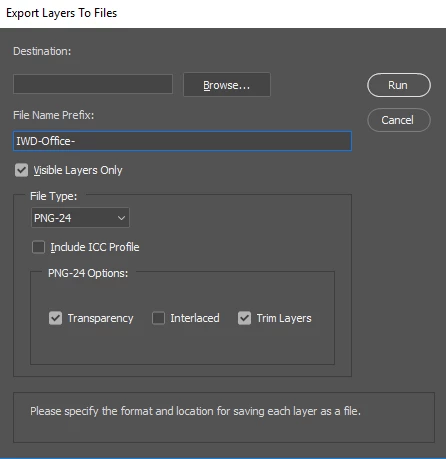
2. IWD-Office-x // x being a number is what we would like the export to look like.. ex: IWD-Office-1 ...


3. IWD-Office-_0000_Layer-2.png // instead we get this and then have to manually remove that info.

Is there a way to have it export in the format in item 2?

I've seen solutions on Stack (adobe photoshop - CS5 export layers as files with NO number sequence - Graphic Design Stack Exchange) where we have to hack a script file in the PS core, but we'd really like to avoid doing this.

Thanks,

This topic has been closed for replies.

2 replies

Stephen Marsh
Community Expert
Community Expert
March 12, 2019

...we have to hack a script file in the PS core, but we'd really like to avoid doing this.

So you have to either hack a copy of the script, or use something like Bridge’s Batch Rename tool to bulk rename the files after the script as a second step:

There are of course multiple equivalent Find strings:

(^.+-)(?:_.+)

(^\w+-\w+-)(?:.+)

(IWD-Office-)(.+)

Participating Frequently
March 12, 2019

We have been using a similar utility called Bulk Rename Utility to do the post-renaming. But I think it would really help if PS had the native option set of Bridge built into the option modal for batch export.

JJMack
Community Expert
Community Expert
March 12, 2019

Bridge does not do the export Photoshop does and how would you want files named. There need to be something to generate unique name. If there are duplicate layer names do you want a suffix appended to the  filename like Image processor generates.  You can modify export layer to files remove the serial sequences and add the unique name code like Image Process has in it to export layers to files.

JJMack
JJMack
Community Expert
Community Expert
March 11, 2019

You should to do that with any Photoshop version export layers to files script.  Remove the sequencing numbering code. And save ii with a different script name.  So you can use it with and Photoshop version.

The line numbering and code will be different.  More like line 2193, 2197 and 2229

Warning Layer name need not be unique removing  the sequence could easily produce dupe file names. You mat want to number your layer names first.

JJMack