sizing problems in photoshop

Copy link to clipboard
Copied
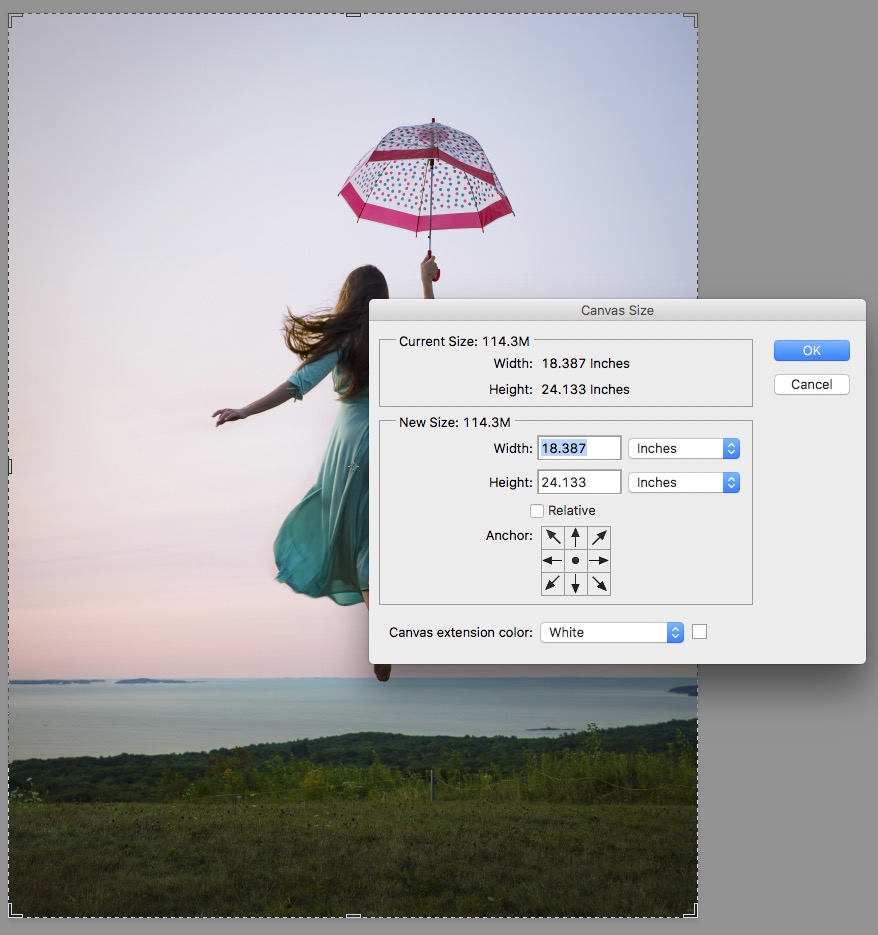
i am printing this image as a 20x24 as well as 5x7ish on 8x10 paper. there are border requirements for the printing company that work with my other images, but this one is different. i created it in a class i did and i don't know what is making a proper crop so difficult. for example, i cropped this particular one to 4.8 x 6.3 and chose a canvas size of 8x10 for a very wide border. but that's not the actual result. after i crop and then choose the choose the canvas size, i get a message box saying that the canvas size is smaller than the image and it will be cropped. if i click the relative box i don't get that message, but the result is that the image itself is larger than the crop i selected and the border isnt wide enough. changing image size seems to work for proper dimensions, but the photo gets distorted a bit, the girl gets a little wider and a little shorter. so confused. attached image shows photo dimensions after cropping before i enter the canvas size i want.



Explore related tutorials & articles
 10
Replies
10
10
Replies
10


Copy link to clipboard
Copied
When you do the Crop, are you using the W x H x Resolution option, or just the Ratio option?
Copy link to clipboard
Copied
unconstrained crop
Copy link to clipboard
Copied
How about making a copy of your document and using Image>Image Size? In there you can set the size of the image and resolution for your print.
Copy link to clipboard
Copied
i can try that. thank you.
Copy link to clipboard
Copied
Did it work for you?
Copy link to clipboard
Copied
Sebastian i realized i can see the actual ration of the image when i have the crop setting on and click to adjust it manually with the mouse. i can see the numbers, so that's what i used, after i entered the numbers - to correct the result. it worked. Thanks for your help!

Copy link to clipboard
Copied
Your screenshot shows that you are getting that message because your image is 18.387 inches x 24.133 inches and you are making the canvas 8 inches x 10 inches. Therefore Photoshop has no choice but to tell you that the image will be clipped.
Use Image > Image Size first to size your image to your requirement, then use Image >Canvas size to extend the canvas to your paper size.
Dave
Copy link to clipboard
Copied
i'm attempting to crop the image at 19x23 and then make the canvas size 20x24 for printing purposes. when i crop the image, despite the numbers that i'm putting in, the image is slightly bigger than 19x23, therefore the border isn't big enough, and i don't want to lose any of the image on the printing end. i don't understand why PS won't crop as i'm telling it to. i've tried multiple ways - unconstrained, custom, size and resolution, image size (which distorts it). it just won't do what i'm asking.
Copy link to clipboard
Copied
ignore that message box for now, i was making another smaller image.
Copy link to clipboard
Copied
thanks all. in the end i realized i can see the actual ratio of the image when i have the crop setting on and click to adjust it manually with the mouse. i can see the numbers, so that's what i used, after i entered the numbers - to correct the result. it worked. Thanks for your help!


Get ready! An upgraded Adobe Community experience is coming in January.
Learn more
 AdChoices