
Participant
September 18, 2018
Answered

Slow opening files psd/psb

  • September 18, 2018
  • 3 replies
  • 9700 views

I don't know if I'm expecting too much or there is a tweak or issue. I believe I have a pretty decent machine.


OS: Windows 10

CPU: Intel Core i9-7900X

RAM: 32GB (12GB in use at time of file open)

System storage: Intel Optane SSD 900P running at full PCIx 3.0 x4 @ 15% free space

Photo storage: Samsung 970 Evo running at full PCIx 3.0 x4 @ 46% free space

Photoshop CC 19.1.5

Lightroom is also open in the background


It takes about 9 seconds to open a 740mb file and about 34 seconds to open 3.2gb psb. This is when Photoshop is already open.


I'm thinking both files should open at least at half the time. Am I expecting too much?
This topic has been closed for replies.
Correct answer D Fosse

If your files have many layers, that sounds about normal. Layers take a long time to compress/decompress.

If these are flat files, then yes, that's very slow.

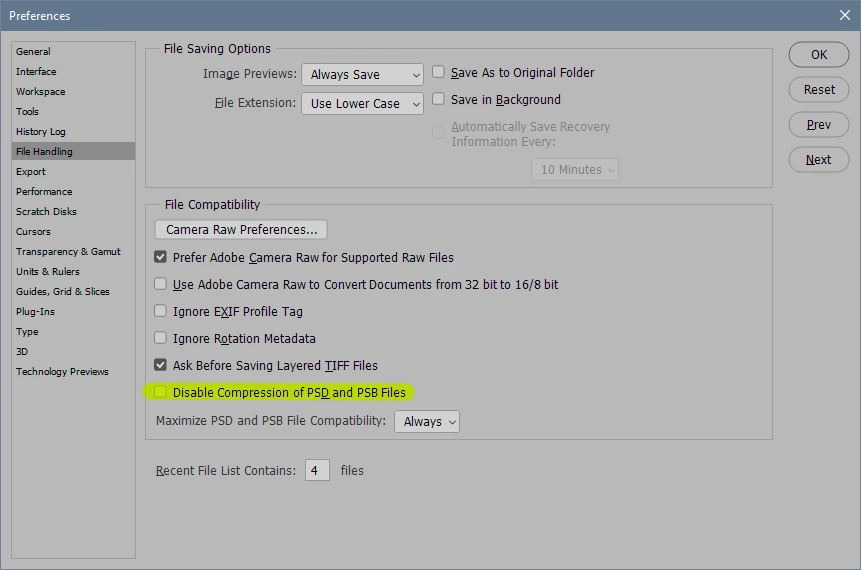
You can try this setting, at the expense of bigger files (up to 2x or more):

3 replies

Participant
February 13, 2020

Hey sorry to dig up an old thread. But, I have a 15GB file that is taking over 10 minutes to open even with Compression turned off. Is there any other tricks or tools I can use to open and edit quicker? TIA

Participant
March 16, 2021

I have the same problem.  Both opening and saving take a lot of time.   This was not a problem in the past. I have increased the amount of RAM available for PS but that has no effect.  I literally have time to do a short workout while waiting several minutes.  It's great to keep in shape but I'm trying to get some work done.

Any solutions will be much appreciated.

Participant
March 20, 2021

me as welll... but no workout 🙂

D Fosse
Community Expert
D FosseCommunity ExpertCorrect answer
Community Expert
September 18, 2018

If your files have many layers, that sounds about normal. Layers take a long time to compress/decompress.

If these are flat files, then yes, that's very slow.

You can try this setting, at the expense of bigger files (up to 2x or more):

Participant
September 18, 2018

That was it! There's a huge performance increase at the expense of larger file sizes.

9 seconds  (741mb) to 2 seconds (1.2gb) psd

34 seconds (3.2gb) to 9 seconds (8.0gb) psb

So the decompression is what slowing everything down. Makes sense. I wasn't aware of this.

I don't think I can afford the new file sizes of 2x to 3x.

Sahil.Chawla
Adobe Employee
Adobe Employee
September 18, 2018

Hi Conrad,


We're sorry to hear about the slow performance of Photoshop while opening files, could you please try the steps mentioned on this article and let us know if it helps with the speed?


Optimize Lightroom Performance - Optimize performance


Regards,
Sahil

Participant
September 18, 2018

Hi Sahil,

Thanks for the response. I believe my issue is purely with Photoshop, not with Lightroom. I'm opening a psd/psb directly from within Photoshop (files that show up in the recently opened list).