


Copy link to clipboard
Copied
hello everyone!
This is a new problem, about a month ago everything was ok. But with new update of Photoshop CC I got a problem.
Before, if I change proportions Canvas Size inside a Smart object, after saving in main file Smart object changes proportions too. For example, if Canvas Size was 22x22 mm and in main file it was square, and I change it to 44x22, after saving in main file I can saw parallelogram.
Now, I change it to 44x22, after saving in main file I can saw STILL SQUARE! Distorted, compressed from the sides, non-proportional square!
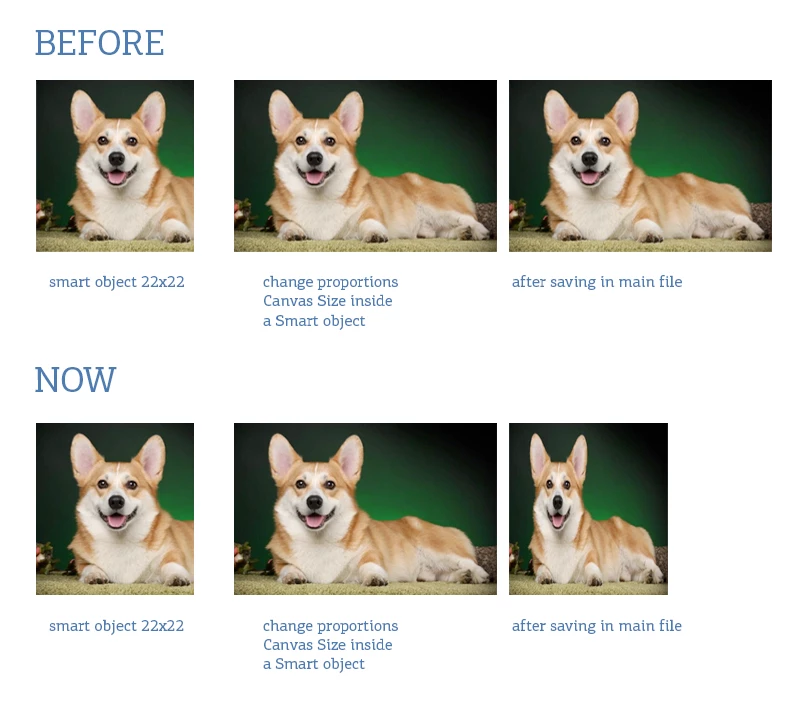
I hope "it's no bug, It,s feature". But please, help me turn this feature off...
Copy link to clipboard
Copied
I do not believe its a bug. Its a fix. Users have been opening Smart object and changing the Object size via image size and crop, That should not be done. Once a Smart Object is created and hardened there is a transform created to transform the Smart Object Pixels to generate pixels used for the layer that scale and positions the layer pixels in some area over the document's canvas. You can not change a smart object actual pixels with Photoshop tools. You can Replace the smart objects Pixels using Replace content or Open and editing the pixels. However Using replace content or Open can not change the number of Pixels. For the object transform is not changed. There cans be many of them for object can be shared by copied layers. And warping can be added, These layers Object transform will not work it the object size is changed.
Copy link to clipboard
Copied
Is it wrong for Photoshop To presurve a document smart object layer's Size and Aspect Ratio I will not get on either side for it does not matter to me. I havs seen the distortion you show in 21.2 on my machine. However, Today 21.2 is working like prior version of Phoroshop like CS6. Still I think my testing will will show changing a Smart Object size is not a thing one shoul do.
What is wrong is changing a smart object's Size. Here I explore your square Smart Object with replacement Objects that are not square. One object I try is larger then the Square Object and the other object is smaller then the square one. Does this work in old versions and not 21.2. You seem to claim old version does thing Right. I claim Changing the size of a smart object is a no no. Here is what I observed using CS6 and using 21.2. I stand by my claim changing the size of a smart object is a no no. It should not be done. However, with a single layer you may get away with it with some replacements.
I do not know my MY 21.2 version is working like cs6 today it was working like you show a day or two ago
Copy link to clipboard
Copied
I did some more testing and there is huge differences between 21.2 and older versions when you replace object with wrong size object and some of the Smart object layer object transform also have warping. It reinforces my opinion that you should not change the size of an object...
Copy link to clipboard
Copied
Interesting. Hadn't noticed this before. BTY cute corgi. Looks very much like one we used to have.
Get ready! An upgraded Adobe Community experience is coming in January.
Learn more