
Exit
  • Global community
    • Language:
      • Deutsch
      • English
      • Español
      • Français
      • Português
  • 日本語コミュニティ
  • 한국 커뮤니티
0

smart object doesn't open in photoshop

Community Beginner ,
Feb 22, 2023 Feb 22, 2023

hi,

I can no longer manage to open the smart-object from a mock-up. Double clicking does not work and also via layer>smart object does not work.
Has a setting changed in an update? Others also this problem?
I am working on an older mac from 2011 and photoshop is just now unable to update. Does that cause me to not be able to use this now?

Anybody got a tip?
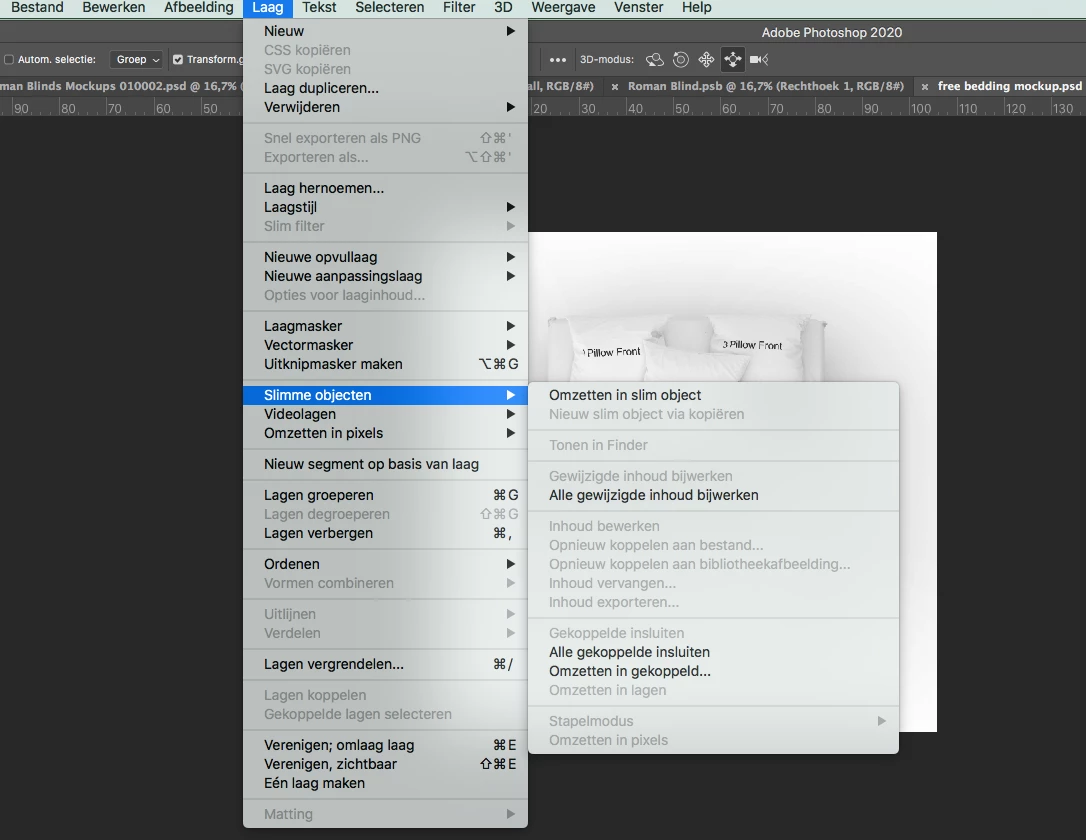
 

Schermafbeelding 2023-02-22 om 12.37.49.png

TOPICS
Actions and scripting , macOS
3.4K
Translate
Report
Community guidelines
Be kind and respectful, give credit to the original source of content, and search for duplicates before posting. Learn more
community guidelines
Adobe
Community Expert ,
Feb 22, 2023 Feb 22, 2023

Is the selected Layer even a Smart Object? 

Could you please post screenshots with the pertinent Panels (Toolbar, Layers, Options Bar, …) visible? 

Translate
Report
Community guidelines
Be kind and respectful, give credit to the original source of content, and search for duplicates before posting. Learn more
community guidelines
Community Beginner ,
Feb 22, 2023 Feb 22, 2023

Thank you for your reaction.


Yes, it is a smart object. And it is not just this file.

All my files with smart objects don't work anymore by double clicking.

It's a mockup I've bought and used before.


Schermafbeelding 2023-02-22 om 14.30.39.png

I hope you have an idea?

Translate
Report
Community guidelines
Be kind and respectful, give credit to the original source of content, and search for duplicates before posting. Learn more
community guidelines
Community Expert ,
Feb 22, 2023 Feb 22, 2023

That is a 3D Smart Object, not a pixel or vector Smart Object, where do you expect it to open to? 


Anyway, Photoshop’s 3D features are being deprecated. 

https://helpx.adobe.com/photoshop/kb/3d-faq.html


Translate
Report
Community guidelines
Be kind and respectful, give credit to the original source of content, and search for duplicates before posting. Learn more
community guidelines
Community Beginner ,
Feb 22, 2023 Feb 22, 2023

Hi C.P,

Earlier I could double click on the smart object, it then opened in a new window. Here it was possible to put a fabric pattern on it, save it and then it was rendered in the other file. Super convenient.
So does it no longer work at all for 3d mockups? That would be a shame....

Translate
Report
Community guidelines
Be kind and respectful, give credit to the original source of content, and search for duplicates before posting. Learn more
community guidelines
Community Expert ,
Feb 22, 2023 Feb 22, 2023


@esthers40056810 

For testing purposes, can you open SOs that are not 3D objects?


3DD09ABB-2A7B-4B17-B1E3-244B82B93D5C.jpeg


Jane


EDIT: C.P.'s post came in 28 seconds before mine. 

Translate
Report
Community guidelines
Be kind and respectful, give credit to the original source of content, and search for duplicates before posting. Learn more
community guidelines
Community Beginner ,
Feb 22, 2023 Feb 22, 2023

Hi Jane,

It is indeed really the 3d layers that don't work. In none of the files, so it will indeed be because Photoshop stopped doing that.

Too bad.


Translate
Report
Community guidelines
Be kind and respectful, give credit to the original source of content, and search for duplicates before posting. Learn more
community guidelines
Community Expert ,
Feb 22, 2023 Feb 22, 2023

@esthers40056810 


Adobe recommends that you use PS 22.2 for 3D. See this help page for details:

https://helpx.adobe.com/photoshop/kb/3d-faq.html

"We recommend using Photoshop 22.2 if you continue to need access to Photoshop 3D features. That version will remain accessible to you in the Creative Cloud Desktop application for installation for up to two years from August 2021 (however, the operating system requirements for 22.2 will remain as they were in February 2021 when it was originally released)."


Jane

Translate
Report
Community guidelines
Be kind and respectful, give credit to the original source of content, and search for duplicates before posting. Learn more
community guidelines
Community Beginner ,
Feb 22, 2023 Feb 22, 2023

Yes, I have seen this message. I am using 21.1.3

Hi Jane,

And it also says until August this year. Then I will have to look for another solution anyway.
Or do you know something for now?


Translate
Report
Community guidelines
Be kind and respectful, give credit to the original source of content, and search for duplicates before posting. Learn more
community guidelines
Community Expert ,
Feb 22, 2023 Feb 22, 2023

Are you sure you double-clicked the SO in the Layers Panel and didn’t open the various maps from the 3D Panel perviously? 

Translate
Report
Community guidelines
Be kind and respectful, give credit to the original source of content, and search for duplicates before posting. Learn more
community guidelines
Community Beginner ,
Feb 22, 2023 Feb 22, 2023
LATEST

Dear C.P.

I have really used the mockups many times.
And always by double clicking in the layers panel (as it says to do).
I have already tried several mockups today and unfortunately they all no longer work.

If you know anything to get around this I would love to hear about it.


Translate
Report
Community guidelines
Be kind and respectful, give credit to the original source of content, and search for duplicates before posting. Learn more
community guidelines