
Inspiring
July 4, 2023
Answered

Smart object is losing quality

  • July 4, 2023
  • 2 replies
  • 1715 views

Hi community.


I have made an icon using shapes, with 72 ppi, and when I turn the layers into a smart object, and then change the resolution to 144 or 300 ppi, its losing quality. But the shape layers and text that are not converted into a smart object, regardless of scaling the resolution up or down, retain the crisp quality. So what's making the smart object to lose its quality?


The top icon has not been converted into a smart object.

and the icon below is converted to a smart object which he quality degredation is obvious.
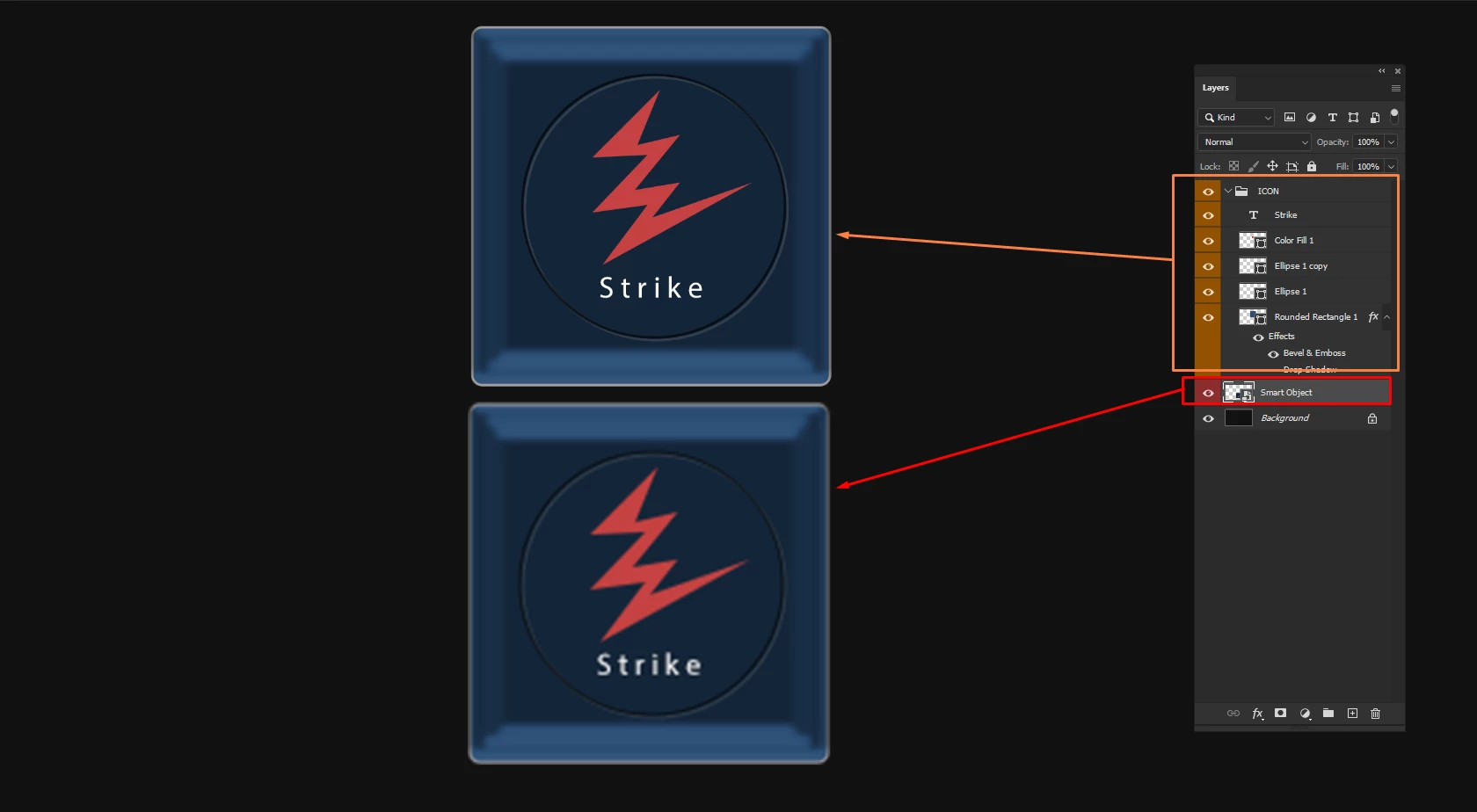
 

Thank you.


Correct answer c.pfaffenbichler

When you create a Smart Object at 72ppi and upscale it 200% that seems as expected. 


When one creates a Smart Object in Photoshop by converting Layers to a Smart Object that Smart Object is a psb – a pixel image format, not a vector format like ai or pdf. 

So scaling instances of that Smart Object will scale the pixel composite data of that psb. 

One work-around is opening the Smart Object, using Image > Image Size to increase the Resolution and saving it. (Layer Styles may need to be checked to make sure their appearance hasn’t changed.) 

2 replies

Bojan Živković11378569
Community Expert
Community Expert
July 6, 2023

If I can understand what is your problem then I can not reproduce. Simply converting shape and type to Smart object is not degrading quality. I am viewing at 100% scale although that is not factor in this case. Try with preference reset what can solve weird problems.

I didnt take in acount further scaling, so please see above answer.

Inspiring
July 7, 2023

Thank you for your reply Bojan.


This is so weird, because your results look correct. My one again, is with quality loss. One Is a smart object with Rectangle Shape, logo, and text, converted to smart object. And the same Rectangle Shape, logo, text, I just put in a group. But when I scale to 300, the smart object loses quality. but when I double click inside smart object, its ok.


Inside smart object quality is perfect. 


Trevor.Dennis
Community Expert
Community Expert
July 7, 2023

Hi Stefan.  It looks like your graphics are being upsampled, or stretched to think.  It's best to avoid thinking in terms of DPI when open in Photoshop, because it is really meant for printing.  Inside Photoshop, look at pixel sizes.


The thing is, if both the shape and text are still vector layers, they should scale OK without IQ loss.  But this is only when viewed at 100% 1:1 zoom ratio.  If  we could have seen the entire workspace with the problem image displayed, we could see its zoom ratio, so full screen, full res, screen shots are allways preferred.

c.pfaffenbichler
Community Expert
c.pfaffenbichlerCommunity ExpertCorrect answer
Community Expert
July 6, 2023

When you create a Smart Object at 72ppi and upscale it 200% that seems as expected. 


When one creates a Smart Object in Photoshop by converting Layers to a Smart Object that Smart Object is a psb – a pixel image format, not a vector format like ai or pdf. 

So scaling instances of that Smart Object will scale the pixel composite data of that psb. 

One work-around is opening the Smart Object, using Image > Image Size to increase the Resolution and saving it. (Layer Styles may need to be checked to make sure their appearance hasn’t changed.) 

Inspiring
July 7, 2023

Hi C.


I thought that Photoshops vector shapes and text, wouldnt be affected. Yes, your work around does work, openining the smart object. 


Kind regards.

c.pfaffenbichler
Community Expert
Community Expert
July 7, 2023

The problem is that while the Shape Layers, Type Layers, … are maintained as such inside the Smart Object the Smart Object instances are generated off of the pixel composite data. 


A convoluted work-around might be saving a copy as a pdf (vector data) and placing that as a Smart Object.

But »Preserve Photoshop Editing Capabilities« seems to cause the pdf to be placed as pixel preview so one would need to uncheck that and the pdf would not be properly editable in Photoshop anymore.