
Participating Frequently
January 24, 2019
Answered

Smart Objects (Created in Illustrator) Can Not be Updated from Photoshop

  • January 24, 2019
  • 5 replies
  • 4509 views

I've updated to CC 2019 (for Photoshop and Illustrator) and now I can't open smart objects anymore. I bring a smart object into Photoshop from illustrator and when I go to edit my smart object, it pops up with this warning:
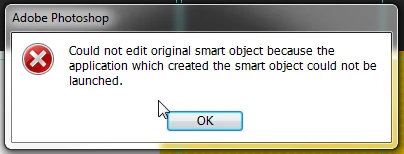
Anyone else experiencing this?

My illustrator is open already. I have tried going back to the previous versions but I have the same issue.

This topic has been closed for replies.

5 replies

Participant
April 11, 2022

solution is very simple. Create a text file and rename it as .psb

Then rignt click > properties 

then change the "Open With"  application to Photoshop.

Thats it.

Participant
April 1, 2022

Mac users: the issue has been fixed with the latest update of macOS Monterey 12.3.1 (21E258)... at least for me, it works now.

jane-e
Community Expert
Community Expert
January 24, 2019

What is your operating system? I’m on CC2019 with High Sierra and this is working for me.

Participating Frequently
January 24, 2019

I'm on Windows 7

JJMack
Community Expert
Community Expert
January 24, 2019

Make sure your file extensions .AI and .svg  are Associated with AI and that they the open in Ai from Windows file explorer open. That AI is installed on you machine. I do not install AI they will not open on my machine in AI.

JJMack
c.pfaffenbichler
Community Expert
c.pfaffenbichlerCommunity ExpertCorrect answer
Community Expert
January 24, 2019
Participating Frequently
January 24, 2019

This did happen when I tried to open files in bridge and I have since associated the files to the correct programs. I wish there was some way I could do this within Photoshop as this does seem to be part of the issue.

c.pfaffenbichler
Community Expert
Community Expert
January 24, 2019
Trevor.Dennis
Community Expert
Community Expert
January 24, 2019

It sounds like it is looking in the wrong location perhaps?  I don't know the answer I am afraid.  You may remember we had issues with file associations that required apps to be reinstalled.  I'd suggest that, but it would be a complete guess.

I'll change your subject line to show this is an Illustrator Smart Object issue, and you could ask the same question over there.  If you don't get answer, we'll try and get a staff member involved.

Good luck