

Smart Objects, more options for the timeline.
Hey there guys, I know this probably applies to a very small audience, but I want to get an idea out there because it would help me personally.
When creating a moving object on a time line, you can make it a smart object. If an object is a smart object, you can click on the little arrow to make it have some preset movement options.
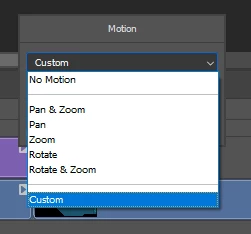 This
This
<
<
Now hear me out; I want more movement options. I'm not asking for much, just a couple.
I make my YouTube videos in photoshop (Don't judge me lol its efficient) and having an object be able to do a little more than pan, or zoom, would definitely help a little.
Here's an example in what I mean:
Shake: an option to make the object chosen to shake in place, with a little severity meter to make it more, or less apparent, and maybe a direction option.
scroll: Make text start at one end, and scroll across the screen until the text is gone off the other side.
I absolutely love photoshop, and things like this would make my time in photoshop so much more enjoyable, and honestly would enable more people to try the whole "Making Videos" in photoshop thing.
Thanks for reading!
also, here's my [link removed by moderator] if you wanna check it out.
 AdChoices