Innotex Nico Tanne
Inspiring
May 11, 2021
Question

Smartobject size to 100%

  • May 11, 2021
  • 3 replies
  • 7903 views

Hello all,

is there a possibility to bring a smartobject to exactly 100% by script. This would help me a lot.

This topic has been closed for replies.

3 replies

JJMack
Community Expert
Community Expert
May 11, 2021

What do you mean by 100%.  and is the smart object a Placed image file. Place scale smart objects,  In fact place may scale a smart object twice.  Once because there are different print resolution  in the Place image File the  document it is placed into a document and second second scaling if the smart object layer does not fit on canvas and your Photoshop preferences is  set to resize during Place. 


Script can scale a smart  layer to fill some area and mask  it to the area aspect ratio and shape.  I do that all the time.  Scaling a  smart object layer object transform to 100% may not be the size you are expecting the object  to be because Place may have scaled the object because of different resolution are involve.  Smart object layer implementation is more complex then most users think.


New versions of Photoshop have reset place layers transform I do not know if that will reset the PPI scaling Place may as well at place resize and user transform. It may I did not test that though.


I just tested reset place layers transform will reset all transforming done to the smart object sizing  and warping but positioning is not changed  so if the  transforming also move the positioning that will not be reset.

JJMack
Innotex Nico Tanne
Inspiring
May 11, 2021

Hello JJMack,

I have a document with a resolution of, for example, 100 dpi and then place images with different resolutions (dpi) as Smart Objects.
In order for the print size to be correct, however, I have to set the smart objects to exactly 100%, so a simple reset of the transformation is unfortunately not possible.

Legend
May 13, 2021

From what they wrote I do not know exactly what they are doing or are after.  They used "Load Image"  when they used place and saw the smart object was scaled  by "Place" because of the different print resolutions. I also think they saw the Smart Object Layer would  be scald to fit on canvas if the object was scaled larger or is larger than canvas size. They also wrote about the document DPI and use  dimensions in CM not inches.    They provided no details about the documents Canvas size  dimensions in pixels or why they did not use Place's interactive transform to scale the smart object layer to the size they seen to want of if they used an automated place that did not have an interactive transform.   I have scripts that can be use in place of Photoshop place command that  scripts place so there will be no mismatch Print resolution.  The script simply changes the document's print resolution to match the image file being place in print resolution then places the image file into the document then restore the document's print resolutions back to what it was.  Adobe stated they do the scaling to be compatible with other Adobe applications. (I do not know for sure make Photoshop look more like a vector application like AI). The object is created with all the object actual pixels Place just scales the object for the layer. I do not use other Adobe application.  Photoshop has too many issues. I do not need other complex applications with too many issues.


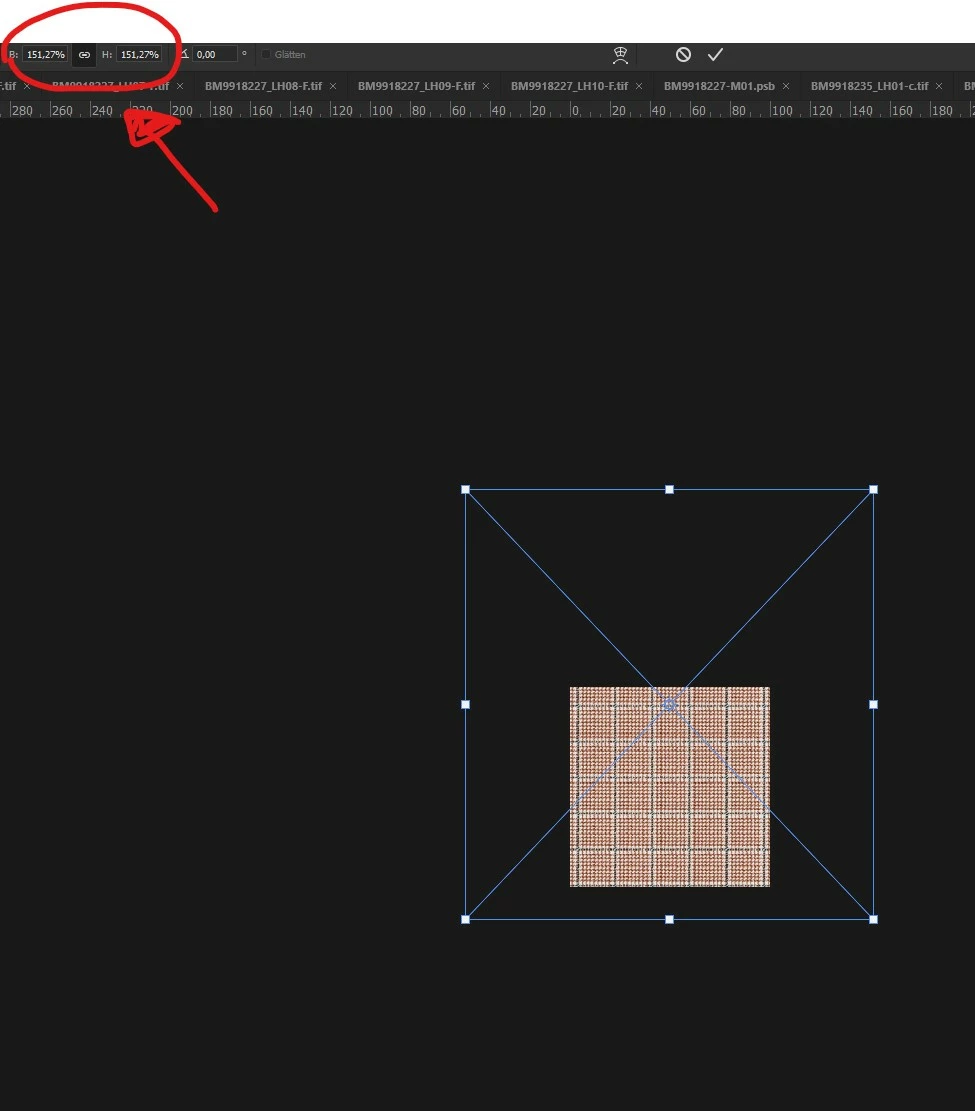
It seems to me that the author just wants to turn the numbers 157.27% in the first screenshot into 100%.
Stephen Marsh
Community Expert
Community Expert
May 11, 2021

A fuction call/function that you will find on this forum in multiple scripts, where varSomeFile may be a variable to a single file or multiple files:


placeFile(varSomeFile, 100);


function placeFile(file, scale) {
    var idPlc = charIDToTypeID("Plc ");
    var desc2 = new ActionDescriptor();
    var idnull = charIDToTypeID("null");
    desc2.putPath(idnull, new File(file));
    var idFTcs = charIDToTypeID("FTcs");
    var idQCSt = charIDToTypeID("QCSt");
    var idQcsa = charIDToTypeID("Qcsa");
    desc2.putEnumerated(idFTcs, idQCSt, idQcsa);
    var idOfst = charIDToTypeID("Ofst");
    var desc3 = new ActionDescriptor();
    var idHrzn = charIDToTypeID("Hrzn");
    var idPxl = charIDToTypeID("#Pxl");
    desc3.putUnitDouble(idHrzn, idPxl, 0.000000);
    var idVrtc = charIDToTypeID("Vrtc");
    var idPxl = charIDToTypeID("#Pxl");
    desc3.putUnitDouble(idVrtc, idPxl, 0.000000);
    var idOfst = charIDToTypeID("Ofst");
    desc2.putObject(idOfst, idOfst, desc3);
    var idWdth = charIDToTypeID("Wdth");
    var idPrc = charIDToTypeID("#Prc");
    desc2.putUnitDouble(idWdth, idPrc, scale);
    var idHght = charIDToTypeID("Hght");
    var idPrc = charIDToTypeID("#Prc");
    desc2.putUnitDouble(idHght, idPrc, scale);
    var idAntA = charIDToTypeID("AntA");
    desc2.putBoolean(idAntA, true);
    executeAction(idPlc, desc2, DialogModes.NO);
}


Kukurykus
Legend
May 11, 2021
runMenuItem(stringIDToTypeID('placedLayerResetTransforms'))
Legend
May 13, 2021
quote
runMenuItem(stringIDToTypeID('placedLayerResetTransforms'))

By @Kukurykus

Interesting. But does not work in 2020.

Kukurykus
Legend
May 13, 2021

I don't know when it was implemented, but probably it's something quite new. Try not by ran item, but traditional way, however I think that will fail too if I guess you don't have it in panel.