
Snap to guides are not functioning accurately
I use guides to mark out divisions on an artwork, the guides are accurate but when I use 'Snap To Guides' it doesn't align perfectly.
Here my artwork is 42cm x 42cm and I'm using guides to mark the middle point
1. I mark out halfway point of artwork using a guide - Here I set the guide at X:21cm - the exact halfway point of my artwork
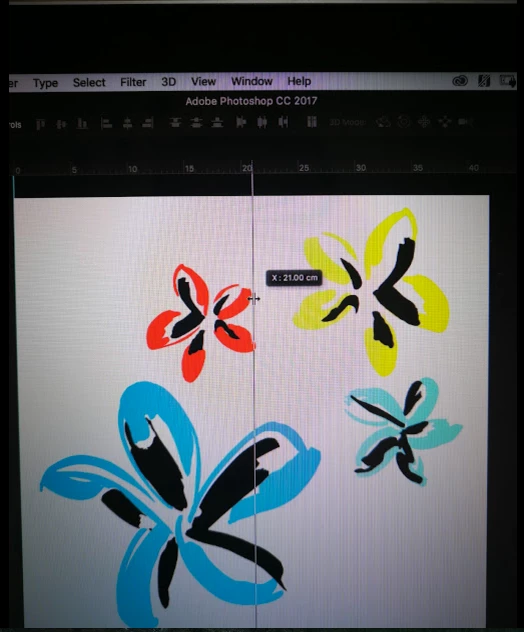
2. Then when I go to use the Rectangular Marque to select exactly half of the artwork (21cm), using X as a guide - BUT it flips to 21.01cm
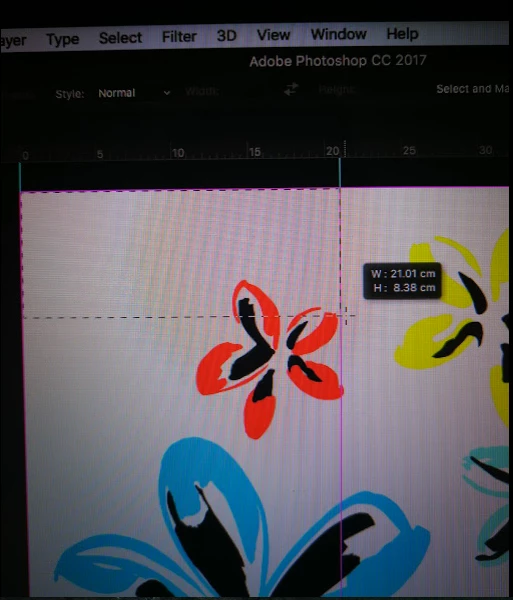
I want it to snap to 21cm - Isn't the point of 'Snap To' to be perfectly accurate? If not, how is best to get a perfect alignment?
NB: This is also the case if I'm moving an element using <alt> to copy, and <shift> to constrain; - It'll not copy and move exactly to 21cm along, rather it'll snap to 21.01cm... being just off
I'm trying to be exact with my measurements and movements - can anyone help?
Thank you
 AdChoices