
Participant
December 9, 2016
Question

Snap to Points Grid (Working with 144p resolution) [Photoshop]

  • December 9, 2016
  • 1 reply
  • 735 views

Hello everyone.

I have a really annoying trouble.

So, on my workplace I have a iMac 5k and because of that I decided to work with the retina-ready documents. Every new document created by me must be in 144p resolution. To simplify my workflow I changed all types of numbers from PX to PT to work with standard values as 14px (14pt) font for web sites. So, my goal is to get the sharp result on the Retina display using 144p resolution for the standard layout with standard values. So before I was creating 1440x900 px layout in 72p and zoom it 2x to get the actual size on retina monitor. Now, avoiding zooming in, I'm using 1440x900 pt in 144p.

So, what is my problem?

As you can see down below, I have 1 PT shape on 1x1 PT grid. (PT in 144p res.) But I still have a fractional value of spacing (0.5 pt), because my 1PT is 2PX.
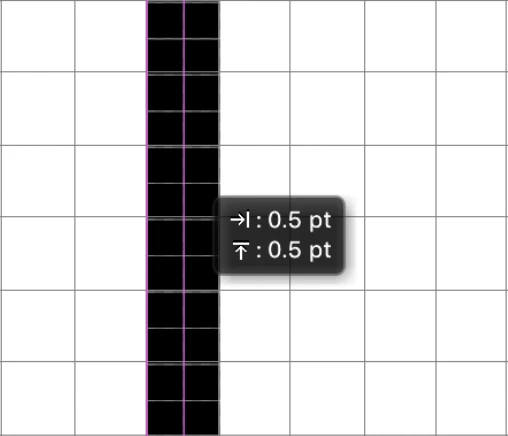
In that case, HOW I can drag this shape by 1 PT? How I can see only points to have a well work on retina monitor?

Thank you

This topic has been closed for replies.

1 reply

JJMack
Community Expert
Community Expert
December 9, 2016

Your document DPI Resolution makes no difference when it come to your retina 144ppi resolution.  The pixels on your retina display are always 1/144" by 1/144" square. That is size of you LCD Displays pixels.    Photoshop Zooms images on your display by quickly scaling your image size. An image with a different number of pixels.  The Pixels you see on you display are always 1/144" x 1/144"  you just view different size images.  Images that have a different number of pixels.  The only time you are actually viewing you document actual pixels is when you view your image zoomed to 100%  scaled full size.  At any other zoom level your not viewing your document pixels you viewing a scaled down or up image. Not your your actual image.  You document DPI resolution setting is only meaning full for Programs the use that information  and devices that support different size pixels.  Photoshop need to use your documents resolution when you use units that are relative to resolution.   If you use canvas size and have Photoshop add 100px to the width and height it makes no difference what your document resolution is.  However if you  use Image size to add 1" the the document width and height  Photoshop nee to use tot document resolution to calculate how many pixels it need to add. Printers use your document resolution to set the pixel size to print with.

At what zoom level are you dragging things are you dragging your document pixels or some other scaled image pixels. All retina Displays do not have a 144ppi resolution. Resolution is calculate using the display size and number of pixels the display displays.  All 1080p TV display 1920x1080 pixels  27" and 60" they just have different resolutions.   Retina displays have a resolution above older displays when most had a ppi resolution around 100ppi.  The first marked high resolution display was the IBM t221 a 22" 16:10 204 ppi display in 2001 3840x2400px.  They cost $20,000 back in 2001...

JJMack