This topic has been closed for replies.
Correct answer TuhinBagh

If it's a bug, you're the only one seeing it.

reset all the settings

So you trashed the preference folder? as per my instructions? (re-installing PS does not reset the preferences)

And your screen shot hides the document title.. what is your Color Mode?


i just simply freshly re-instaled my os (operating system) !!

7 replies

Participant
January 23, 2018

I think you have the pencil tool selected.

Participant
January 12, 2018

This is ridiculous, i have a project that needs to been sent to a factory within the hour and i cannot finish without a soft brush! Adobe hot fix ASAP PLEASE!!! This is insane... I'm going to try converting to legacy brush's, if that doesn't work i'm out of idea's. I just installed the newest release Photoshop CC 2018 - Installed on 1/10/2018. So far, i am not happy at all with this release...

Rod Neil
Participant
November 10, 2017

I am experiencing weirdness with the brush tool. I have it set on SOFT but it behaves like it is set on DIFFUSION leaving the usual speckled look. This is so aggravating. I just re-installed Adobe Photoshop, re-booted, and am still having the same problem.

ADOBE PLEASE FIX THIS FAST !!!! How about a monthly adjustment since you are charging for a buggy product?

September 3, 2016

Here's The Proper Solution , It Doesn't Need To Re-Install The OS

Here It Is :

STEP 1 : Open Photoshop

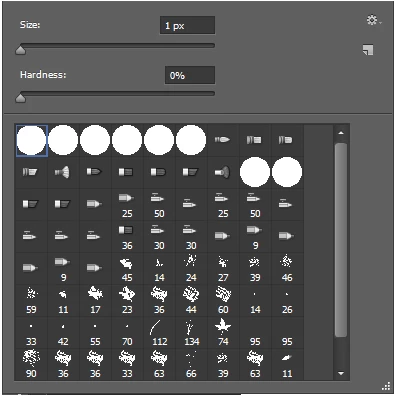
STEP 2 : Click On The Brush Icon

STEP 3 : Click On This Arrow

STEP 4 : SELECT THE SETTINGS ICON

STEP 5 : Now Select Reset Brushes

STEP 5 : When You Select Reset Brushes Option , You Will Get A Popup Like This , And Then Select Ok

STEP 6 : When You Select Ok , It Will Create A ABR File In Your Photoshop CS6 Folder, And The Path This ABR File Will Be Saved Is Program Files > Adobe > Adobe Photoshop CS6 > Presets > Brushes.

That's It : )

Participant
September 28, 2016

This did not work for me. It still stays with hard brushes only, which pretty much sucks. For now I'll try finding other ways to fix this.

EDIT: I found a way to fix this without having to reinstall OS. Simply press Shift + B over and over until it reverts back! (:

Participant
August 10, 2014

Has any of you been able to find a way to sort this out. I really cannot reinstall Windows... Started experiencing this yesterday, i have tried everything i know and the suggestions here but the problem still exists.

Participant
April 11, 2013

This is hapening to me as well on my work and personal system.  2 different installs.  Work uses E-learning Suite.  The only similarity between the systems is the Intuos5 Pad.  Any other work arounds for this?  Really not wanting to reinstall both systems...

June 13, 2012

Click on the "gear" in upper right corner.  It will give you a list of other brush palletts.

Inspiring
June 13, 2012

Or you have the Pencil Tool selected.

TuhinBaghAuthor
Inspiring
June 13, 2012

:| No dude i had double checked it..!! its in brush tool only..!!