
Participant
March 14, 2023
Answered

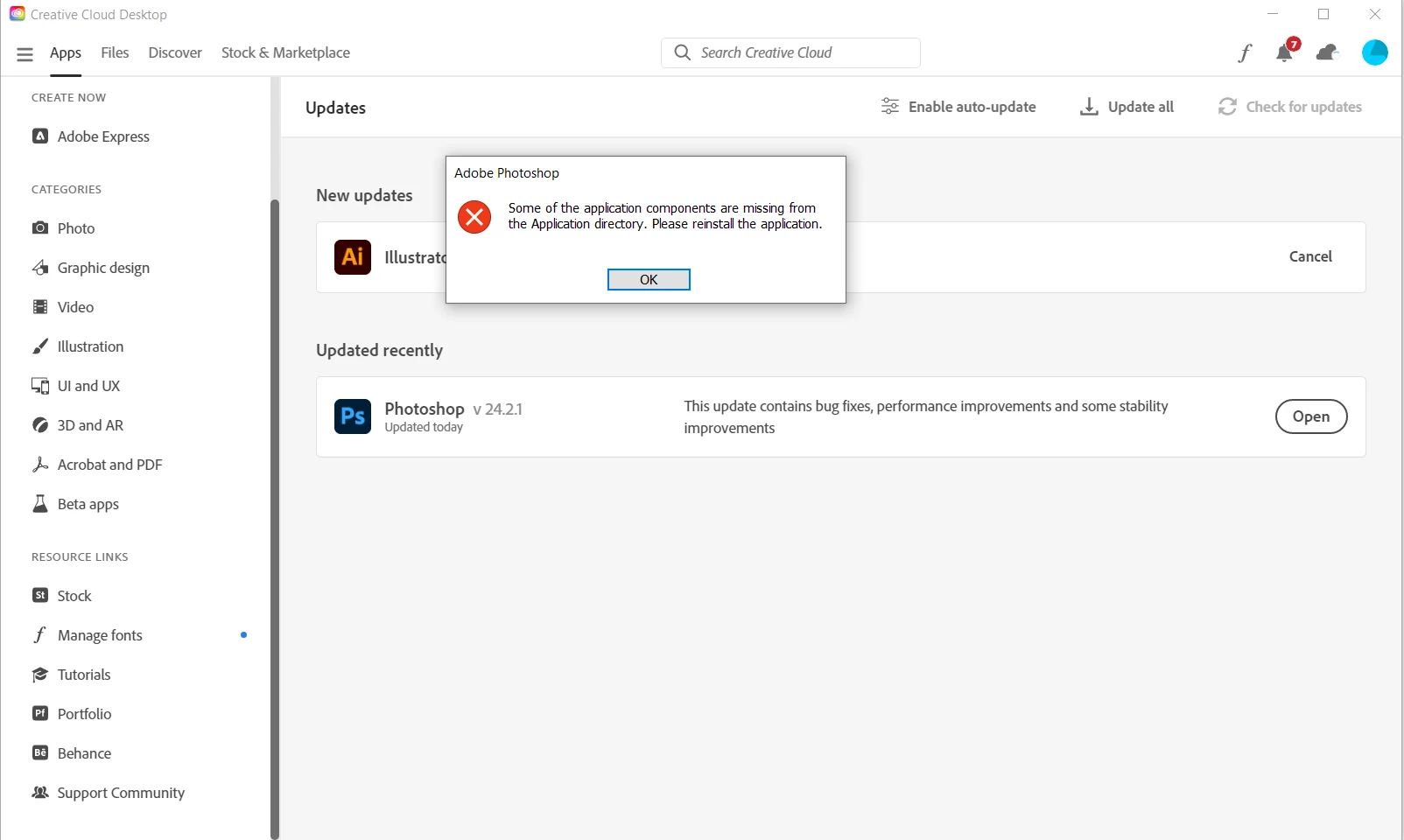
Some of the applications components are missing from the Application directory. Please reinstall...

  • March 14, 2023
  • 25 replies
  • 33004 views

Hello,


I wouldn't be posting another post about this issue, but everything I have tried so far, nothing worked. I still get the same error message. I am hoping there is an easy fix.


It works on my laptop, but not on my PC, which runs on Windows 10.


I tried reinstalling and removing everything connected to photoshop several times and in different ways. Nothing works.


Best,

Luka


Correct answer Vaishagh5FDE

Please change the Install language to English on the Creative cloud > Preferences. 

Reinstall the Photoshop and reset the preferences of the Photoshop from the location mentioned below. 
C:\Users\user name\AppData\Roaming\Adobe\Adobe Photoshop 2024\Photoshop 2024 settings to Photoshop 2024 settings.old

25 replies

Participating Frequently
November 7, 2023

Hi, i had the same problem. Its missing Locales folder in Photoshop folder. This happend to me with Beta version of Photoshop. The problem was that the location and the language in Creative Cloud were not english (US) version. Try deleting program, then change language in preferred languages on your profile to eng (US), reinstall the app and it should work. After that you can change prefferd languages again, as with instal it will also download locales folder that youre missing. 

 
Participant
November 2, 2023

Hello, I  had the same issue in Windows 11 and i downloaded 24.0 version and now it works. Si point of the story is Adobe is responsible for this.

Participating Frequently
May 8, 2023

Hi Luka,

Did you manage the issue with PS? 

Best regards,

Matjaž M.

peterr69831979
Participant
August 23, 2023

You need to change the language to English in the Creative cloud app then install PS and it should work... Seems like Creative cloud doesn't recognize that PS is not available in your local language (of your subscription ) which Creative cloud defaults to... omg Adobe.. you need to fix stuff like that... Just tell the app your local language is not supported... and run PS in default English...

PECourtejoie
Community Expert
Community Expert
August 23, 2023

Hi, I'd try to install in the other language after installing in english, it just instll the language pack. Change the install language in the CC app, then in preferences>interface, you can switch from En to localized.

Participating Frequently
May 6, 2023

Dear Support Community,

I've seen that I can change UI language in PS to my native one. PS is installed on my laptop, drive C:. I changed the language in Adobe Creative Cloud app and than uninstalled PS. When I reinstalled PS and tried to open it I got the message: Some of the application components are missing from the Application directory. Please reinstall the application.

I did it as adviced, but the message was the same. 

I don't sync my files with Adobe Cloud. Should I have to clean Creative Cloud?

Thank You for your help

Matjaz M.

Kevin Stohlmeyer
Community Expert
Community Expert
May 8, 2023

Hi @matjazm_1951 what language is your Windows OS installed with? Is it the same language as you are trying to install PS?

Participating Frequently
November 30, 2023

Hoj

Imam isti problem. Ker pa nisem računalničar imam mal težav z razumevanjem tega, kaj moram stroriti. A lahko kdo tole mal za telebane razloži. Večno hvaležen.
Windows 11 home 64


Zdravo!

Ker je že nekaj časa pretkelo, ko se mi je to zgodilo, bom poskušal opisati problem in rešitev. Nekje sem prebral, da je Photoshop tudi v slovenskem jeziku, le v Creative Cloud Application je treba to spremeniti, pobrisati Photoshop in ga ponovno inštalirati. Seveda, PS mi je po reištalaciji javljal napako "Some of the application components are missing from the Application directory. Please reinstall the application.". To sem naredil, pa ni nič pomagalo. Potem pa sem v Creative Cloud Application spet popravil jezik na angleški in PS ponovno inštaliral in od takrat stvar deluje.

lp

Matjaž

Participant
April 6, 2023

wtf 😕😕 @CShubert , now even my instalation stuck in same error, the virtual asistants are guiding me the whole day and even remote controling my pc about 10 instalations and downloads and so on and on happened and it's still the same message 😕😕

should we really find alternative software?


I need solution yesterday, and since the payments are getting higher, that looks just insane. 😞

Kevin Stohlmeyer
Community Expert
Community Expert
May 8, 2023

Hi @NACFOTO are you installing a different language version than the OS?

Participant
March 20, 2023

I used the tool and the problem persists, unfortunately.

Participant
March 20, 2023

Sorry for a late reply. Yes, it's installed on my primary drive.

CShubert
Community Manager
Community Manager
March 16, 2023

Hi everyone, making sure you all have cleaned your CC desktop app as this sounds like it is corrupt.


Has everyone walked through these steps as @Ged_Traynor listed and afterwards, does this issue persist?

https://helpx.adobe.com/creative-cloud/kb/cc-cleaner-tool-installation-problems.html


Kevin Stohlmeyer
Community Expert
Community Expert
March 16, 2023

@Leonnoel same question to you - where are you installing Photoshop?

Participant
March 16, 2023

Hello, 


I have the same problem and have tried everything, nothing works. Are there any other solutions?


Thank you

Leon