


Participating Frequently
April 9, 2023
Question

Some text layers created in Ps CS4 ME can't be opened in PS 2023

  • April 9, 2023
  • 3 replies
  • 515 views

I have some old files in my archives, that were created in Photoshop CS4, Middle Estern Version.

I recently tried to open one on an up-to-date version of PS and was unable to. The error message I received was:
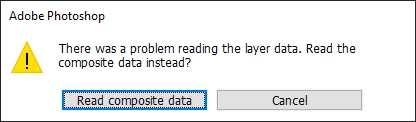
I had the old CS4 CD's and was able to install a version and open the file. Removing layer groups one by one I was finally able to find the culprit(s), a bunch of text layers.

I created a file with just one of those text layers, using the general (non-ME) single-line composer, that PS2023 still refuses to open. The file is attached. It produces a different error message:
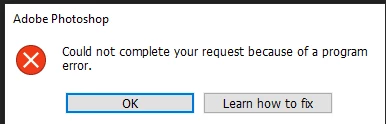
Please find whatever's wrong with those files/layers and fix them. 

OS: windows 10, CPU: Intel i5-8400, GPU: Nvidia RTX 2060 super.

This topic has been closed for replies.

3 replies

Jeff Arola
Community Expert
Community Expert
April 9, 2023

Here is a copy saved out of Photoshop 2023 (ps version 24.3) on Windows 10


https://assets.adobe.com/id/urn:aaid:sc:US:e91985ec-cf70-4876-9534-aa9eb8da2c7f?view=difile

Participating Frequently
April 9, 2023

Thanks for the suggestion; unfortunately that did not work for me.

Can you do me a favor? open the file, resave in PS2023, and attach? If I can open that, then all I need to do is take them to another copy of PS2023, resave there and bring back to work.

Jeff Arola
Community Expert
Community Expert
April 9, 2023

The file opens here on both macOS Ventura 13.3.1 and Windows 10 using photoshop 2023 (ps ver 24.3)


Did you try resetting your photoshop 2023 preferences?

From within photoshop go to Edit>Preferences>General, click Reset preferences on Quit and restart photoshop.

https://helpx.adobe.com/photoshop/using/preferences.html