
Answered
Some Tools are Missing and Not Adding to Quick tool Bar
I updated Photoshop to version 26.6.1 a few days ago. After that update, some tools are missing from the toolbar and even when I add them via keyboard shortcuts, they are not added.

I updated Photoshop to version 26.6.1 a few days ago. After that update, some tools are missing from the toolbar and even when I add them via keyboard shortcuts, they are not added.
@TEJAFX you have mentioned which tool are missing.
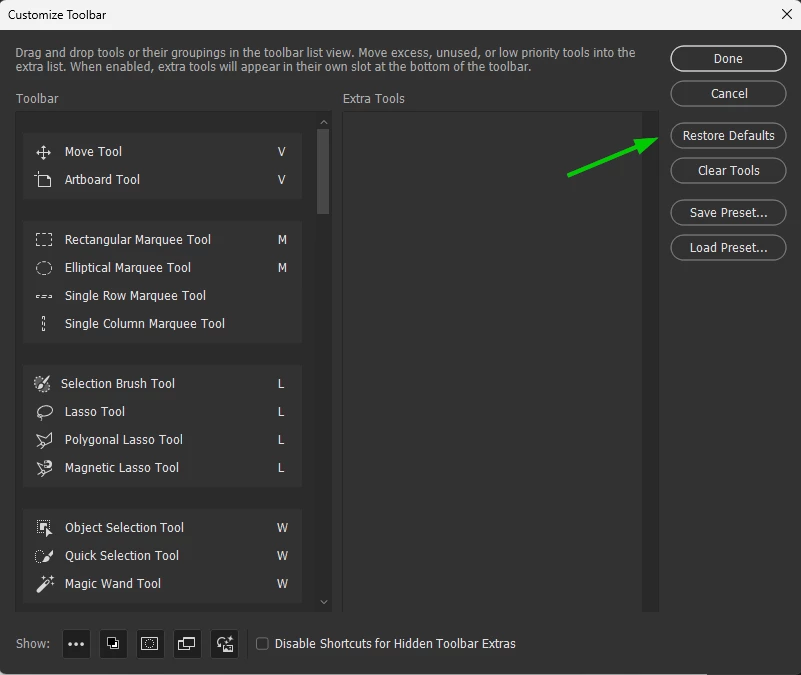
Try restoring the defaults
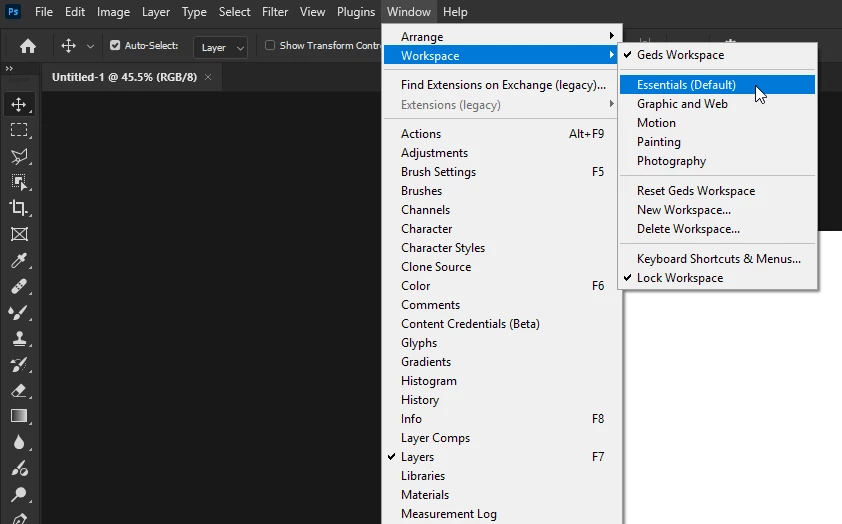
Make sure you're working in the essentials workspace
If none of the above helps, try manually resetting your Photoshop preferences
https://helpx.adobe.com/ie/photoshop/using/preferences.html#Manually
Remember to back up your settings before doing the preference reset
https://helpx.adobe.com/ie/photoshop/using/preset-migration.html
Already have an account? Login
Enter your E-mail address. We'll send you an e-mail with instructions to reset your password.
 AdChoices