

davescm
Community Expert
Community Expert
June 12, 2020
Question

Something for the weekend - Part 97 - Redacted!

  • June 12, 2020
  • 17 replies
  • 4872 views

Hi,

Thanks to all that took part in last weekend's bathroom challenge.


We often see requests for help in removing redactions from images. That is something which we do not get involved with and on single layer files cannot be done. However, I thought we might have a bit of fun with it.

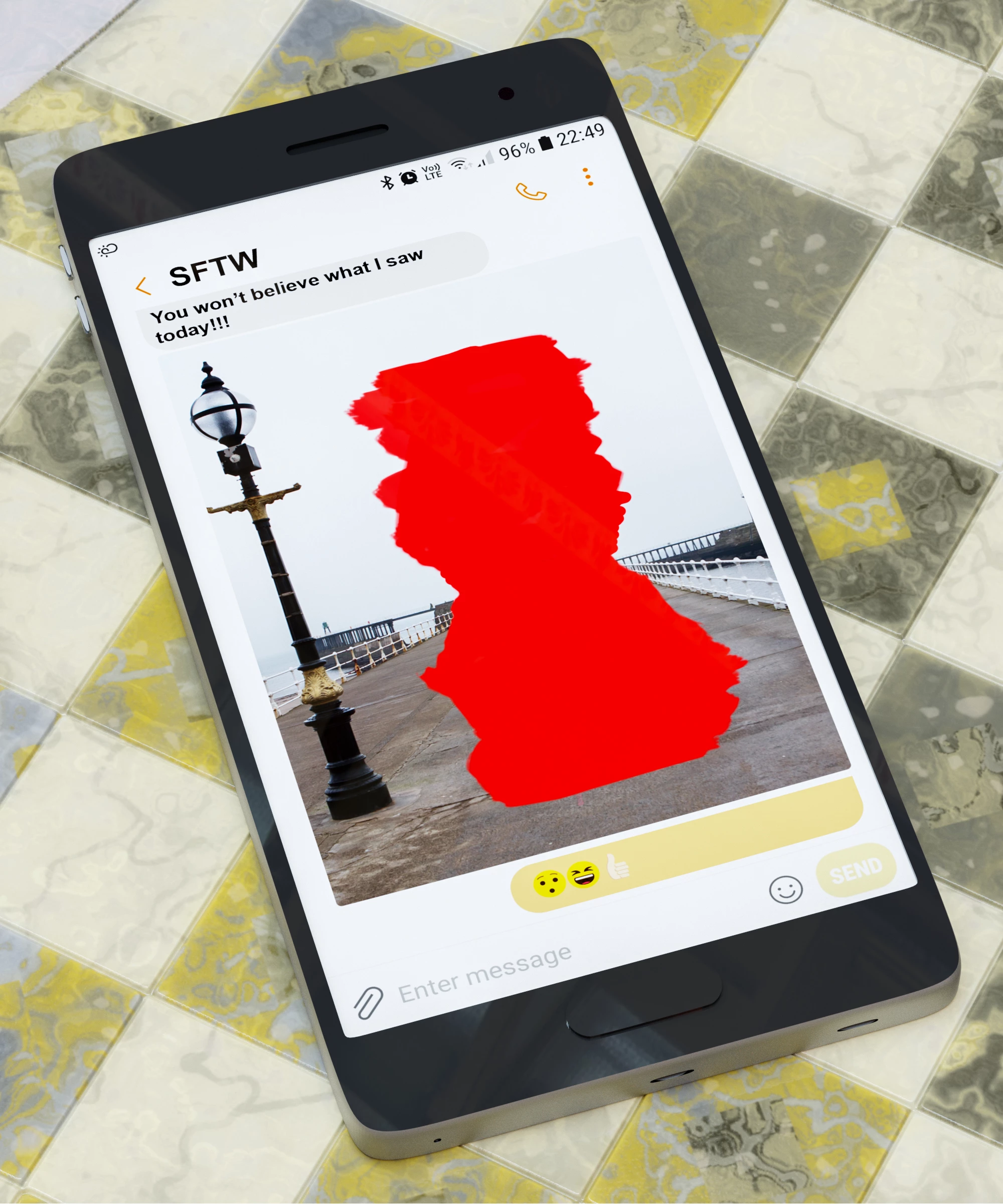
So, I give you a phone with an image on screen. Can you show us what is behind the red and causing all the fuss?

The “rules”:

  • Anything goes, as long as it meets the forum rules on decency, copyright etc.
  • Anyone, and everyone, is welcome to have a go, whether you are a complete beginner or a Photoshop expert.
  • There are no prizes apart from the chance to practice, show off, or bring a bit of humour and fun. Don't be shy, join in and have a go!

To download the image below at 2000 x 2400 pixels with an embedded ICC colour profile (sRGB), hover over the image and click on the circle with the arrows at the top right. Then, when the image opens in its own window, right click and choose “Save Image As/Save Target As” (or similar depending on your browser).


Have fun !


Dave

This topic has been closed for replies.

17 replies

Semaphoric
Community Expert
Community Expert
June 17, 2020

I saw what I saw what I saw . . .

Community Expert
June 18, 2020

Semaphoric - great idea.

It reminds me of what is happening in many online classes on my ened where instructors share their screen while still showing the online classroom - so see their screen sharing their screen sharing their screen..... 

jane-e
Community Expert
Community Expert
June 16, 2020

Who remembers this thread from 2015? Notably Trevor's "You can always make it up" and Dave's "Can't you just lift the screen and have a look..." !
https://community.adobe.com/t5/photoshop/erase-black-paint-from-a-screen-shot/td-p/7639627


~ Jane

Jacob Bugge
Community Expert
Community Expert
June 16, 2020

I remember seeing it, Jane, long after it was live.


Trevor.Dennis
Community Expert
Community Expert
June 15, 2020

Dave, I was reading your starter post again, and noticed the bit about requests to reveal redacted text and images.  I made me think of the typical content of my Private Message inbox.  Heck, I just had a closer look and realized all these are just from May and April this year!  It think that's eight different users asking the same thing.  I used to reply and explain the realities, and if it was not from a phone or tablet (which are 100% impossible to do anything with) I even had a go, but I don't think I have ever got more than fragments.  That number of requests has still amazed me.


davescm
Community Expert
davescmCommunity ExpertAuthor
Community Expert
June 16, 2020

Yes, I get a lot of those Trevor. My answer is that on single layer images it can't be done technically,  and from a legal view this forum is not about trying to unedit documents.


Dave

jane-e
Community Expert
Community Expert
June 15, 2020


The Tardis can't get here fast enough — there's some kind of time warp! Glenn?


davescm
Community Expert
davescmCommunity ExpertAuthor
Community Expert
June 15, 2020

Nice Jane - and you changed the message at the bottom 🙂


Dave

jane-e
Community Expert
Community Expert
June 16, 2020

Dave, can we guess that you drew the tile in Blender? I like the patterns and colors.

~ Jane

davescm
Community Expert
davescmCommunity ExpertAuthor
Community Expert
June 14, 2020

Seaside retirement ....


Dave

davescm
Community Expert
davescmCommunity ExpertAuthor
Community Expert
June 14, 2020

I found the easiest way to fill the background was to copy the photo part to a new layer, straighten it using Edit>Transform>Distort, then use the clone stamp inside Vanishing point. Then after drawing the mice, Edit > Transform> Distort it all again back to the cellphone photo shape.

Dave

Trevor.Dennis
Community Expert
Community Expert
June 14, 2020

Dave I used Perspective Crop to straighten and cut out the iPad in the inkblot image.

Trevor.Dennis
Community Expert
Community Expert
June 14, 2020

davescm
Community Expert
davescmCommunity ExpertAuthor
Community Expert
June 14, 2020

Nice one Trevor! Living in the UK, I 'm not sure what that symbol is near the bottom though 🙂

Dave

Trevor.Dennis
Community Expert
Community Expert
June 14, 2020


davescm
Community Expert
davescmCommunity ExpertAuthor
Community Expert
June 14, 2020

Haha - always a smile with SFTW. Nice to see you here again Trevor 🙂

Dave

Community Expert
June 14, 2020

davescm
Community Expert
davescmCommunity ExpertAuthor
Community Expert
June 14, 2020

Haha - we are getting into Trevor's inkblot territory 🙂

Dave

hans-g.
Legend
June 14, 2020

Good Morning,

in this case I thought I should take a look behind the red revision mark. And lo and behold a red text appeared. Must be an important message!


davescm
Community Expert
davescmCommunity ExpertAuthor
Community Expert
June 14, 2020

We'll have to have a challenge sometime to put an image together showing what "Lorem Ipsum...." might mean 🙂

Dave

Ussnorway7605025
Legend
June 15, 2020

Translates to 'get a life'

🤔 🤔


Jacob Bugge
Community Expert
Community Expert
June 13, 2020


The other pier, with the twins with the updos.


davescm
Community Expert
davescmCommunity ExpertAuthor
Community Expert
June 14, 2020

Look carefully - the end of the pier is the same one as in teh original image (just to the left). The pier has two sections 🙂

Dave

KShinabery212
Community Expert
Community Expert
June 14, 2020

Dave, I am blind.

Let's connect on LinkedIn. https://www.linkedin.com/in/kshinabery/