

MrPixelWarrior
Participant
June 27, 2020
Answered

Sorting images using Photoshop script problem

  • June 27, 2020
  • 3 replies
  • 1191 views


Hello guys, I'm trying to combine tilesets into a single background image.

I named the images background_01.png up to background_300.png  and I use the script made by Andrew Noske (Photoshop Script: Create a montage from ordered image tiles)

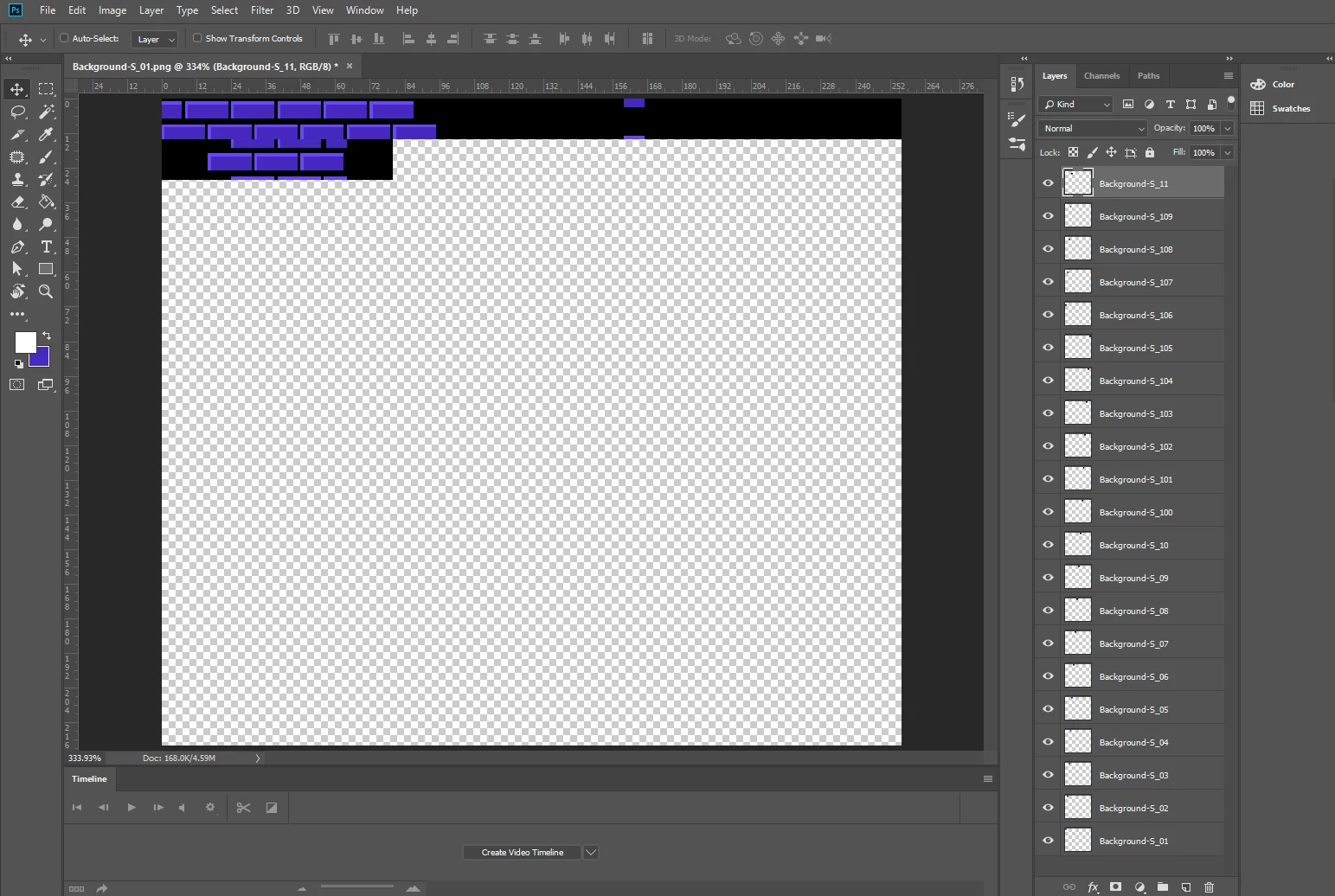
but somehow the script just jumps to 100 after 10. ignoring the 11-99 images.


I also tried the script Insert Arrangement 2-2_D_EN made by Dido Scripts, its also similar to the first one but somehow it doesn't work as intended as well.


Image below for reference, does it have to do with the numbering? how do I name the tiles to make the script work? Thanks in advance.


This topic has been closed for replies.
Correct answer jazz-y

just rename images with 3 digits:

background_001.png,

background_002.png

...

background_099.png

3 replies

MrPixelWarrior
Participant
June 28, 2020

Alright, I'll also look into this further. Thanks for the tip as well.

JJMack
Community Expert
Community Expert
June 27, 2020

Does the script even sort the images files.  Most likely most likely it does not. It will just process the files in some file system order. Create a layer for the Image, names the layer with the file name paste in the image  size the image the positions the images for the composite. The image layers will be stack  in the order files were processed. Most likely in File Names sort order.  The script may use a custom positioning method.  Like Size the images to fill a particular tile sizes,  mask off  excess image content so the image can be tiled out in a matrix with even white space between images.  Like I scripted in my Paste Image Roll script.   You specific the tile size in the script dialog the white space sizes the width of the document and print resolution  in this dialog.  The script calculate the size the canvas need to be based on the number  of image files you selects in a file selection dialog. If the script you have is saved as text JSX not JSXBIN you can edit the JSX text file  and search for sort.  I do not think you will find that the script sort the images.

JJMack
MrPixelWarrior
Participant
June 28, 2020

I'll look into this thoroughly, thanks for the help!

jazz-yCorrect answer
Legend
June 27, 2020

just rename images with 3 digits:

background_001.png,

background_002.png

...

background_099.png

MrPixelWarrior
Participant
June 28, 2020

Will try it, I'll search some batch file naming softwares. Thanks!