Spot color previews affected by RGB channels in CC2017
Hi,
I make spot color separations for screenprinting by building spot color channels over RGB and then converting to and saving as a multichannel DCS/EPS.
I will have a solid substrate color spot color channel that is first in the order and then more spot color channels under that. When I wanted to preview my work, I just set all of the spot color channels on and the substrate color masked the RGB so I could see the results of my work in just the channel view. The preview with just the spot colors on would not change whether the RGB channels were on or not
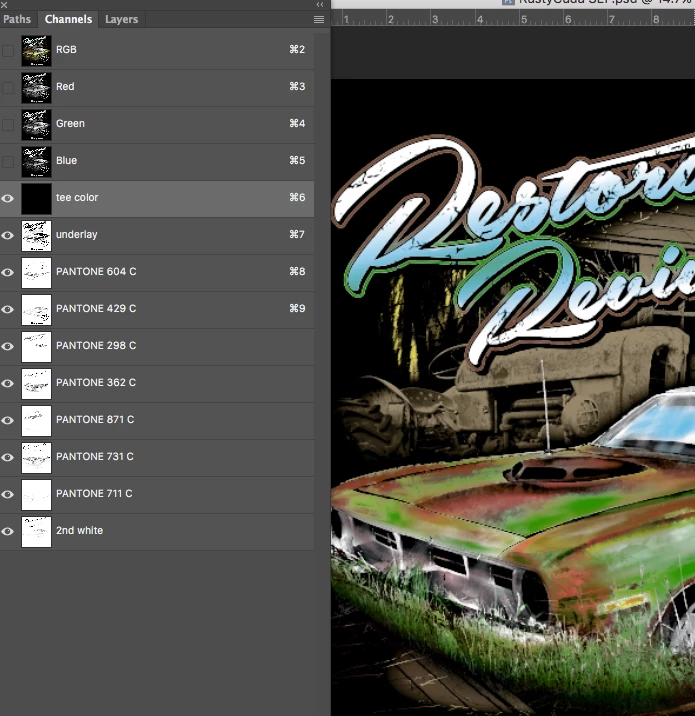
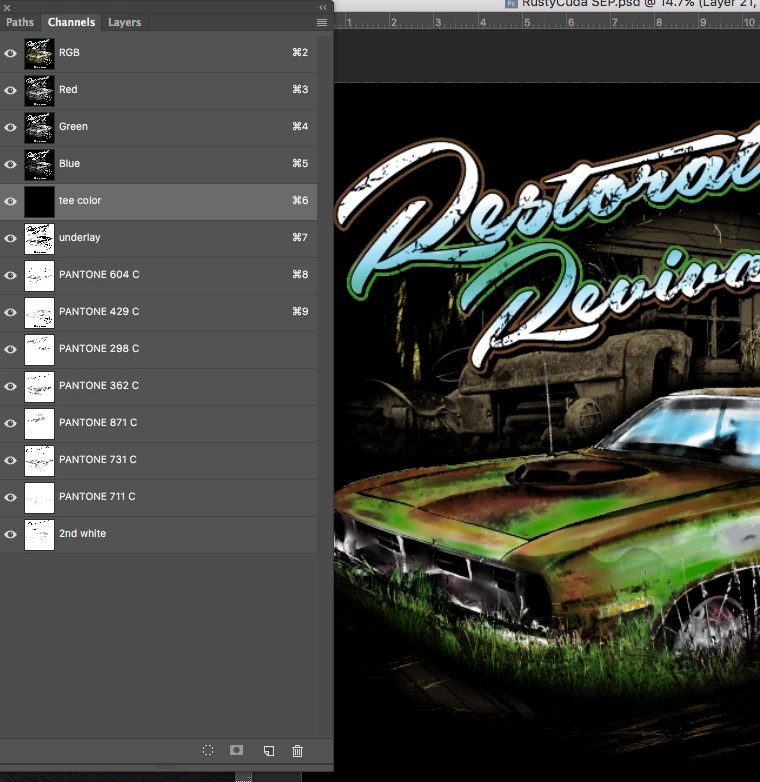
Now, after updating to CC2017.1.0, the channel preview changes when I toggle the RGB channels on or off. They never did this before. In our office we have older versions running and the same file behaves correctly, but on my station with the latest, I get different blending depending on whether the RGB preview is toggled on or off. It doesn't even matter if there is anything on the RGB channels to blend. It behaves the same whether there is any artwork on any layer or not. It behaves this way on older files created with older versions on the my updated sattion, but on other stations running older, it doesn't
It only does this in RGB. If I convert to CMYK, the behavior doesn't occur. I prefer working in RGB.
Is there any way to change this behavior? what is causing this?
See attached screenshots
Thanks!
 AdChoices