
magdalenaz59854474
Inspiring
February 24, 2024
Answered

Spot healing brush cursor tip

  • February 24, 2024
  • 3 replies
  • 1178 views

Hi to all! Recently I updated Photoshop to version 25.0.0. Previously, I used the 2019 version. I imported "my workspace" to the new version to keep all the settings. Overall, I don't have any major problems getting used to the new version, apart from the spot healing brush. In the 2019 version, the spot healing brush had a round cursor with a small black dot in the middle. This little black dot did all the work in cleaning up the imperfections. This was a very good solution for me, it allowed for great precision in working with this tool. Unfortunately, in the new version 25.0.0 of Photoshop, the cursor is still round, but when working, it uses the entire cursor surface (when clicked, the entire cursor tip is black). I tried but I just can't get used to it. It doesn't allow it to be as precise as with the tool in the old version of PS. Does anyone have a similar problem? Can this be changed somewhere in the settings? It looks like a feather setup to me. I've been looking for a solution wherever I can for several months and I can't find it. I work on a desktop with Windows 10. I will be grateful for help. Kind regards!
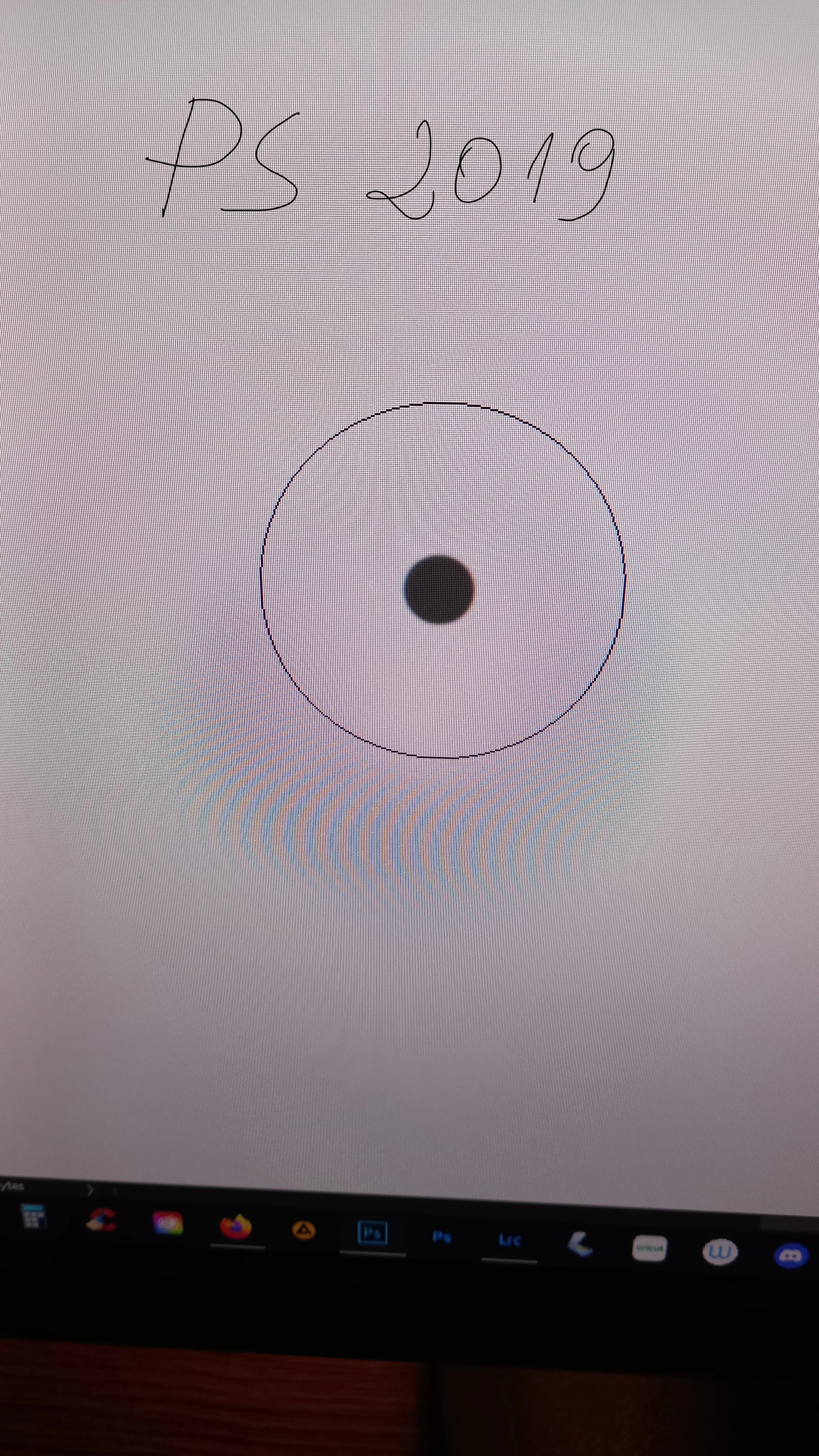
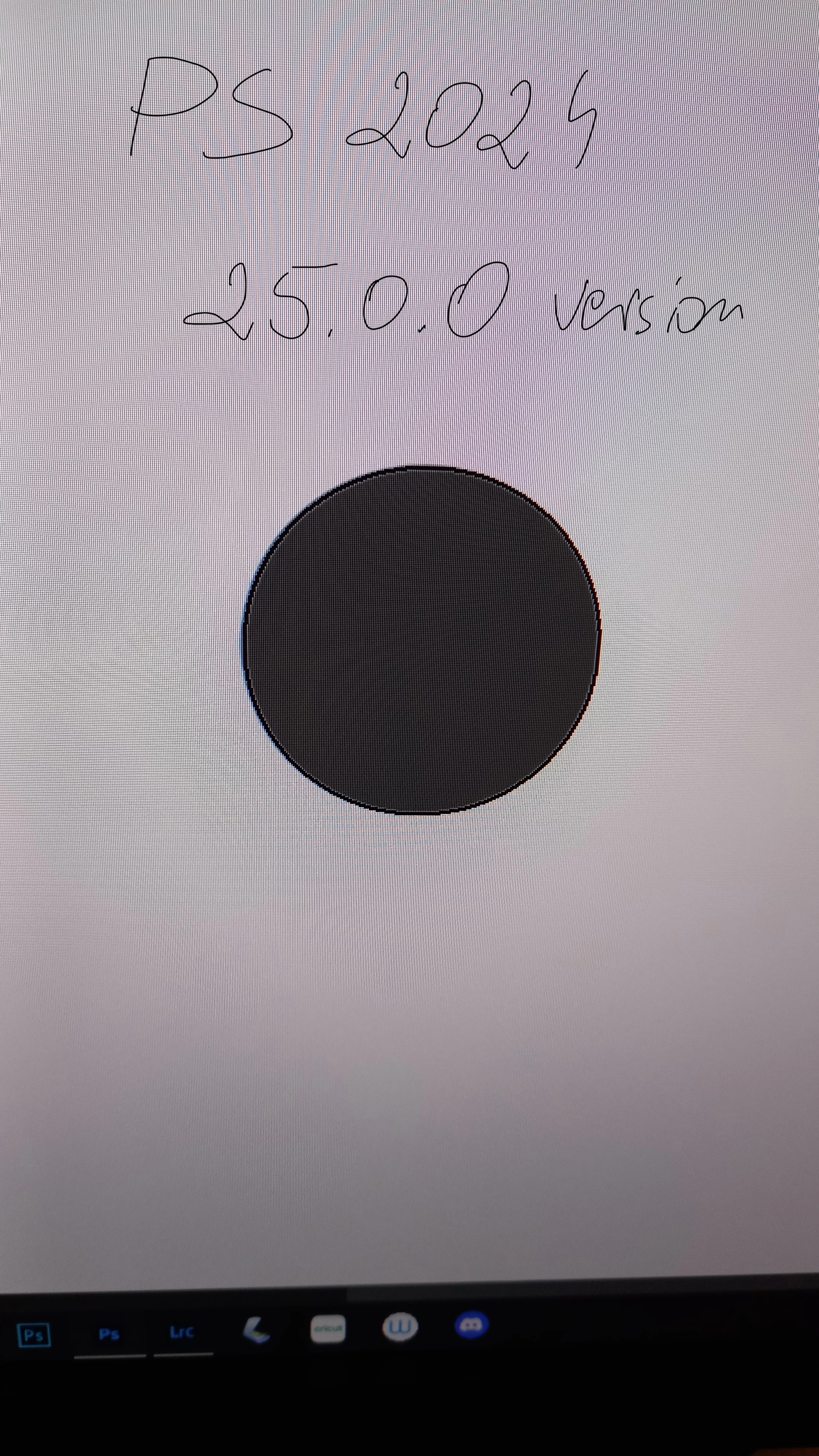
 

This topic has been closed for replies.
Correct answer magdalenaz59854474

Problem solved! I found the solution by accident when I was trying to solve another problem. I just added the PSUserConfig.txt file with the text  UseSystemStylus 0 in it to the Adobe Photoshop 2024 settings folder. And boom, a miracle! The spot healing brush tip is back to normal!

3 replies

magdalenaz59854474
magdalenaz59854474AuthorCorrect answer
Inspiring
April 3, 2024

Problem solved! I found the solution by accident when I was trying to solve another problem. I just added the PSUserConfig.txt file with the text  UseSystemStylus 0 in it to the Adobe Photoshop 2024 settings folder. And boom, a miracle! The spot healing brush tip is back to normal!

c.pfaffenbichler
Community Expert
Community Expert
February 26, 2024

Just to make sure: Are you working with a mouse or a tablet? 

magdalenaz59854474
Inspiring
February 26, 2024

I use Wacom Intuos Pro tablet.

c.pfaffenbichler
Community Expert
Community Expert
February 25, 2024

Please post proper screenshots 

https://www.take-a-screenshot.org/

or, if the cursor doesn’t appear in those, screen recordings with the pertinent Panels (Toolbar, Layers, Options Bar, Brush Settings, …) visible. 

What is the Size-setting? 


What have you done for all-purpose trouble-shooting so far?
Restoring Preferences after making sure all customized presets like Actions, Patterns, Brushes etc. have been saved might be a good starting point:
https://helpx.adobe.com/photoshop/using/preferences.html
https://helpx.adobe.com/photoshop/kb/basic-trouble-shooting-steps.html
https://helpx.adobe.com/photoshop/kb/troubleshoot-gpu-graphics-card.html

magdalenaz59854474
Inspiring
February 26, 2024

Hi, thank you for your answer! I'm not sure how I can do a proper screenshot when at the same time I have to click the spot healing brush to show how it looks (sorry, I'm not good with computer). I tried to record the screen but I get the info that my PC doesn't meet requirements fot doing it.

As to what I've done so far. Not much, as this is happening from the beginning, when I got a new version of PS. I still use the old version, 2019 and the spot healing brush works fine. I'm hesitant about restoring the preferences because I know from experience that even after saving my preferences, there are issues with restoring all my settings. I'd rather not do that as for me every time I update of the app is really stresfull and takes a week or two for me to sort everything the way I'm used of. First of all, I would like to know if such a brush cursor is normal for the new version.

c.pfaffenbichler
Community Expert
Community Expert
February 26, 2024
quote

I would like to know if such a brush cursor is normal for the new version.

That depends on the settings.  

Again: What is the Size-setting? (see screenshot in previous post.)