Known Participant
February 24, 2020
Answered

Spot Healing Brush issue since latest update...

  • February 24, 2020
  • 10 replies
  • 9148 views

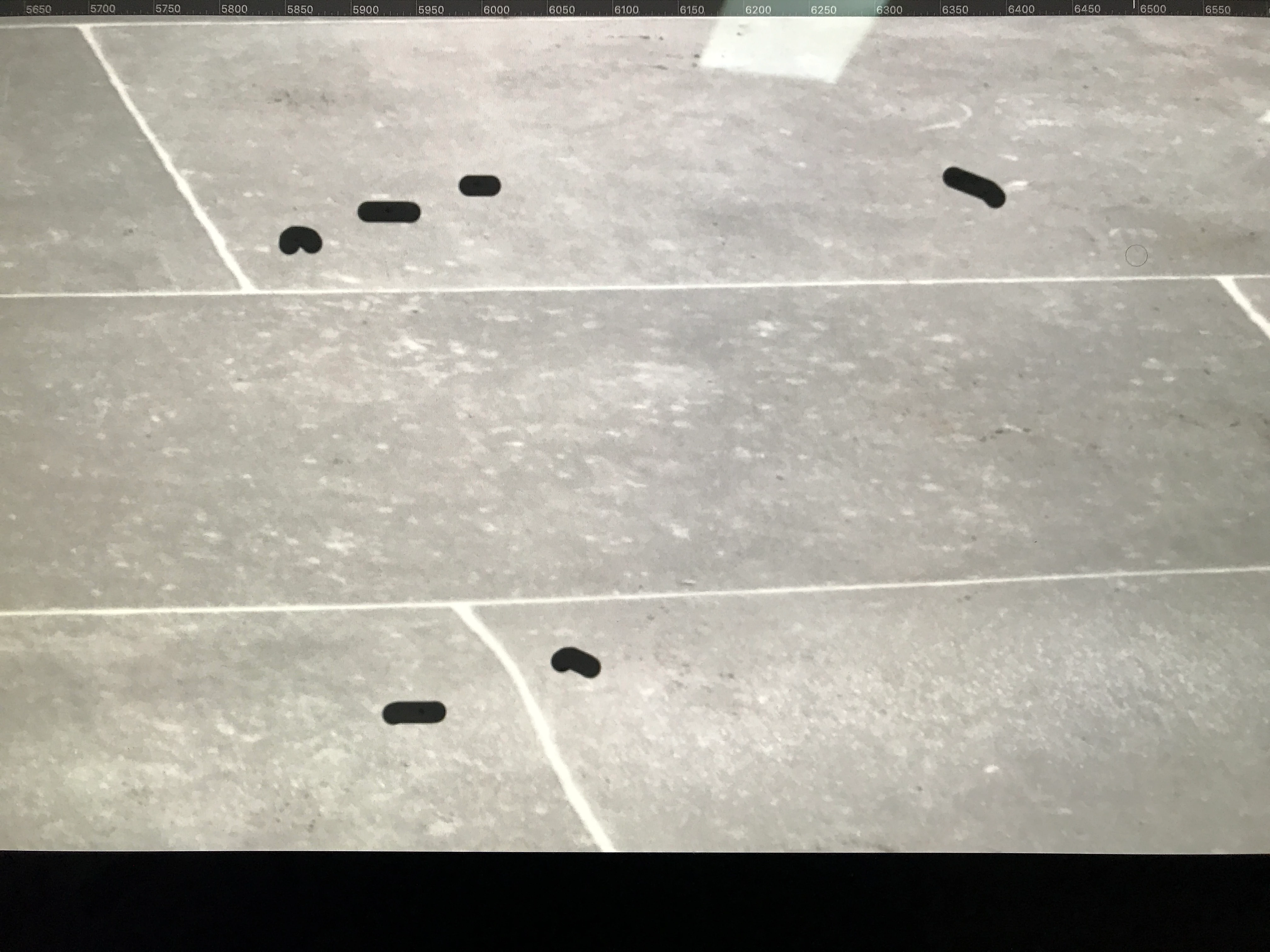
My edits are remaining on screen until I click off the layer or move my image? Anyone else having this problem? Latest PS CC 2020 on Mac Catalina 10.15.3. 


See image:


This topic has been closed for replies.
Correct answer mariend88459528

Adobe support told me (via Facebook) to reset the spot healing brush. That fixed it for me.
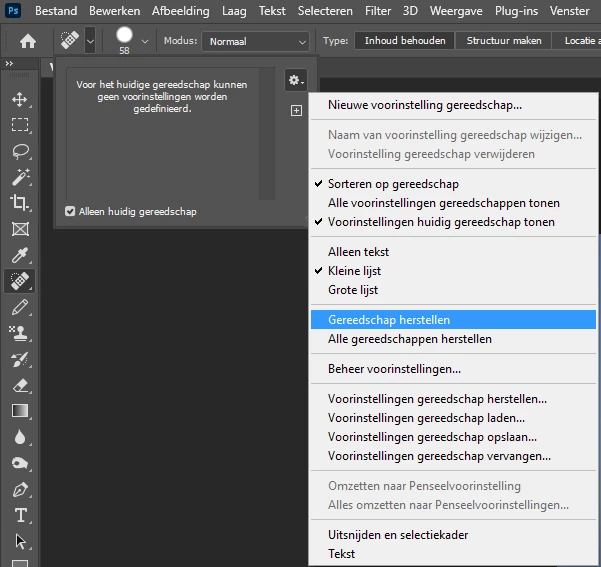
 

(sorry that the screenshot is in Dutch, but I think you'll get the idea of how to do this)


10 replies

Participant
February 22, 2023

I had the same issue in Photoshop 2023. This helped for me:

In Photoshop go to Preferences / Performance. Then enable "Use Graphics Processor". For the setting to take effect you have to restart Photoshop (it took me a long time to figure out you have to restart Photoshop, as it was only indicated in a small short popup text). Hope this helps for you or others!

Alexa Zinola
Participating Frequently
July 11, 2021

after applying 

in ~/Library/Preferences/Adobe Photoshop 2020 Settings to ~/Library/Preferences/old-Adobe Photoshop 2020 Settings


that partially fixed the issue. The edit black brush lines dissapear BUT not the first one applied in a series.

Participant
July 5, 2021

You are most likely running an iOS operating system that is unsupported. If you are running an iOS Op system that required a patch Photoshop will run terrible, the computer will drag, struggle to stay connected to the internet and your kernel task cpu usage will be through the roof. Go back down to the last iOS Op system that gave you no issues, download an older version of PS and it will work perfectly.

Weapon6

Participant
July 5, 2021

Thanks for the reply. I am running Catalina 10.15.7 so I am unclear if that is unsupported. The two issues I am having is the healing brush tool, and images not showing up when opened from LR. If you move the PS window the image shows up. Frustrating but easily dealt with. The healing brush is another matter. It will work on the background layer but not any other layer. On any other layer the black dots remain until you move to another tool. I have uninstalled and went back to an older version and it runs fine. This computer is only used for editing, is clean and has ample memory so it is frustrating. A fellow photographer has exactly the same machine (late 2013) set up identically and his runs just fine. 


Participant
June 8, 2021

Hi Adobe,

Same issue where the spot healing brush does not finish automatically and just leaves the black train on the screen.  It seems to be a screen refresh issue since any action that forces a screen refresh will complete the spot healing brush action. OS is Catalina 10.15.7 - PS 22.4.1

Renaming the preferences file did not help not resetting the tools.

Does work on some photos but not everywhere in the same photo.

This was working fine on my Mac until the latest PS 2021 update.

Thank you for your attention

Eric

Participant
June 8, 2021

I am having exactly the same issue with the healing brush.

Participant
September 22, 2021

Make sure that "sample all layers" is selected. The setting should be:

Mode: Normal

Type: Content Aware

Check the box for Sample All Layers

ilinas64965902
Participant
April 24, 2021

I have the same problem.


I've tried on two different brand-new computers with 64BG RAM and latest everything, Windows 10.


Resetting the tool didn't help in my case.


Interestingly, this is happening on some PSD files, and not on others (both are open simultaneously).


Please help, Adobe.

Participant
April 27, 2021

Same problem. I can't work like this. Sort it out for godsake.

Betterburnout
Participating Frequently
April 17, 2021

Hello everyone,

I'm fighting for days with this problem..

This is ultra-frustrating.

Waste of time and and a bit dangerous to manipulate our files with such hazardous tool.

Is there a way to contact Adobe efficiently ? Gosh.

Phoenixx Creative
Participant
April 16, 2021


Same issue with me.  I've tried all of the above "fixes," including Uninstalling and re-installing PS.  
My computer is not the issue - everything is new, up-to-date, and industry standard.  
This is ridiculous.  Just as someone said above, Adobe likes to release patches, new versions, and constantly screwing up the wheel that was once perfect and flawless.  Unbelievable, for a company who already runs a monopoly on the industry.

alisona68897270
Known Participant
March 11, 2021

I am having the same issue suddenly, on Windows 10. Have tried all suggestions herein and no joy. Adobe customer service's answer to everything is to reset the preferences and it almost never solves a problem; it only creates more wasted time for us to have to re-build our preferences. I'm so sick of this. Every darned day it's something gone wrong with one Adobe app or another. 

Bartek Dabrowski
Participant
November 5, 2020

Hi Richard

I'm having similar problem. Thie error applies to Healing Brush and Spot Healing Brush. With HB, I'm having same thing as You - after I use brush, a black trail remains untlil I touch the picture somewere else, then the trail disappears and the healing effect shows. With Spot HB, when I sample a spot and then apply healing, the coursor cross stays "locked" in the exact spot, where I was sampling and there is no healing effect to where I put it. Then, when I make another sample, the firs one appears to work. HOWEVER, this problem happens when I'm using Wacom Tablet, or tablets, as I tried it with two different devises. When I'm using mous, both tools work just fine. 


For your information, I'm using Mac OS Mojave and PS CS 6. 

Participant
November 14, 2020

In version 22.0.0 it is still NOT fixed.
How hard can it be to get a perfectly working feature back in this release? Who broke this functionality??? And why???

Participant
November 19, 2020

Running 22.0.1 and healing brushes are completely nonfunctional. Soo f***ing tired of every patch introducing new issues. I don't have time for this!

lambiloon
Community Expert
Community Expert
February 24, 2020

Hi this may be due to low system specfications or low vga memory....regards

Ali Sajjad / Graphic Design Trainer / Freelancer / Adobe Certified Professional
Known Participant
February 24, 2020

Just for your information... I spoke to Adobe. I changed the folder name in ~/Library/Preferences/Adobe Photoshop 2020 Settings to ~/Library/Preferences/old-Adobe Photoshop 2020 Settings


That fixed the issue.

bonniec60404062
Participant
February 28, 2020

I'm having this exact same issue since the latest update, although I am not finding this folder that is mentioned. 
How would I navigate my way to that?

Thanks.


Hold down option key while selcting "go" in th th top bar on desktop then selct library.
