Known Participant
July 1, 2019
Answered

Square / Diamond Overlay on Image

  • July 1, 2019
  • 2 replies
  • 1273 views

Hi All,

Can anybody help with creating this overlay effect:

Ideally, it would be great to have the squares / diamonds as a template, then can change the image as and when, just looking for some quick tips on creating the template etc.
    This topic has been closed for replies.
    Correct answer davescm

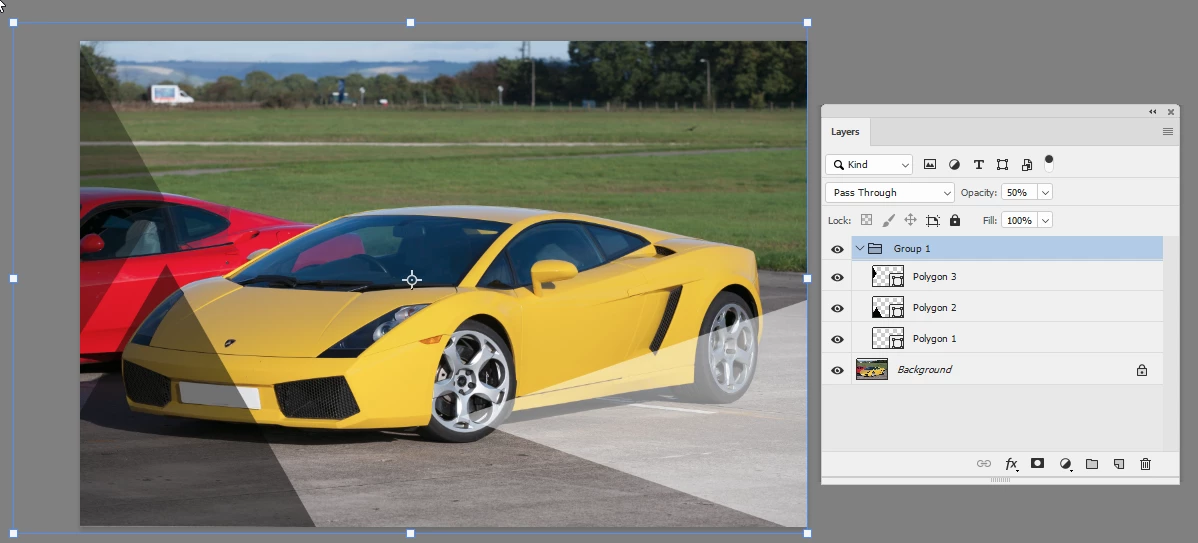
    Something like this :

    Just polygon triangle shapes, filled in white and black, then put in a group and opacity adjusted.

    Dave

    2 replies

    davescm
    Community Expert
    davescmCommunity ExpertCorrect answer
    Community Expert
    July 1, 2019

    Something like this :

    Just polygon triangle shapes, filled in white and black, then put in a group and opacity adjusted.

    Dave

    c.pfaffenbichler
    Community Expert
    Community Expert
    July 1, 2019

    Dang, I had overlooked the dark shapes.

    As for the template wrok/watermarking there are kind of two possible approaches:

    • Have a »watermark« and place it in the images

    • Have a prepared file and place the other photographs in that one

    Both could be automated to some extent with Actions or Scripts.

    Trevor.Dennis
    Community Expert
    Community Expert
    July 1, 2019

    c.pfaffenbichler  wrote

    Dang, I had overlooked the dark shapes.

    I gave been getting into watching a few YouTube channels of late.  Some of them have quite a following, and you see the same people in the comments.  There might be several hundred thousand views, but only 200 comments, so it seems to be really competitive trying to get the first comment.  You see some people who just ay 'Yippee, I got the first comment', only they have 20 comments before them.  They have forgotten the lag, of course.  There no comments when they clicked on the video, but others were quicker off the mark while My Yippee was either watching the video, or typing too slowly.

    Which kind of gets me back to the relevance of your comment.  There is absolutely no doubt that people post their comments before watching the whole video, and consequently ask questions that were answered after the point they stopped to comment.  Some don't watch any of the video, but just race to post to get to the top of the list.  Then there are the people who reply to the first comment with no relevance to it, but it keeps them at the top of the page.  About as relevant as the post I am typing now,

    Not that we need YouTube to fall into this 'too hasty' trap.  I am forever parsing a forum post too quickly and answering the wrong bit, and generally stuffing up.  It's coming up to 1am here, which I am going to use as my excuse for this daftly off topic post.

    c.pfaffenbichler
    Community Expert
    Community Expert
    July 1, 2019

    You can use the Rectangle Tool to create a white, square Shape Layer.

    Then use Edit > Free Transform to get the diamond-shape and reduce its opacity.

    To automate the application of this element you could put it into your CC Library or include the Path in an Action or …