
Inspiring
January 10, 2022
Answered

Start Photoshop & run script without user interaction

  • January 10, 2022
  • 2 replies
  • 3576 views

Hey


I'm in need of running script in photoshop without it 
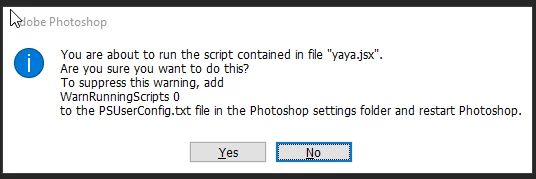
Asking for that.

I want to start PS & run Script, ur run script in already running PS.

I don't want to add settings entry in PSUserConfig.txt file. 

Any ideas how that can be done?

I know that vscode/extendtoolkit are able to send messages to PS without that "pop-up" as thats how we run scripts there... any idea how to piggy back off them?

My current command

"C:\Program Files\Adobe\Adobe Photoshop 2022\Photoshop.exe" -r "C:\Users\Master\Desktop\yaya.jsx"

Regards

Dariusz

This topic has been closed for replies.
Correct answer Kukurykus

Why don't you make part of script that edits that .txt file to update of necessary line?

2 replies

Kukurykus
KukurykusCorrect answer
Legend
January 10, 2022

Why don't you make part of script that edits that .txt file to update of necessary line?

Stephen Marsh
Community Expert
Community Expert
January 11, 2022

I'm sure that @Dariusz1989 has this well in hand, however, I like using these discussions as a learning exercise and wanted to expore the solution presented by @Kukurykus. The following was a personal exercise, I can confirm from testing that the following works on CC2020 – CC2022 on both Mac and Win.


/*
Warn running scripts config - universal.jsx
v1.1 updated 12th January 2022
https://community.adobe.com/t5/photoshop-ecosystem-discussions/start-photoshop-amp-run-script-without-user-interaction/td-p/12645933
*/

/* https://helpx.adobe.com/photoshop/kb/enable-optional-extensions-photoshop-cc.html */

#target photoshop

var os = $.os.toLowerCase().indexOf('mac') >= 0 ? "mac" : "windows";
if (os === 'mac') {
    var appNameMac = app.path.fsName.replace(/^\/.+\//, '');
    var userConfigFile = new File("~/Library/Preferences/" + appNameMac + " Settings/PSUserConfig.txt");
    //var userConfigFile = new File(app.preferencesFolder + "/PSUserConfig.txt");
    //alert(userConfigFile.fsName);
    if (userConfigFile.exists)
        userConfigFile.remove();
    userConfigFile.open("w");
    userConfigFile.encoding = "UTF-8";
    userConfigFile.lineFeed = "Unix";
    userConfigFile.writeln("WarnRunningScripts 0");
    userConfigFile.close();
    /*
    var userConfigFile = Folder("~/Library/Preferences/" + appNameMac + " Settings/");
    //var userConfigFileDir = Folder(app.preferencesFolder);
    //alert(userConfigFileDir.fsName);
    userConfigFileDir.execute();
    userConfigFile.execute();   
    */

} else {
    var appNameWin = app.path.fsName.replace(/^.+\\/, '');
    var userConfigFile = new File("~/appData/Roaming/Adobe/" + appNameWin + "/" + appNameWin + " Settings/PSUserConfig.txt");
    //var userConfigFile = new File(app.preferencesFolder + "/PSUserConfig.txt");
    //alert(userConfigFile.fsName);
    if (userConfigFile.exists)
        userConfigFile.remove();
    userConfigFile.open("w");
    userConfigFile.encoding = "UTF-8";
    userConfigFile.lineFeed = "Windows";
    userConfigFile.writeln("WarnRunningScripts 0");
    userConfigFile.close();
    userConfigFile.execute();
    /*
    var userConfigFileDir = Folder("~/appData/Roaming/Adobe/" + appNameWin + "/" + appNameWin + " Settings/");
    //var userConfigFileDir = Folder(app.preferencesFolder);
    //alert(userConfigFileDir.fsName);
    userConfigFileDir.execute();
    userConfigFile.execute();
    */
}


Kukurykus
Legend
January 12, 2022

@Kukurykus 


Haha, I obviously didn't recall that there is a predefined app.preferencesFolder - which is why I did it in such a torturous Rube Goldberg way!


I like your approach of updating the existing content, instead of removing and recreating the file with the desired settings (no need to worry about platform specific line endings etc).


P.S. Apart from this scripting warning flag, what else could this preference file optionally contain?


Jul 20, 2021

c.pfaffenbichler
Community Expert
Community Expert
January 10, 2022

If I undersatand you correctly you could try using 

File > Scripts > Script Events Manager 

instead and link the Script to the »Start Application«-event. 

Inspiring
January 10, 2022

Hey

Interesting idea, thank you! But it wont work, I want to send different scripts /etc.

I dont want user to have to configure anything except for just running my app & that run scripts in ps.

Regards

Dariusz