Answered
Straighten distorted text in an image file
I have a jpeg file where the texts in it are distorted due to scanning issues,

How can I use photoshop to straighten the text on the left side of the image?

I have a jpeg file where the texts in it are distorted due to scanning issues,
How can I use photoshop to straighten the text on the left side of the image?
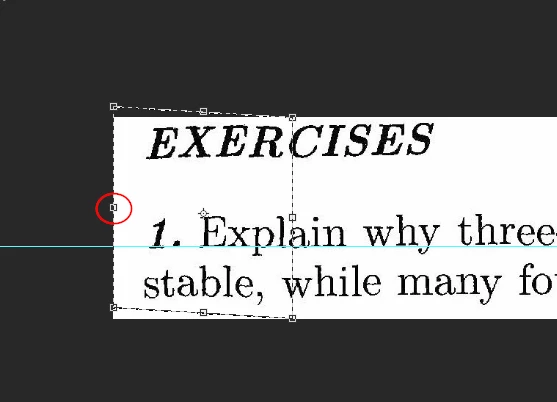
Drag down a guide to align with the good text.
Select just the problem area.
Use Free Transform, and hold down the Ctrl key while dragging up the centre left handle until that part of the text aligns with the guide.
Already have an account? Login
Enter your E-mail address. We'll send you an e-mail with instructions to reset your password.
 AdChoices