

Strange black and white workspace and palettes screen flashes
I am seeing strange screen flashes when I open up Photoshop and when I Save As. Here is an example:
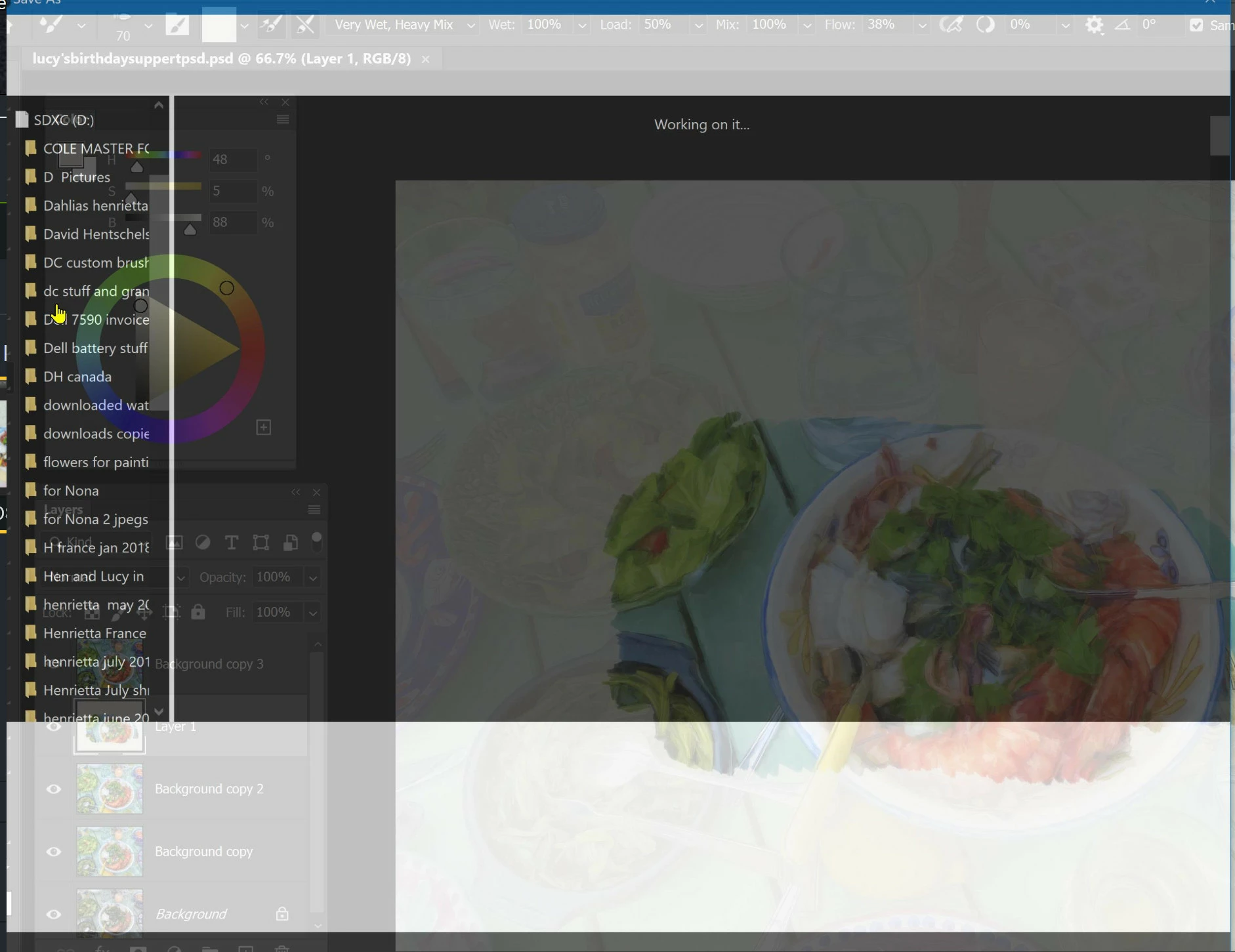
Resetting preferences did not help unfortunately. I see this flashing effect only in Photoshop...not for example, in Corel Painter. I don't think it's a driver effect.
The effect ioccurs when I first open Photoshop and when I do a Save As. It is only visible for just a moment and the effect is too quick for me to easily make a screenshot.
The effect is like a very simplified version of the workspace and some palettes being seen in large blocked areas of black and white. The 'Open' flashed effect is the whole workspace white, with just my Brushes palette being in black on the right of the screen. The black and white pattern seems to have the opposite tone to that on my workspace and palettes. Like a sort of negative.
It's strange. I don't want to have to reinstall Photoshop unless I have to - meaning I want to know that a reinstall will fix the problem.
I have the latest PS with updates and W10 Pro with updates. I am using a Dell XPS 17 with 64gb of ram, an Intel Core i7-10750H, 4700 MHz (47 x 100), integrated Intel gpu and a GTX 1650 Ti/PCIe/SSE2 gpu which is being used by PS. The laptop is working fine in other respects.
Any ideas please?
 AdChoices