

webpuzzlemaster
Participant
May 30, 2022
Answered

Stroke Display Problem in Photoshop

  • May 30, 2022
  • 3 replies
  • 633 views

When I apply a stroke to any element in Photoshop, it is there but not visible when I have a background layer with fill color beneath it. When I turn off the fill color, I can see the stroke and when I save the image, the stroke is there. But it is making it very difficult to work with this problem. This is a new problem. I tried closing and reopening the program and file. I tested with a new file and the problem continues to be present. Any help with this will be very much appreciated.
    This topic has been closed for replies.
    Correct answer c.pfaffenbichler

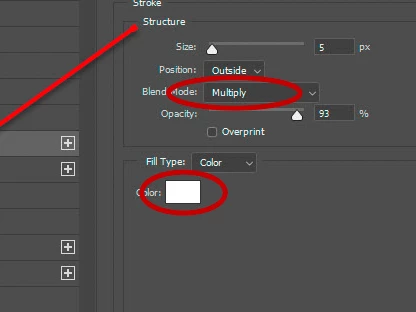
    When you use a white Stroke why set it to the Blend Mode »Multiply«? 

    3 replies

    melissapiccone
    Community Expert
    Community Expert
    May 31, 2022

    Screen shots and include your layers. Is the fill color the same color as the stroke?

    Melissa Piccone | Adobe Trainer | Online Courses Author | Fine Artist
    webpuzzlemaster
    Participant
    May 31, 2022

    the fill color is a blue and black gradient. The stroke is white. The blend mode is normal. The same thing happens if I apply a stroke around text or another shape. I even tried on a new image and it's the same. Very strange. Should I uninstall the program and reinstall it?

    melissapiccone
    Community Expert
    Community Expert
    May 31, 2022

    Try resetting your preferences first - you can select reset prefs on restart under general preferences. 

    Melissa Piccone | Adobe Trainer | Online Courses Author | Fine Artist
    webpuzzlemaster
    Participant
    May 31, 2022

    https://www.dropbox.com/sh/n8xupf9czy8uc2i/AACE9ZedFcGF2FNEStPS8OPwa?dl=0

    Here is a dropbox folder with 3 screenshots that I believe clearly show the problem. I've never had this problem before and didn't change any of my settings. I really appreciate it if you can help me to get this resolved.  Thank you.


    c.pfaffenbichler
    Community Expert
    c.pfaffenbichlerCommunity ExpertCorrect answer
    Community Expert
    May 31, 2022

    When you use a white Stroke why set it to the Blend Mode »Multiply«? 

    webpuzzlemaster
    Participant
    May 31, 2022

    that was the problem. I didn't notice that. Thank you so much!


    c.pfaffenbichler
    Community Expert
    Community Expert
    May 30, 2022

    Could you please post screenshots with the pertinent Panels (Toolbar, Layers, Options Bar, Paths, …) visible? 

    What is the Blend Mode of the active Layer?