
Participant
August 2, 2017
Answered

Suddenly brushes and gradients are very pixelated

  • August 2, 2017
  • 2 replies
  • 3058 views

Hi

I have a problem: All of a sudden when using soft brushes and gradients on transparent backgrounds, everything gets these really pixelated edges, as if the pencil tool is selected instead of the brush (it's not), or it the setting is dissolve (it's not).
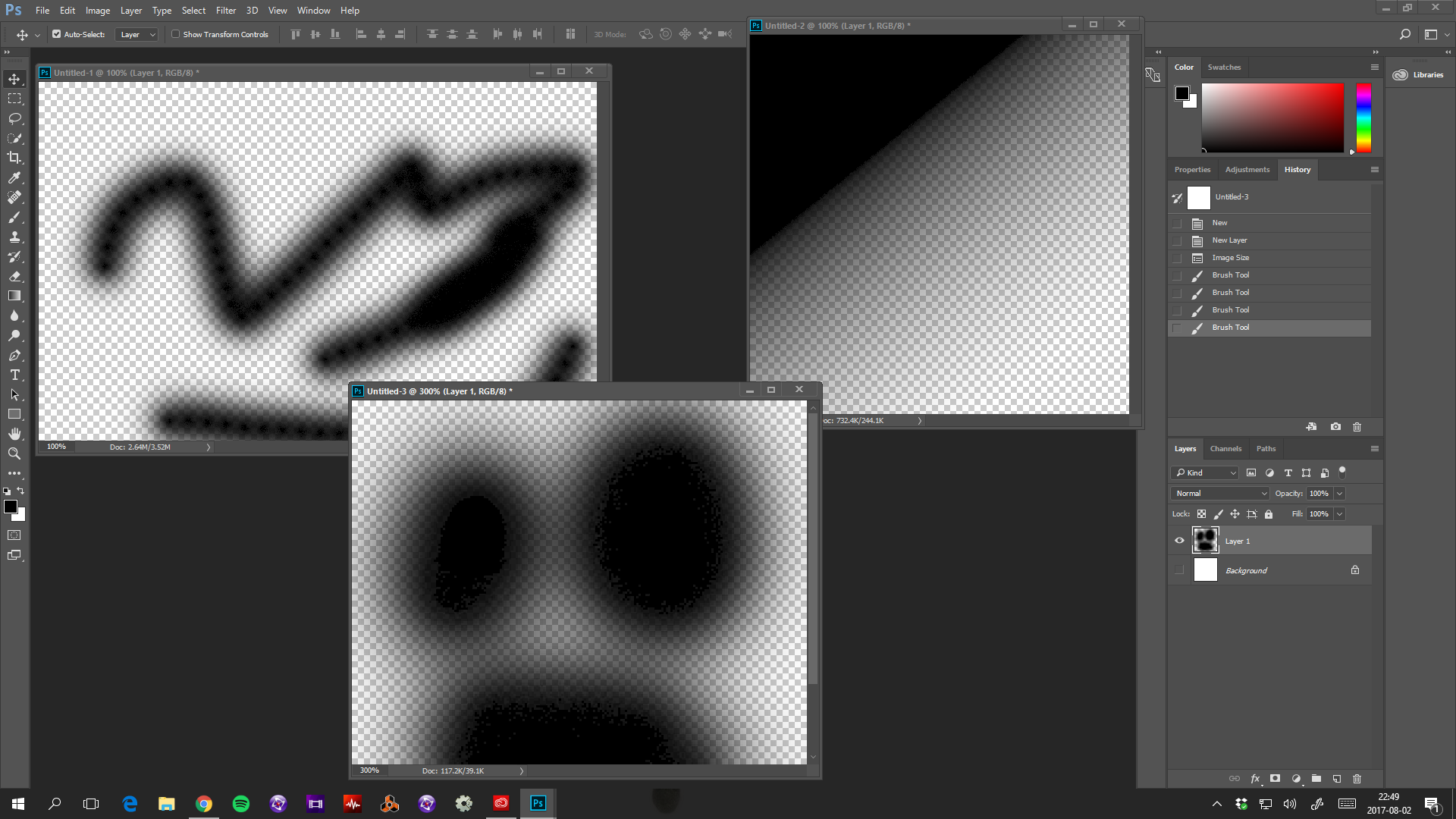
photoshoperror.png

Top left is the standard round brush on transparent background. Right is gradient black to transparent. Middle bottom is a zoomed in on black soft round brush. All of these are on a fresh install with the settings and preferences deleted and resetted. I've tried several different versions of photoshop, same problem in all. I'm freaking out here, can't work. What I'm missing?

This topic has been closed for replies.
Correct answer davescm

Hi

What you are seeing is an on screen artefact when viewing against the transparent checkerboard.  Put something solid behind (i.e. a solid layer at the bottom of the stack) and you will see that this is just an artefact - the actual layer and brush transparency is fine.

Dave

2 replies

Known Participant
February 15, 2024

This has been happening to me even when not on transparency with blacks.


c.pfaffenbichler
Community Expert
Community Expert
February 15, 2024

@kimamel , could you please post screenshots taken at View > 100% with the pertinent Panels (Toolbar, Layers, Brush Settings, Options Bar, …) visible? 

Trevor.Dennis
Community Expert
Community Expert
August 2, 2017

It would have been helpful if you'd had the brush selected in those screen shots as we'd have been able to see its blend mode.  It would have been more helpful to see the brush panel at the same time to ensure that everything but Smoothing was unchecked.  My screen shot is zoomed to 300% the same as yours BTW. 

What do you see if you overlap a brush stroke?  Yours has a 'wet edges' look to it.

Try resetting the brush tool as a first step.

JMartenJAuthor
Participant
August 2, 2017

Hi

Blend mode is normal, on both brush and layer. As I said, I completely uninstalled photoshop, then installed, opened it and without changing anything, painted those images. The brush tool has been resetted, and the setting looks exactly like yours. The problem only occurs on the transparent backgrounds.

davescm
Community Expert
davescmCommunity ExpertCorrect answer
Community Expert
August 2, 2017

Hi

What you are seeing is an on screen artefact when viewing against the transparent checkerboard.  Put something solid behind (i.e. a solid layer at the bottom of the stack) and you will see that this is just an artefact - the actual layer and brush transparency is fine.

Dave