
ASnyder
Participant
April 5, 2022
Question

Suddenly limited on font size??

  • April 5, 2022
  • 3 replies
  • 458 views

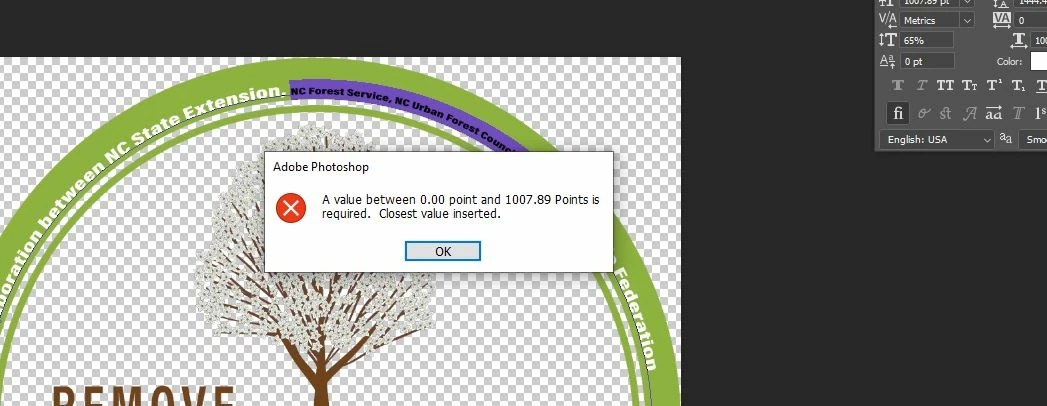
I created a logo design a month ago and now I need to make part of the font size a little bigger. It is currently at 1783.26 pt font size and had no issues with it when I created it. However now whenever I try to edit the text and enlarge it I get an error message saying "A value between 0.00 point and 1007.89 Points is required. Closest value inserted." and it automatically makes my font tiny. The thing is I have another portion of the logo with the same font and the text is sized to 4903.96 pt. So I have no idea why everytime I now try to enlarge this text or even when I create a new text layer it is limiting me to 1007.89 point size. Any ideas on how to get around this?
This topic has been closed for replies.

3 replies

Semaphoric
Community Expert
Community Expert
April 5, 2022

What is the resolution of your document, in PPI ( see Image > Image Size)? Type set using Points as a unit is one of the only places where resolution matters for non-print images. Points are defined as 1/72 of an inch, so your current size is over two feet (63cm).

If you go to  Edit > Preferences > Units and Rulers, you can change the default to pixels, which is best for images that will be viewed on-screen (not printed).


c.pfaffenbichler
Community Expert
Community Expert
April 5, 2022

Could you please post screenshots with the pertinent Panels (Toolbar, Layers, Character, Options Bar, …) visible? 

What is the image’s Resolution? 

ASnyder
ASnyderAuthor
Participant
April 5, 2022

It won't let me edit my post but wanted to add I am using Adobe Photoshop 2022 running on Windows 10.