Hae Yun Jung
Participating Frequently
September 3, 2025
Answered

Suggestion : Hiding Layer styles function / Guide hiding function

  • September 3, 2025
  • 3 replies
  • 341 views

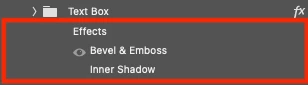
1. Hiding layer styles

It would be great if I can fold this kind of information, or hide it.

It would be great if I can make some layers visable, and some layers hidden. Not all hidden or all visable.


2. Hiding Guides

I ususally work with guides on, but sometimes I want to it to be off for a second.

I want it to be hidden temporarily, but currently I have to delete all the guides and make it all over again.

Correct answer Sameer K

Hey, @Hae Yun Jung. Welcome to the Photoshop Community. Thanks for raising the idea. 


Right next to the FX icon, you'll find a small arrow that you can click on to collapse or expand the list of Effects. 


For Hiding guides, there are a few ways you can approach this yourself. 


1 - Press CTRL/CMD + H to hide & show all Extras, or use the CTRL/CMD + ; shortcut. 


2—If this does not work, you can record an action with a menu item and assign a Function key on your keyboard. This is the same as above, but with extra steps.


Sameer K
(Type '@' and type my name to mention me when you reply)

3 replies

jane-e
Community Expert
Community Expert
September 3, 2025

@Hae Yun Jung 


In addition to what has been said, you can also create and use Layer Comps to hide/show the same set of layers, effects, and/or position.


Julieanne Kost

https://www.youtube.com/watch?v=hA_SFUcZTpg


Jesús Ramirez 

https://www.youtube.com/watch?v=b0Ch-ShfFW0


Jane


Hae Yun Jung
Participating Frequently
September 5, 2025

Thx for the great tip! 😄

Stephen Marsh
Community Expert
Community Expert
September 3, 2025
quote

It would be great if I can make some layers visable, and some layers hidden. Not all hidden or all visable.


With one or more layers selected, use Ctrl/Cmd + , (comma) to toggle layer visibility off/on.


Hae Yun Jung
Participating Frequently
September 5, 2025

Not the answer I wanted(due to my lack of english skills), but thx for the good tip! I didn't know this

Sameer K
Community Manager
Sameer KCommunity ManagerCorrect answer
Community Manager
September 3, 2025

Hey, @Hae Yun Jung. Welcome to the Photoshop Community. Thanks for raising the idea. 


Right next to the FX icon, you'll find a small arrow that you can click on to collapse or expand the list of Effects. 


For Hiding guides, there are a few ways you can approach this yourself. 


1 - Press CTRL/CMD + H to hide & show all Extras, or use the CTRL/CMD + ; shortcut. 


2—If this does not work, you can record an action with a menu item and assign a Function key on your keyboard. This is the same as above, but with extra steps.


Sameer K
(Type '@' and type my name to mention me when you reply)

Hae Yun Jung
Participating Frequently
September 5, 2025

@Sameer K THX for the answer! 🙂