
Inspiring
August 8, 2022
Question

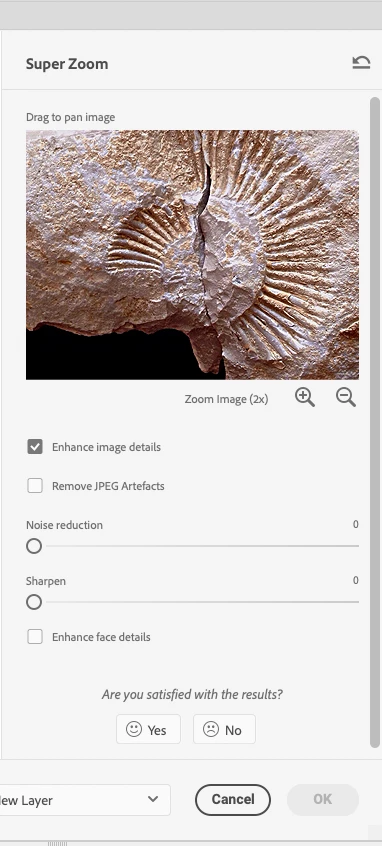
'Super Zoom' 'Okay' button is greyed out

  • August 8, 2022
  • 1 reply
  • 966 views

I'm trying to enlarge an image with the Super Zoom neural filter (the image is currently 3000px wide, is this too big?).


But the okay button greys out as soon as I click the 'zoom in' button. I've tried waiting for a couple minutes incase it needed time to process, but still no luck.


See sceengrab below


I'm on a high-spec M1 MacBook pro.
 

This topic has been closed for replies.

1 reply

J E L
Community Expert
Community Expert
August 8, 2022

Hi @mttplbkp, sorry to hear about the trouble. I just tested the Super Zoom filter with a 3000 pixel-wide photo and zoomed first 2x, then 3x times, and the OK button is active and the zoomed layer saves correctly. However, I'm using Windows 10. Perhaps this is an M1-specific issue, but I don't see it in the known bugs list yet.


Does the “Processing on device....” bar show up at all? Does the zoom filter work if you try it with another image? Are you having trouble with any of the other Neural filters? Or just this one? Were you able to use this filter with an earlier version? Sometimes a Preferences reset will clear things out or even a system reboot. Let us know what you've tried so far.


mttplbkpAuthor
Inspiring
August 9, 2022

Hi, no I don't see the 'processing' bar.


I've just tried a few other photos but still no luck, I tried reducing the size of one of them first and resaving it too.


Strangely the filter works if I just take a screengrab of part of my desktop background and try it on that instead. Maybe the photos I'm trying are too complex (my desktop bg is quite simple / abstract).


A few weeks ago I managed to get the filter working with a different stock image, but cant think how these would be any different.


I'll try resetting the prefs and rebooting

Participant
June 27, 2024

this is an old question but the answer might be useful to others

You just have to wait.  Even though it does not show a processing bar, it is processing and takes more time for larger files.  Even with a very powerful system, mine takes a few minutes.