
Inspiring
July 31, 2021
Answered

Surprising results setting the black point in a Curves adjustment layer

  • July 31, 2021
  • 3 replies
  • 1482 views

I have the following working spaces in my Photoshop Color Settings:


RGB: Adobe RGB

Gray: Gray Gamma 2.2


I open the following Photoshop document, which is in Adobe RGB

 

The image has six square cells with HSB values (0,0,100), (0,0,99), (0,0,98), (0,0,97), (0,0,96), and (0,0,95). I included the marching ants in the screenshot so that you can see the pure white cell on the left.


I add a Curves adjustment layer and set the black point (using the black eyedropper) on the rightmost cell.

I expected this to change the HSB values to 


(0,0,100), (0,0,80), (0,0,60), (0,0,40), (0,0,20), and (0,0,0)


but it did not.  The actual values, measured with the eyedropper, are


(0,0,100), (0,0,80), (0,0,61), (0,0,41), (0,0,22), and (0,0,2)


OK, so maybe there's a numerical issue, since HSB is not a real color model and Photoshop is working in its own internal numbering system.  I thought I should be able to fix it by using the "click and drag" feature in the curve adjustment. But when I tried to click and drag in the (0,0,2) cell, Photoshop would not let me lower the value below (0,0,2). It let me raise it, but not lower it.  This is really puzzling, and I hope someone can explain why.


One possible solution is to (1) fill the last cell with solid black and then (2) "click and drag" to adjust the tone of the other cells.  However this would defeat the purpose of the exercise, which was for this to happen automatically when I originally set the black point.


I have two questions. (1) Why won't Photoshop allow me do click and drag the rightmost cell down to (0,0,0) and (2) where else is my thinking wrong? 


EDIT: If I work in RGB, setting the black point does the right thing. For example, if I have eighteen cells spaced one unit apart from 255 down to 238, and I set the black point on 238, I get 


255, 240, 225, ..., 15, 0    (equal steps of 15).


This only works for numbers that evenly divide 255: 1, 3, 5, 15, 17, 51, 85, and 255 itself.
This topic has been closed for replies.
Correct answer J Isner

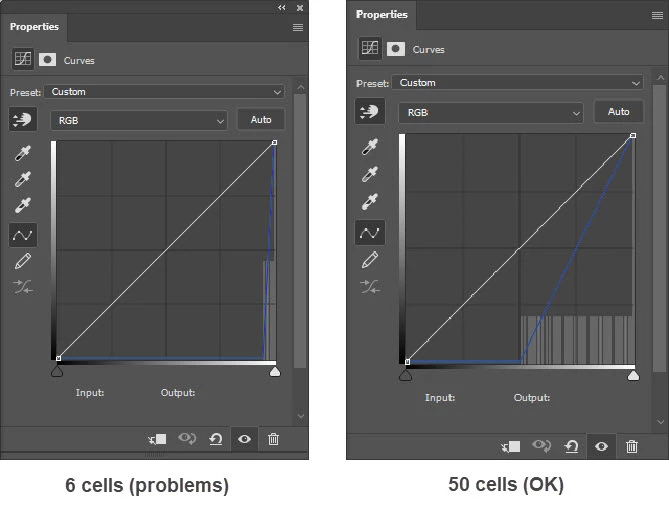
It turns out that my method of redistributing tone works just fine EXCEPT when the tonal range being redistributed is very short, as it was in the example I posted. I believe this results from Curves limitations when the points of the curve are very close together. For 10, 20, 25, and 50 cells, setting the black point redistributes the tones in perfectly equal steps from 255 to 0.

3 replies

TheDigitalDog
Inspiring
July 31, 2021

Try the same test, work in L*a*b*. What are the results? 

Author “Color Management for Photographers" & "Photoshop CC Color Management/pluralsight"
J IsnerAuthor
Inspiring
July 31, 2021

Same problem as with the original example. Setting the black point on the rightmost cell makes Lightness of that cell = 16%. I can click and drag it down to 7%, but Curves won't let me go any lower. Also, the tone is unequally distributed among the other cells. I think it's a limitation of Curves when the tones are so close together:


I tried Gradient Map without success. I suspect it can be done with a LUT, but I'm not clever enough to  figure out how to do that.

J IsnerAuthorCorrect answer
Inspiring
July 31, 2021

It turns out that my method of redistributing tone works just fine EXCEPT when the tonal range being redistributed is very short, as it was in the example I posted. I believe this results from Curves limitations when the points of the curve are very close together. For 10, 20, 25, and 50 cells, setting the black point redistributes the tones in perfectly equal steps from 255 to 0.

Omar.Fathy
Community Expert
Community Expert
July 31, 2021

It is so weird. If I understand well, You said that changing the curev of the image doesn't change the HSB values of the color but it changes already on the screen. It is not logic for PS and exactly something wrong or there is a missing point.

J IsnerAuthor
Inspiring
July 31, 2021

There is no hue.  All tones are gray.

Omar.Fathy
Community Expert
Community Expert
July 31, 2021

Sorry, I meant the HSB Values