
Participant
March 22, 2025
Answered

Tell me what is this layer?

  • March 22, 2025
  • 2 replies
  • 275 views

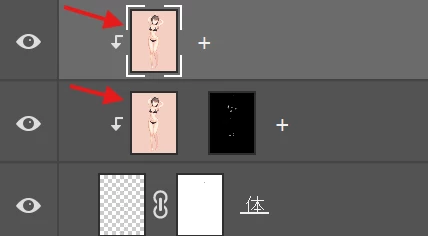
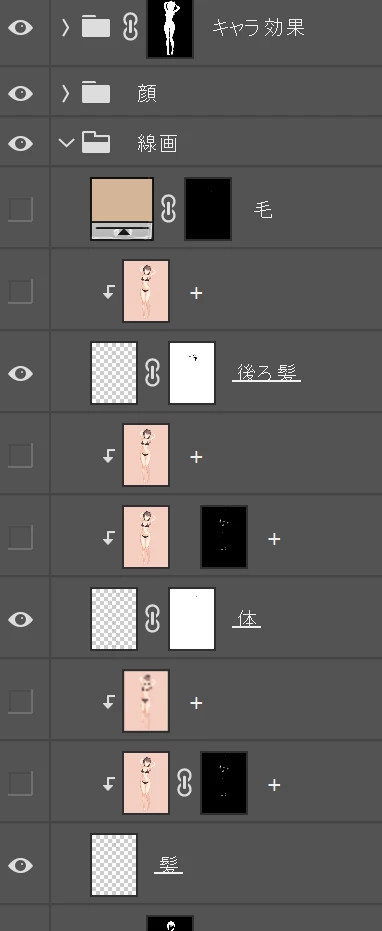
What is the layer that the red arrow is pointing to? And how do I get it like that? How is it different from a normal layer with a checkerboard pattern? I've tried many methods but still can't find the way I want. If I typed something wrong, I apologize. I just started using Photoshop for the first time a few weeks ago. Some of them don't look like chipping mask because some of them just have a + symbol behind them. It's a layer that has a small thumbnail in the layer that is the work we created. I don't know what it is.
Correct answer c.pfaffenbichler

That the Layers are apparently Clipping Maksed to what seems like an empty Layer would mean that they do not show at all. 

What are you trying to achieve with this setup? 

2 replies

c.pfaffenbichler
Community Expert
c.pfaffenbichlerCommunity ExpertCorrect answer
Community Expert
March 23, 2025

That the Layers are apparently Clipping Maksed to what seems like an empty Layer would mean that they do not show at all. 

What are you trying to achieve with this setup? 

D Fosse
Community Expert
Community Expert
March 22, 2025

The plus sign is the name you have given the layer. You have apparently done this by double-clicking the layer and typing + in the highlighted field. That's how you name a layer.


Aside from that - for a beginner, this seems like an extremely complex layer setup, and it's not even clear what they're supposed to do. Why do you need to clip standard pixel layers to an underlying empty layer?


I would strongly advise you to start with a much simpler layer structure to get a feel for what they do, before starting to build up these towers of layers.


In any case, if you need to add/subtract/intersect masks on the same image, it's easier to do with grouped layers or smart objects, instead of stacking them on top of each other.