


- Inicio
- Photoshop ecosystem
- Hilos de conversación
- Re: Terrible Photoshop cc 2017.
- Re: Terrible Photoshop cc 2017.
Terrible Photoshop cc 2017.

Copiar vínculo al Portapapeles
Copiado
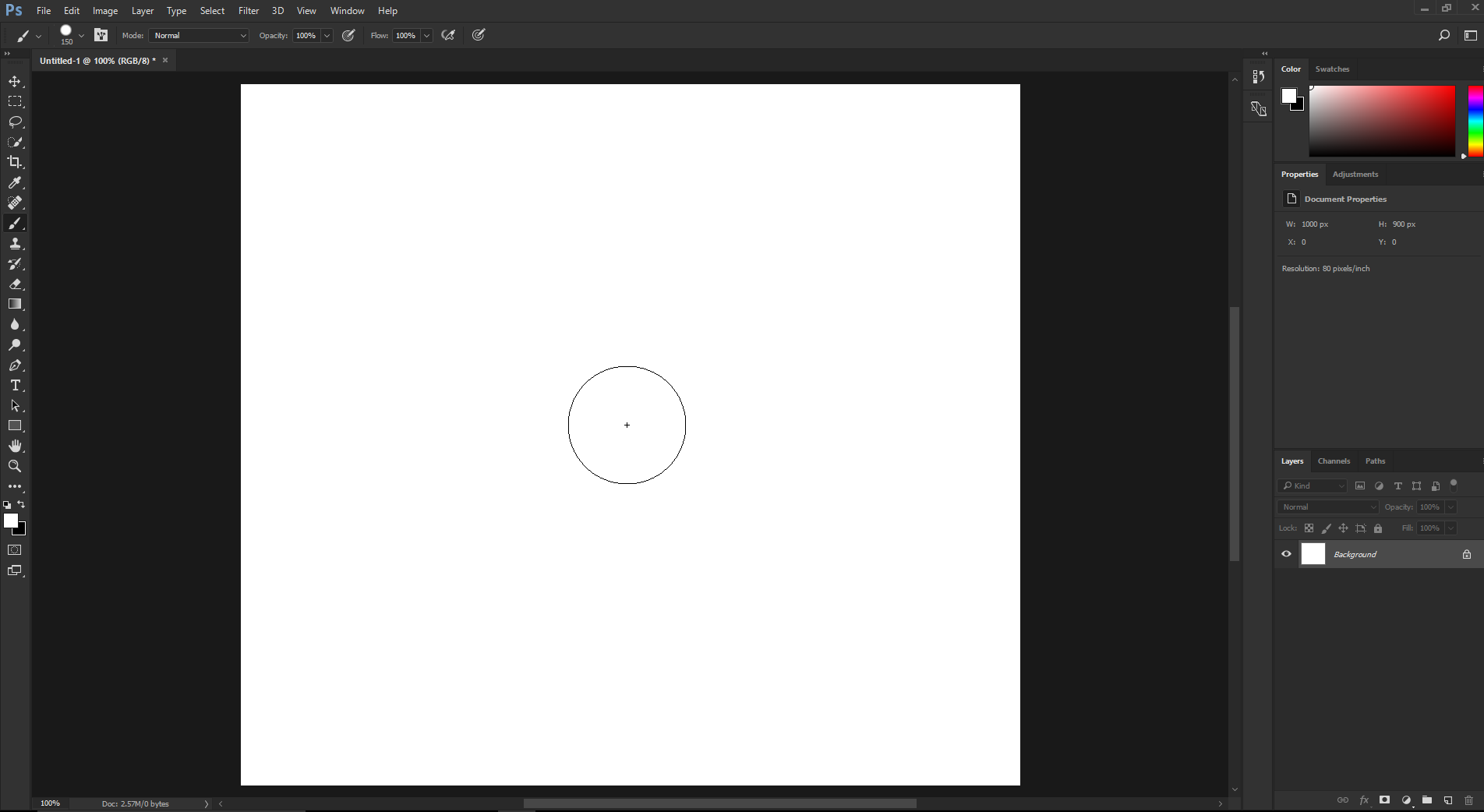
Forced to install cc 2017. But the app's white layout looks bad to me. What is more, it is extremely slow to run it since installed. One thing I really don't like is that the brush circle is gone. I can't gauge and see the size of it while using the brush. Also, the photos are laid out in individual layers, thus very inconvenient to handle. Terrible upgrade from Photoshop cc! Not satisfied with the upgrade at all!



Examinar y buscar tutoriales y artículos relacionados
 10
réplicas
10
10
réplicas
10


Copiar vínculo al Portapapeles
Copiado
Do you mean this non-existent brush circle on a white background?
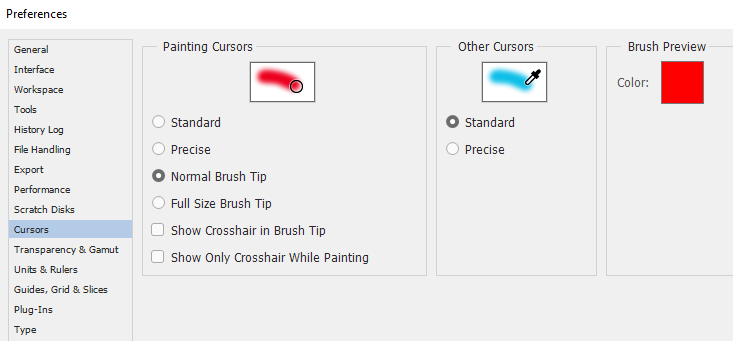
I think you should take a look at your 'preference' settings as these things are set there.
Copiar vínculo al Portapapeles
Copiado
Terri Stevens,
Thank you very much for your help!
I have solved the problems by following the guidances from Dave.
Anyway, your help is much appreciated!
Huaming


Copiar vínculo al Portapapeles
Copiado
I don't think anyone was forced to install the latest version - you can choose.
The White layout is an option in preferences

Whether you use tabs for images or windows is up to you - again set in preferences

Your brush cursor again is an option
Dave
Copiar vínculo al Portapapeles
Copiado
Dave,
Thank you very much for your big help!
You have solved my headaches with the upgraded cc 2017! I am just a user of the app and have never gone so deep to change any settings of those preferences. This is really a good learning experience for me.
I said that I was forced to upgrade the app because I was asked to log into my adobe account again and then ask me to upgrade the app. Otherwise, I had some issues running the program.
Anyway, really appreciate your help, very clear and easy to follow!
Well done!
Thanks again,
Huaming
Copiar vínculo al Portapapeles
Copiado
Huaming
Great that you are sorted - enjoy using it 
Dave

Copiar vínculo al Portapapeles
Copiado
Yes, you are asked to upgrade, but you do not have to press the blue update button. You can continue to run your previous version.
However if you click on that Update button, go into the Advanced options and uncheck "remove previous versions". That way you keep your old install until you are sure 2017 will work properly.
I really wish those options were up front and not tucked away.
Copiar vínculo al Portapapeles
Copiado
Gener7,
Thank you very much for your advice and help!
I should have known that before. But that was not the case when I upgraded the app. I will follow you guidances next time when I face the similar issues.
Thanks again,
Huaming

Copiar vínculo al Portapapeles
Copiado
There's a lot to address in your question:
But the app's white layout looks bad to me.
That's a preference you can control via Preferences > Interface. The two right-most options are lighter that they were previously, but you have darker options.
What is more, it is extremely slow to run it since installed.
We'd need to hear more about your setup to understand this.
One thing I really don't like is that the brush circle is gone. I can't gauge and see the size of it while using the brush.
Is your Caps Lock key on? On any version of Ps, the Caps Lock key toggles the brush size cursor and the precision cursor.
Also, the photos are laid out in individual layers, thus very inconvenient to handle.
Layer handling hasn't changed at all in CC 2017.
Copiar vínculo al Portapapeles
Copiado
BarbBinder,
Thank you very much for your help!
I have solved most of the problems I faced with the new version of cc following the guidances from Dave. For sure, the program is running very slow after I installed the new version. I will have to restart computer and run the program again to see what will happen then.
Thanks again,
Huaming
Copiar vínculo al Portapapeles
Copiado
Isn't it nice when someone is as polite as this? Happy Photoshopping Huaming
Terri


Encuentra más inspiración, eventos y recursos en la nueva comunidad de Adobe
Explorar ahora
 AdChoices