jmoses123
Participant
October 16, 2018
Answered

Text Box Auto Fills with Lorem ipsum text

  • October 16, 2018
  • 4 replies
  • 46945 views

How do I stop the text box from auto filling in photoshop?  It used to just be an empty box when I placed it on the image before the update.

Correct answer Sahil.Chawla

Hi there,

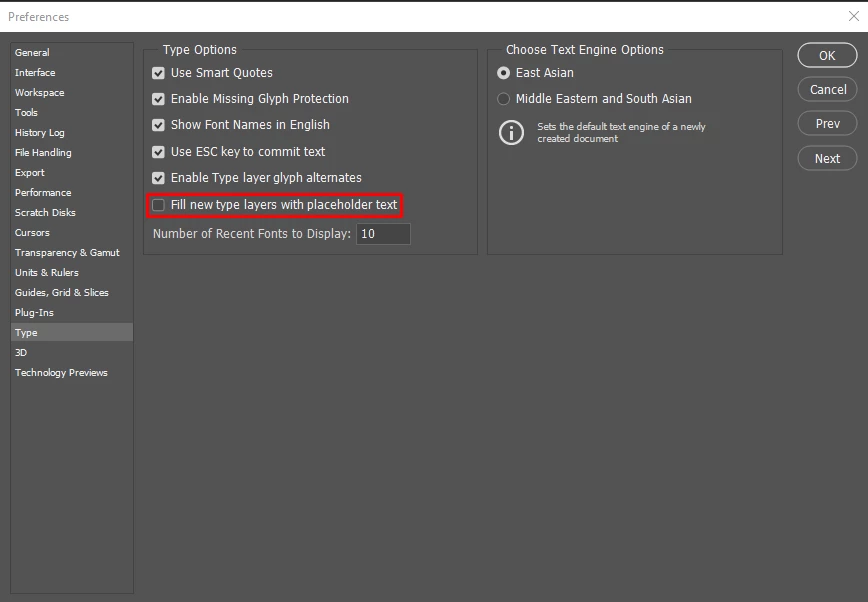
As you're getting a placeholder text please go to Photoshop's Preferences > Type and deselect "Fill new type layers with Placeholder text" and let us know if it helps.
Regards,
Sahil

4 replies

dkangy
Participant
December 27, 2020

This is exactly why I dread updates. Two cups of coffee later and my workspace is finally (somewhat) back to normal.

rodneyk49776409
Participating Frequently
November 11, 2021

I hate updates too!  Give me photoshop from 10 years ago.. and never change or update or "improve" anything.  Fire all developers and leave it as it was.  I don't want anything to change.

Participant
October 2, 2020

Why do updates cause "silly stuff" to happen, some normal functions to cease and otherwise cause annoyances?


llulbaby
Participant
August 11, 2020

Such a simple solution.   Thank you for your help.

Sahil.Chawla
Adobe Employee
Sahil.ChawlaCorrect answer
Adobe Employee
October 16, 2018

Hi there,

As you're getting a placeholder text please go to Photoshop's Preferences > Type and deselect "Fill new type layers with Placeholder text" and let us know if it helps.

Regards,
Sahil

Known Participant
June 19, 2020

I had the same problem. Glad I found this, it help me and it stopped it.


Thank you Sahil