
Serena King
Participating Frequently
August 2, 2023
Answered

Text Defaulting to Italic

  • August 2, 2023
  • 2 replies
  • 9752 views

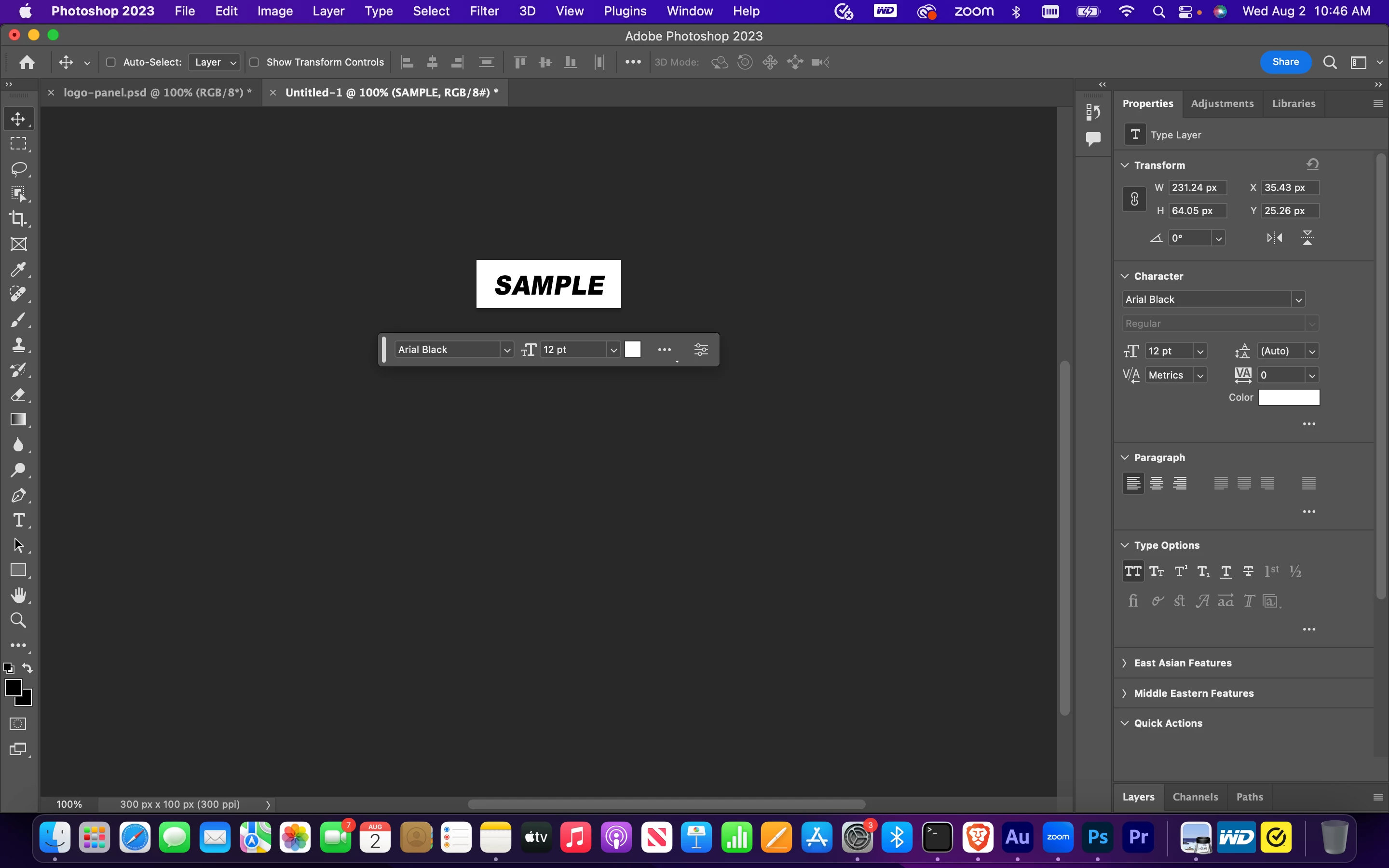
All of my text is showing up as italic. I have read through other examples of this, and have tried the various solutions, but nothing resolves the issue. The font is set to regular, and I do not have the faux-italic override clicked either. I also tried resetting Photoshop and resetting the text tool. Still no luck. 
This topic has been closed for replies.
Correct answer jane-e

Hi @Serena King 


Select your text with the Type tool and open the Character panel from the Window menu. In the icons at the bottom, click the "I" to turn off Faux Italic.


These icons are not in the options bar, Properties panel, or Contextual Task Bar.


Jane


2 replies

Participant
August 8, 2023

Same Problem! Text is coming out all italic...and the Faux Bold and Faux Italics isn't even showing in my Character menu?! See attatched. Anyone?
Photoshop is up to date (2023) and runing MacOs Ventura 13.4

Participant
August 8, 2023

NVM...Found it in yes...that specific character spot.Why not available in the type properties is beyond me.


jane-e
Community Expert
Community Expert
August 8, 2023

@Scott25985293lxlg 


Yes, as stated earlier in this thread, the faux (fake) italic and bold are only in the Character panel, not in options bar, Properties panel, or Contextual Task Bar. In my personal opinion, they shouldn't exist at all.


Jane

jane-e
Community Expert
jane-eCommunity ExpertCorrect answer
Community Expert
August 2, 2023

Hi @Serena King 


Select your text with the Type tool and open the Character panel from the Window menu. In the icons at the bottom, click the "I" to turn off Faux Italic.


These icons are not in the options bar, Properties panel, or Contextual Task Bar.


Jane


Serena King
Participating Frequently
August 2, 2023

Thank you!

jane-e
Community Expert
Community Expert
August 2, 2023

You're welcome, @Serena King , happy to help! 😊


Jane