tomer-n
Participating Frequently
November 20, 2016
Answered

text is missing

  • November 20, 2016
  • 2 replies
  • 366 views

hey

I'm adding new text and i get this strange thing that some of the text is missing. It is only happens when I use uppercase letters?

This topic has been closed for replies.
Correct answer Trevor.Dennis

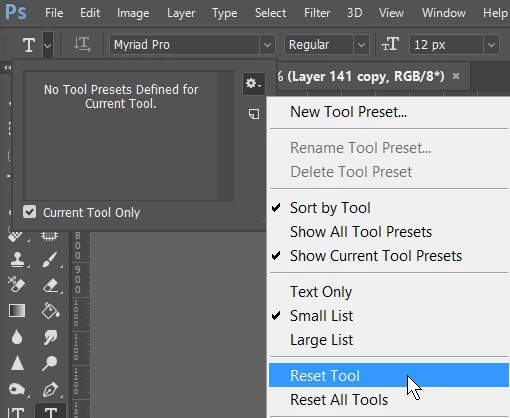
I suspect that it is a particular font thing as JJ has suggested, but if it is a setting, then the easy way to get back to defaults is to reset the Type tool from left end of Options bar with Type tool selected.  If you do this with the Character panel open, you'll see everything change back to the defaults
2 replies

Trevor.Dennis
Community Expert
Trevor.DennisCommunity ExpertCorrect answer
Community Expert
November 20, 2016

I suspect that it is a particular font thing as JJ has suggested, but if it is a setting, then the easy way to get back to defaults is to reset the Type tool from left end of Options bar with Type tool selected.  If you do this with the Character panel open, you'll see everything change back to the defaults

JJMack
Community Expert
Community Expert
November 20, 2016

All Fonts and size in all applications?

Supply pertinent information for quicker answers

  • The more information you supply about your situation, the better equipped other community members will be to answer. Consider including the following in your question:
  • Adobe product and version number
  • Operating system and version number
  • The full text of any error message(s)
  • What you were doing when the problem occurred
  • Screenshots of the problem
  • Computer hardware, such as CPU; GPU; amount of RAM; etc.
JJMack