Snaps042
Participant
September 26, 2018
Answered

Text locked in 'italics'

  • September 26, 2018
  • 2 replies
  • 5828 views

Hello,

I select 'type tool', position my cursor and begin typing, but whichever font I have chosen, the text appears to be locked in italics.

Even clicking the centre drop-down menu (of 3) which allows you to select "Regular", "Italic" or "Bold" and clicking "Regular", my text remains italicised.

In the menu bar I have clicked Window > Character and have found nothing useful there.

Any help would be greatly appreciated.

Thank you.
This topic has been closed for replies.
Correct answer

Hi

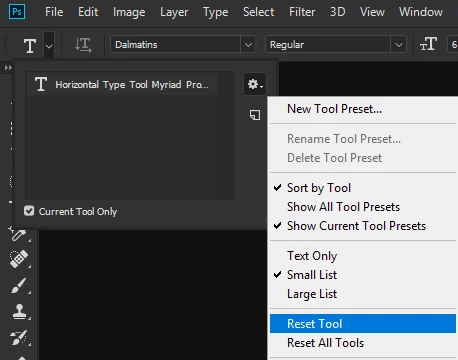
Have you tried resetting the Type Tool

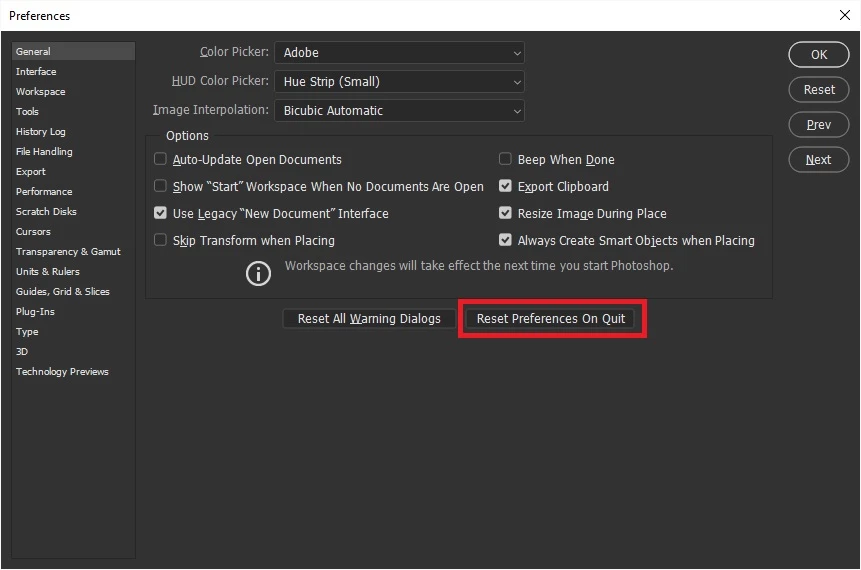
If that doesn't help try resetting Photoshop preferences

2 replies

Carol F Metzger
Inspiring
August 20, 2020

Text stuck in italic, fixes did not work. Version 21.2.2, Mac OS 10.14.6.
After latest PS update now the drop-down for text style does not work.

Correct answer
September 26, 2018

Hi

Have you tried resetting the Type Tool

If that doesn't help try resetting Photoshop preferences

Snaps042
Snaps042Author
Participant
September 26, 2018

Hello Ged,

#1 didn't reset anything but #2 sorted it out nicely.

Thank you very much!

September 26, 2018

You're welcome