Answered
Texte demi cercle
Bonjour à vous tous
Amateur je recherche a faire ce texte (pas la police de caractère) mais se demi cercle....si vous avez des suggestions je suis preneur....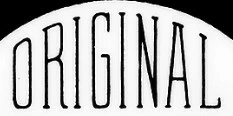
Merci, bonne soirée
Dominique 

Bonjour à vous tous
Amateur je recherche a faire ce texte (pas la police de caractère) mais se demi cercle....si vous avez des suggestions je suis preneur....
Merci, bonne soirée
Dominique
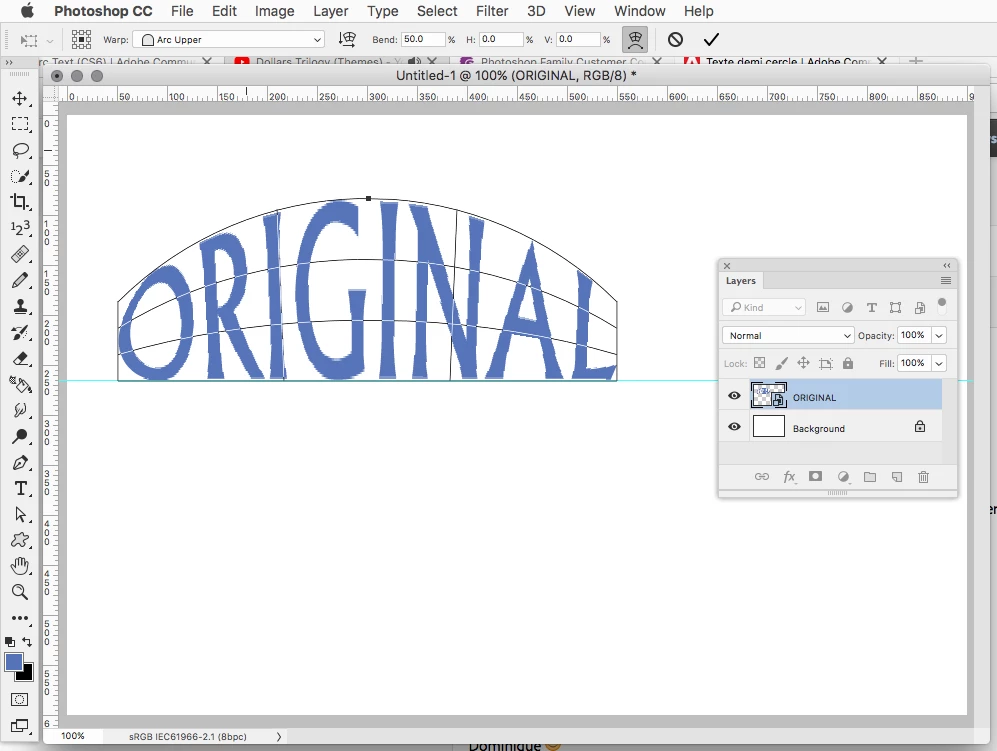
Convert your text layer to a Smart Object (Layer>Smart Objects>Convert to Smart Object)
Go to Edit>Transform Warp and use the Arc Upper preset.
Already have an account? Login
Enter your E-mail address. We'll send you an e-mail with instructions to reset your password.
 AdChoices