
Participating Frequently
April 24, 2017
Answered

Texture issues when trying to change shirt colors - HELP

  • April 24, 2017
  • 1 reply
  • 689 views

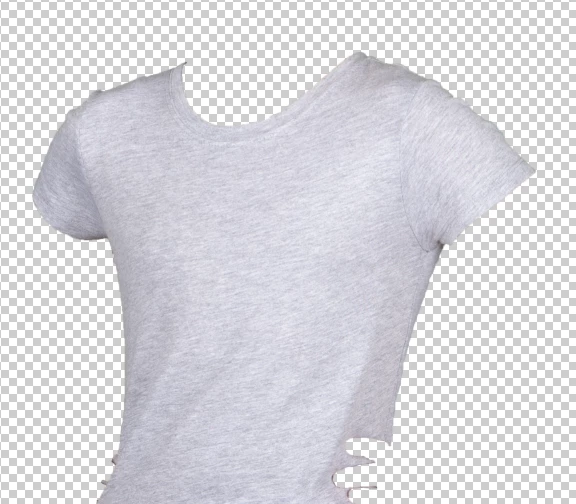
Hi all,  I shot this shirt and want to change it to various colors, which I THINK I know how to do.  PROBLEM is, the grey has black flecks in it that show in the final colored shirt, but the shirt is not supposed to have those flecks, but simply be solid.  Any advice on how to change this color while still preserving the collar, arm seams, wrinkles in shirt?  I don't want to lose those elements, only the black flecks. 
This topic has been closed for replies.
Correct answer Chuck Uebele

I think Norman meant Filter>Blur>Smart Blur.

1 reply

Norman Sanders
Legend
April 24, 2017

I assume you are referring to the texture on the shirt surface and have colored the shirt using Edit > Fill with the Blending Mode set to Color (and locking the transparent areas).

In  that case you may try this:

Add a duplicate Layer.

Filter > Smart Filter: Radius 15,  Threshold 13,  Quality High, Mode Normal.

Then use the Opacity slider to lose the texture being careful to maintain important detail.

Participating Frequently
April 25, 2017

Filter>Smart Filter is not an option.  I saw "convert for smart filters", did that but still no option as described above. 

Chuck Uebele
Community Expert
Chuck UebeleCommunity ExpertCorrect answer
Community Expert
April 25, 2017

I think Norman meant Filter>Blur>Smart Blur.